Kling 3.0 vs Kling 2.6: Latest Kling AI Version Comparison (2026)
Breaking Down the Differences!
In February 2026, Kling released Kling VIDEO 3.0, the latest version of its video generation model. Kling 2.6, which preceded it, has already seen broad adoption due to its relatively stable outputs and predictable behavior across common text-to-video and image-to-video workflows.
While Kling 3.0 introduces a substantial set of new capabilities, the practical value of these upgrades depends heavily on the complexity of the scenes being generated and the requirements of the production pipeline. For many teams, the decision is not whether Kling 3.0 is newer, but whether its expanded capabilities meaningfully change what can be built.
In this comparison, we evaluate Kling 2.6 API and Kling 3.0 API across qualitative output differences.
Latest Kling AI Version (2026)
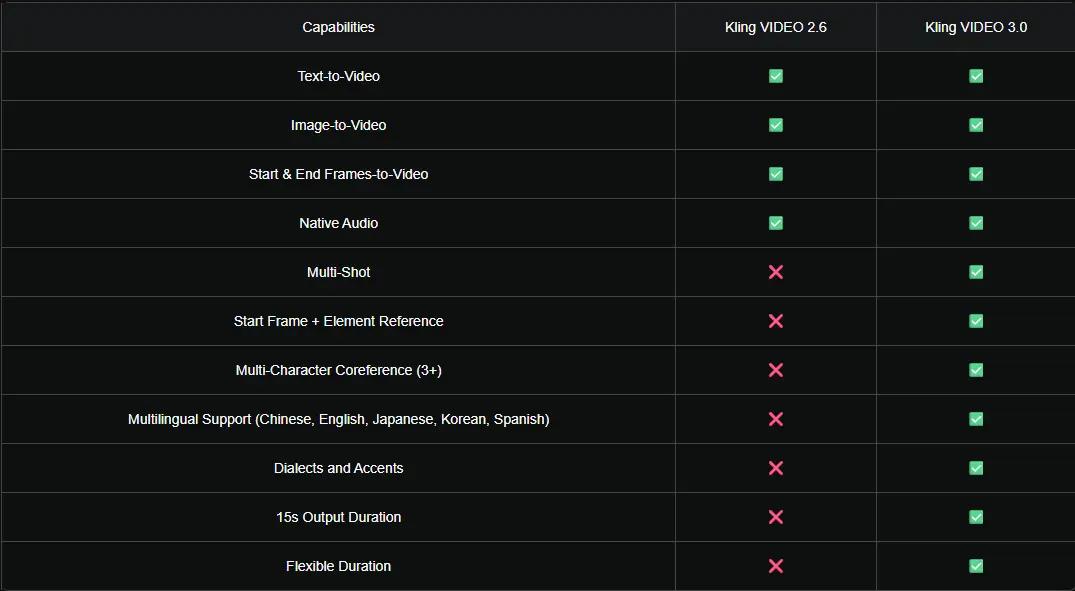
The comparison table above summarizes the functional differences between Kling VIDEO 2.6 and Kling VIDEO 3.0. At a baseline level, both models support core workflows such as:
1. Text-to-Video
2. Image-to-Video
3. Start & End Frames-to-Video
4. Native Audio generation
This makes Kling 2.6 sufficient for many standard video generation tasks, particularly short, single-shot clips with limited scene complexity. However, Kling VIDEO 3.0 expands meaningfully beyond these fundamentals.
Key upgrades introduced in Kling 3.0 include:
1. Multi-shot video generation
2. Start frame plus element reference
3. Multi-character coreference (3+ characters).
4. Broader multilingual support (Chinese, English, Japanese, Korean, and Spanish)
5. Support for dialects and accents
6. Supports longer video durations (up to 15 seconds)
7. Flexible duration settings
These differences become increasingly important as workflows move from experimentation toward production-grade generation.
How we evaluate Kling 3.0 vs Kling 2.6
For the qualitative comparison, we focus on the text-to-video (T2V) capability of both models. The evaluation framework is adapted from a Labelbox-style T2V assessment and evaluates each output across four dimensions:
1. Prompt adherence
2. Video realism
3. Video resolution
4. Artifacts
Each example uses the same prompt for Kling 2.6 and Kling 3.0 to isolate model behavior rather than prompt variation. Although both Kling 2.6 and Kling 3.0 support native sound generation, all videos evaluated in this comparison were generated without audio. As a result, audio-related capabilities were not included in the assessment.
In addition, newly introduced features in Kling 3.0 - such as multi-shot generation, start frame plus element reference, and multi-character coreference - were not tested in this evaluation. The comparison focuses specifically on single-shot text-to-video outputs to ensure a fair and consistent baseline between the two models.
Video Comparison: Kling 3.0 vs Kling 2.6
The following examples illustrate how Kling 2.6 and Kling 3.0 behave under different types of video generation tasks.
Example 1: Prompt adherence
This test is important for story-driven scenes with detailed visual constaints.
Prompt: A woman in a green trench coat walks through a rainy city street at night, holding a transparent umbrella. Neon signs reflect on the wet pavement. The camera starts behind her, then slowly moves to a side angle as she stops and looks up.
Kling 2.6 Output
Kling 3.0 Output
For prompt adherence, both Kling 2.6 and Kling 3.0 perform relatively well, with all key elements from the prompt appearing in the generated outputs. However, a subtle difference can be observed in how environmental details are rendered. In Kling 2.6, the rainy effect is more pronounced, while in Kling 3.0 it appears more subdued.
Although this difference does not significantly impact overall prompt compliance, it highlights how the two models prioritize visual emphasis differently when rendering atmospheric elements, which can influence the final look and tone of the scene.
Example 2: Video realism
This test is relevant for content where lighting, materials, and physical motion affect perceived quality.
Prompt: A close-up shot of a ceramic coffee cup on a wooden table as steam rises slowly. Morning sunlight enters from a window on the left, casting soft shadows. The camera gently pushes forward.
Kling 2.6 Output
Kling 3.0 Output
In the evaluation of video realism, both Kling 2.6 and Kling 3.0 perform strongly and produce visually convincing results. The lighting on both cups is rendered in a realistic manner, with morning sunlight entering from the left and casting soft, natural shadows across the table surface. Reflections and highlights behave consistently with the scene’s lighting conditions, contributing to a believable appearance.
The ceramic material of the cup is also well represented in both outputs. Surface details shows subtle texture, which enhances the sense of physicality rather than making the object appear synthetic. Overall, this example shows that both models are capable of delivering high-quality, realistic close-up shots, particularly in scenes with controlled lighting.
Example 3: Video resolution
This test is importatnf for outputs intended for professional or client-facing uses.
Kling 2.6 Output
Kling 3.0 Output
For the evaluation of video resolution, both Kling 2.6 and Kling 3.0 are graded highly. In both outputs, fine details in the modern workspace scene are rendered clearly, including the laptop body, keyboard, and surrounding environment. The scrolling code text on the laptop screen remains stable throughout the clip, without noticeable blurring or loss of clarity during motion.
Overall, this example indicates that both models are capable of producing high-resolution video outputs suitable for professional or client-facing use cases, particularly in scenes with controlled camera movement and well-defined visual elements.
Example 4: Artifacts
This test is critical for more complex generations.
Kling 2.6 Output
Kling 3.0 Output
For the evaluation of artifacts, several differences can be observed between the two models. In the case of Kling 2.6, the generation shows multiple deviations from the prompt. First, the specified camera movement is not followed correctly: instead of panning from left to right, the camera pans from right to left. Second, key actions described in the prompt are missing, as the video does not clearly depict the person chopping vegetables or plating the food.
In contrast, Kling 3.0 exhibits significantly fewer artifacts. The model largely adheres to the prompt, including the intended camera movement and overall scene progression. However, there is a minor omission, as the action of chopping vegetables is not fully captured. Despite this, the overall output remains more consistent and coherent compared to Kling 2.6.
Our final thoughts on Kling 3.0 API and Kling 2.6 API
Based on the four examples above, both Kling 2.6 and Kling 3.0 demonstrate strong baseline capabilities across prompt adherence, visual realism, and resolution. In controlled scenarios with limited motion or complexity, the two models often produce comparable results, with differences appearing mainly in how visual emphasis and temporal consistency are handled.
Kling 3.0 generally shows more consistent behavior in complex scenes, particularly in reducing artifacts and maintaining correct camera movement over longer or more detailed sequences. In addition, Kling 3.0 offers greater control over its outputs through an expanded feature set, enabling more precise handling of scene structure, subject relationships, and generation constraints. This makes it better suited for production-grade workflows where consistency and controllability are important.
At the same time, it is important to note that Kling 2.6 API generates videos significantly faster than Kling 3.0 API. This performance difference makes Kling 2.6 a practical choice for rapid iteration, early-stage experimentation, and high-volume generation workflows where turnaround time is a key consideration.
In practice, the two models serve complementary roles. Kling 2.6 API is well suited for quick prototyping and prompt refinement, while Kling 3 API is more appropriate for selected final renders that require higher stability, stronger adherence, and finer control over the generated output. Choosing between them depends not only on output quality, but also on workflow priorities such as speed, control, and production requirements.
Start testing both models and get your Kling Avatar API key via PiAPI today!
Unlock the power of 20+ AI models with PiAPI — image, video, chat, music, and more. Sign up today and start building smarter, faster and at scale.