Seedream 5 Pro vs Seedream 5 Lite: Which Model Should You Use?
Seedream 5 Pro made fewer errors in our exact-text and multi-object examples. Seedream 5 Lite costs less at PiAPI's shared 2K setting and adds a 3K option plus sequential generation. Both produced polished images, and Lite followed the cabin's foreground-path instruction more closely.
This Seedream 5 Pro vs Seedream 5 Lite comparison is for developers, creators, marketers, and production teams choosing a model through PiAPI. We reviewed three prompt pairs on July 14, 2026, using identical prompt text within each pair, then compared the images with PiAPI's pricing and API options. Because the exports have different dimensions, this is a first-output review rather than a controlled resolution, speed, or consistency benchmark.
Quick verdict
- Observed Pro edge: Seedream 5 Pro preserved all seven chart values and followed the complex cabinet prompt more precisely.
- Documented Lite advantages: PiAPI lists Seedream 5 Lite at $0.052 per strict 2K or 3K image, compared with $0.136 for Pro at 2K. Lite also supports sequential generation.
- Observed shared strengths: Both produced polished photorealistic scenes, readable typography, coherent layouts, and strong multi-subject placement.
- Evidence boundary: The review used one output per model and prompt, unequal exported dimensions, no task metadata, and no latency records.
Table of contents
- Quick comparison
- What the two models are
- How we evaluated them
- Three generation examples
- Pricing and API differences
- Which model to choose
- Limitations and FAQ
Seedream 5 Pro vs Seedream 5 Lite: Quick Comparison
Pro made fewer exact-text and instruction errors in this small sample. Lite's clearest advantages are documented API options: a lower 2K request price, 3K output, and sequential generation.
The quality rows below are observations from one supplied Pro/Lite pair per prompt. The specification rows come from PiAPI documentation reviewed on July 14, 2026.
| Decision factor | Seedream 5 Pro | Seedream 5 Lite |
|---|---|---|
| Best fit | Exact text, structured layouts, and precise prompt constraints | Cost-conscious generation, 3K output, and sequential image workflows |
| Photorealistic cabin example | More restrained editorial mood; missed the wooden path | Strong composition; followed the wooden-path instruction more closely |
| Text and data example | Preserved all seven day/value pairs | Changed MON 38 to MON 28 in one chart label |
| Multi-subject example | Followed the requested object layout and compass direction more closely | Strong layout, but the compass appeared to point northeast instead of northwest |
| Tested speed | Not measured | Not measured |
| Tested reliability | One supplied output per prompt; no failure records | One supplied output per prompt; no failure records |
| Strict PiAPI sizes | 1K or 2K | 2K or 3K |
| Strict PiAPI price | $0.068 at 1K; $0.136 at 2K | $0.052 at 2K or 3K |
| Reference images | Up to 10; first free, then $0.003 per additional reference | Up to 10; no reference surcharge documented |
| Sequential generation | Not supported | disabled or auto, with 1–15 images |
The specification and pricing rows come from the PiAPI Seedream 5 API documentation, reviewed July 14, 2026. Prices and availability can change, so verify the live documentation before budgeting a production workload.
What Are Seedream 5 Pro and Seedream 5 Lite?
Seedream 5 Pro and Seedream 5 Lite are image-generation task types in PiAPI's seedream API family. Both accept text prompts, up to 10 reference-image URLs, common aspect ratios, and JPEG/PNG/WebP output. Pro supports 1K/2K; Lite supports 2K/3K and sequential generation.
What is Seedream 5 Pro?
Seedream 5 Pro is PiAPI's seedream-5-pro image-generation task type, with strict 1K and 2K output options. PiAPI lists it at $0.068 per strict 1K image and $0.136 per strict 2K image. You can explore it in the Seedream 5 Pro playground or use the Seedream 5 Pro API examples for implementation guidance.
The upstream model reference is ByteDance's official Seedream 5.0 Pro page. PiAPI-specific task types, sizes, and prices should still be verified against PiAPI's documentation because provider configurations may differ.
The Pro name should not be read as proof that it wins every prompt. In our cabin example, Lite followed one important composition instruction more closely. Pro's clearest advantage in this sample appeared when the prompt demanded exact data and multiple bound attributes.
What is Seedream 5 Lite?
Seedream 5 Lite is PiAPI's seedream-5-lite image-generation task type, with strict 2K and 3K output options at $0.052 per image. It also supports sequential related-image generation of up to 15 images. The Seedream 5 Lite playground lets you test whether that lower request price meets your quality threshold.
ByteDance maintains an official Seedream 5.0 Lite page for the upstream model. For requests made through PiAPI, use the provider documentation as the source of truth for supported parameters and billing.
Lite supports 2K and 3K output through PiAPI and produced readable, structurally coherent results in all three examples. Its visible weaknesses were specific: one incorrect chart label and one apparent direction error in the spatial prompt.
How We Evaluated Seedream 5 Pro vs Lite
We used three prompts designed around different production needs: photorealistic editorial imagery, information-dense text rendering, and precise multi-subject control. The user generated one output per model for each prompt and supplied the six original PNG files for visual inspection.
What was controlled—and what was not
The text of each prompt was identical across its Pro and Lite pair. However, the exported files were not equivalent: all three Pro images were 1024×1024, while Lite produced 1792×2240 for the cabin and 2048×2048 for the other two examples. The cabin pair also used different aspect ratios.
We therefore evaluated visible prompt adherence, layout, realism, and usability, but did not award a resolution or sharpness winner. No task IDs, request payloads, generation times, failed tasks, or credit-consumption records were available. Speed, reliability, cost per supplied image, and cross-run consistency remain untested.
Evaluation rubric
Use this same checklist when testing either model with your own prompts:
| Criterion | What to inspect |
|---|---|
| Prompt adherence | Required subjects, counts, colors, directions, exclusions, and relationships |
| Text accuracy | Spelling, numbers, punctuation, units, labels, and internal consistency |
| Visual quality | Composition, lighting, coherence, material rendering, and overall finish |
| Detail | Fine structures that remain meaningful rather than noisy or invented |
| Artifacts | Broken geometry, malformed objects, duplicated elements, or corrupted text |
| Commercial usefulness | Whether the image can be used immediately, needs a small edit, or requires regeneration |
We use these criteria to organize concrete observations rather than reducing each image to broad labels. The analysis below names the visible success or failure that affects whether an output is usable.
How to repeat the comparison fairly
Use a controlled test before choosing a model for production:
- Choose representative prompts. Test the text, subjects, layouts, and failure cases that appear in your real workload rather than relying on showcase prompts.
- Match the request settings. Use the strict Pro and Lite task types, the shared 2K size, the same aspect ratio, and the same output format. Keep each paired prompt byte-for-byte identical.
- Run more than once. Generate at least three images per model and prompt. Alternate which model runs first so time-of-day or service-load effects are less likely to favor one side.
- Keep the evidence. Save task IDs, request payloads, timestamps, completion states, consumed credits, original URLs, and untouched output files. Record technical failures instead of silently replacing them.
- Score before choosing a favorite. Mask the model labels where practical, apply one rubric to every output, and calculate usable-first-pass rate. Compare the median result rather than selecting only the strongest image from each model.
This procedure separates model behavior from resolution, selection, and export differences. It also reveals whether a lower request price remains cheaper after retries and corrections.
Example 1: Photorealism and Environmental Detail
Prompt
Create a photorealistic travel-editorial photograph of a modern glass-and-timber cabin beside a still alpine lake at blue hour. The cabin has one stone chimney with a thin plume of smoke, warm amber interior lights, and a light covering of snow on the roof. Snow also rests naturally on the nearby pine branches. The lake shows a clear but slightly rippled reflection of the cabin and lights. A narrow wooden footpath leads from the foreground to the cabin. Add low mist above the far shoreline and layered mountains in the background. Render the glass, timber, stone, snow, smoke, water, reflections, and natural blue-hour lighting realistically. No people, vehicles, animals, readable text, logos, or fantasy elements.Outputs


Short analysis / evaluation
Both models produced convincing travel-editorial scenes with snow, warm cabin light, mist, mountains, and reflected light on the lake. Pro created the more restrained blue-hour mood, with natural-looking forest, water, and snow detail, but it changed the requested wooden footpath into stone steps. Lite followed the path instruction more closely and gave the architecture greater prominence, although its smoke plume was heavier than requested and the processing appeared cooler and brighter.
Observed result: This pair is a practical tie. Pro produced the quieter editorial mood; Lite followed the foreground-path composition more closely. Because the aspect ratios differ, the pair does not support a general composition or detail winner.
Example 2: Typography and Information-Dense Layout
Prompt
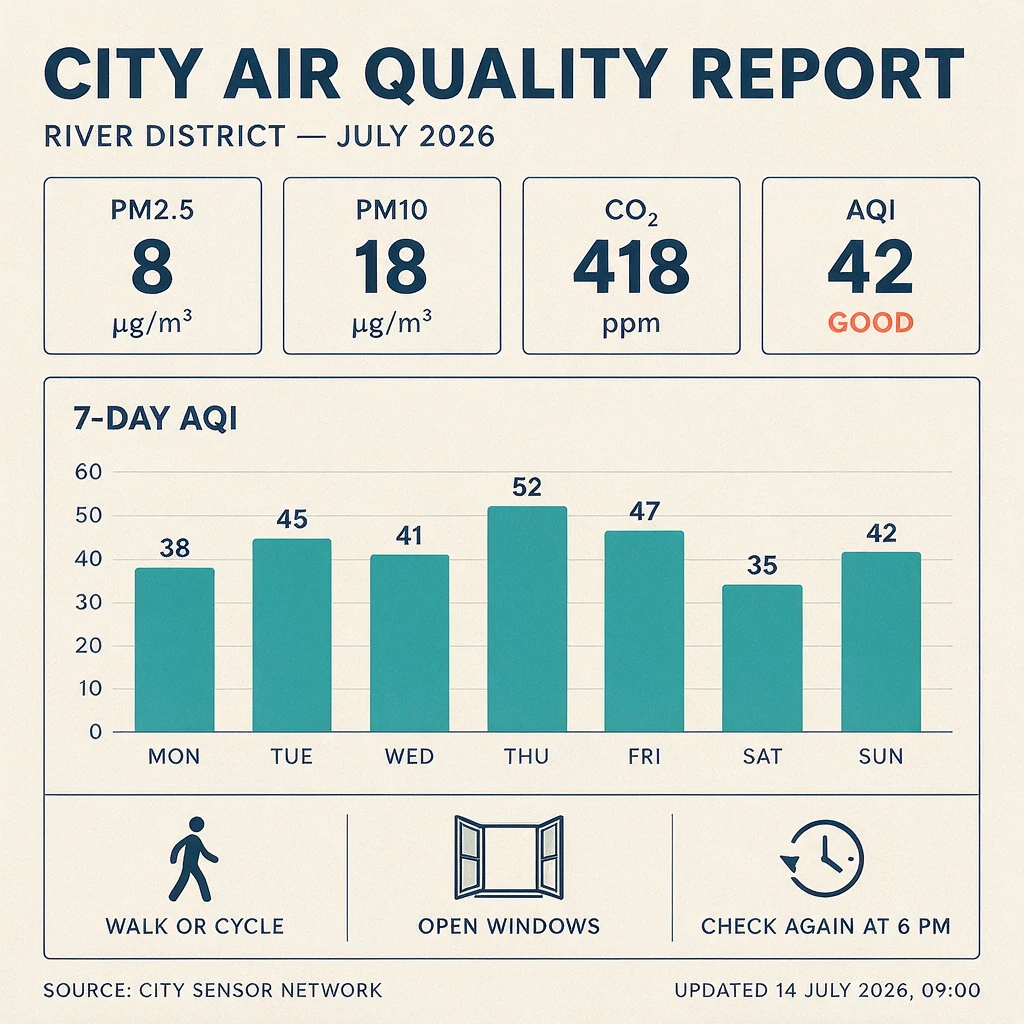
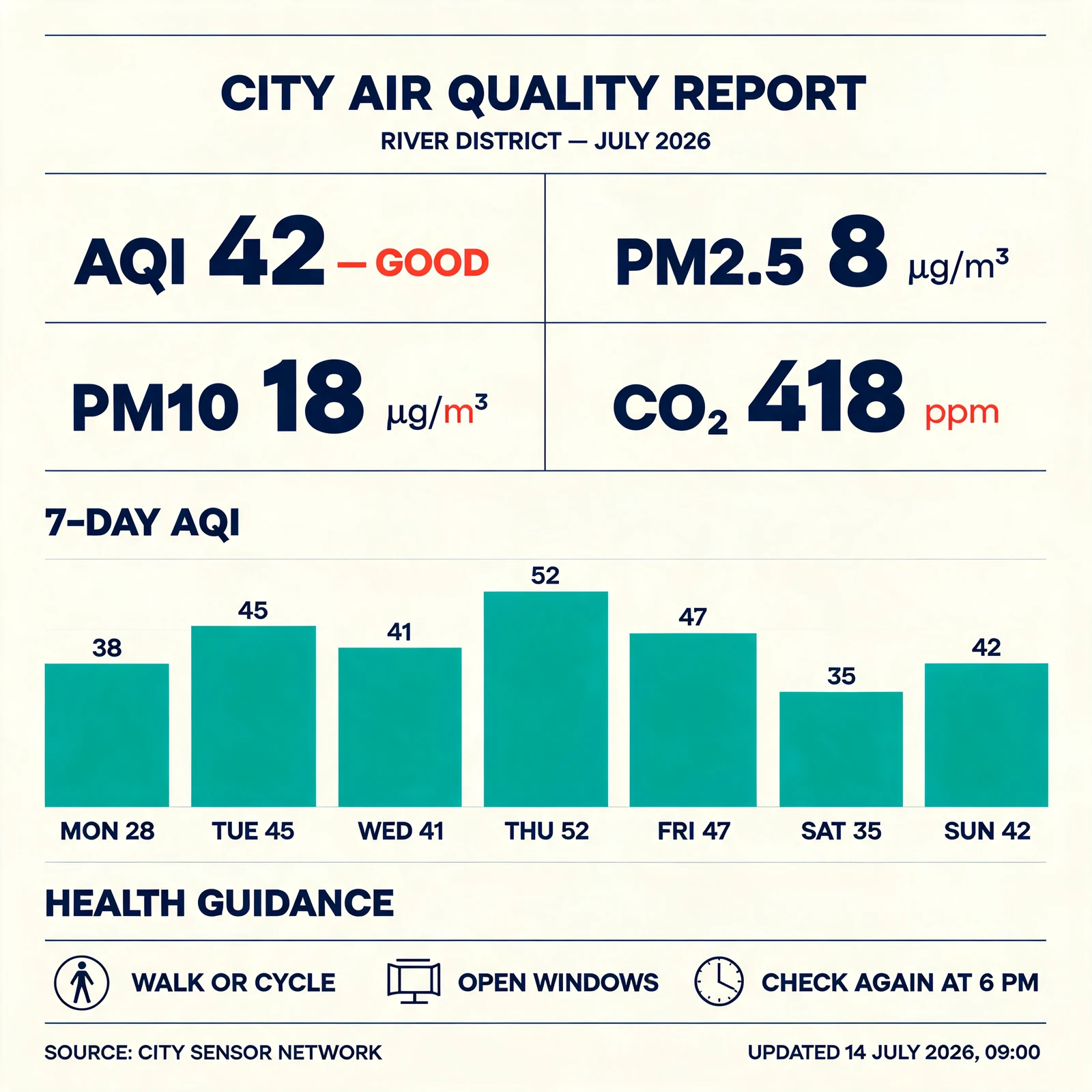
Design a high-density editorial infographic for a fictional city environmental report. Use a precise Swiss-modernist grid, an ivory background, deep navy text, teal data bars, and coral-red highlights. All the following text and numerical values must appear exactly as written and remain clearly readable:

CITY AIR QUALITY REPORT
RIVER DISTRICT — JULY 2026

AQI 42 — GOOD
PM2.5 8 µg/m³
PM10 18 µg/m³
CO₂ 418 ppm

7-DAY AQI
MON 38
TUE 45
WED 41
THU 52
FRI 47
SAT 35
SUN 42

HEALTH GUIDANCE
WALK OR CYCLE
OPEN WINDOWS
CHECK AGAIN AT 6 PM

SOURCE: CITY SENSOR NETWORK
UPDATED 14 JULY 2026, 09:00

Place the title and district subtitle at the top. Arrange the four current-reading values in four clearly separated summary cards. Below them, create a seven-bar chart labeled with the exact day abbreviations and values; the relative bar heights must match the numbers. Place the three health-guidance actions in a clearly separated section with simple line icons. Put the source and update time in a compact footer. Use only the supplied words and numbers. Do not invent, omit, duplicate, or rewrite any text or value. Do not add people, photographs, logos, maps, or decorative copy.
Outputs
Short analysis / evaluation
Both models rendered a dense amount of text clearly and created a coherent hierarchy of cards, chart, guidance, and source information. Pro preserved every supplied chart value and day pairing, matched the relative bar heights, and rendered characters such as µ, ³, and ₂ cleanly. Its small miss was the absent em dash between 42 and GOOD in the AQI card.
Lite reproduced nearly all the brief and produced an attractive, readable layout. However, the first x-axis label says MON 28 even though the number above the same bar is 38. A data graphic with contradictory values cannot be published without correction, making this the most meaningful difference across the three tests.
Observed result: Pro performed better on this text-and-data prompt. Lite's output is visually polished, but its contradictory Monday values require correction.
Example 3: Complex Prompt and Multi-Subject Control
Prompt
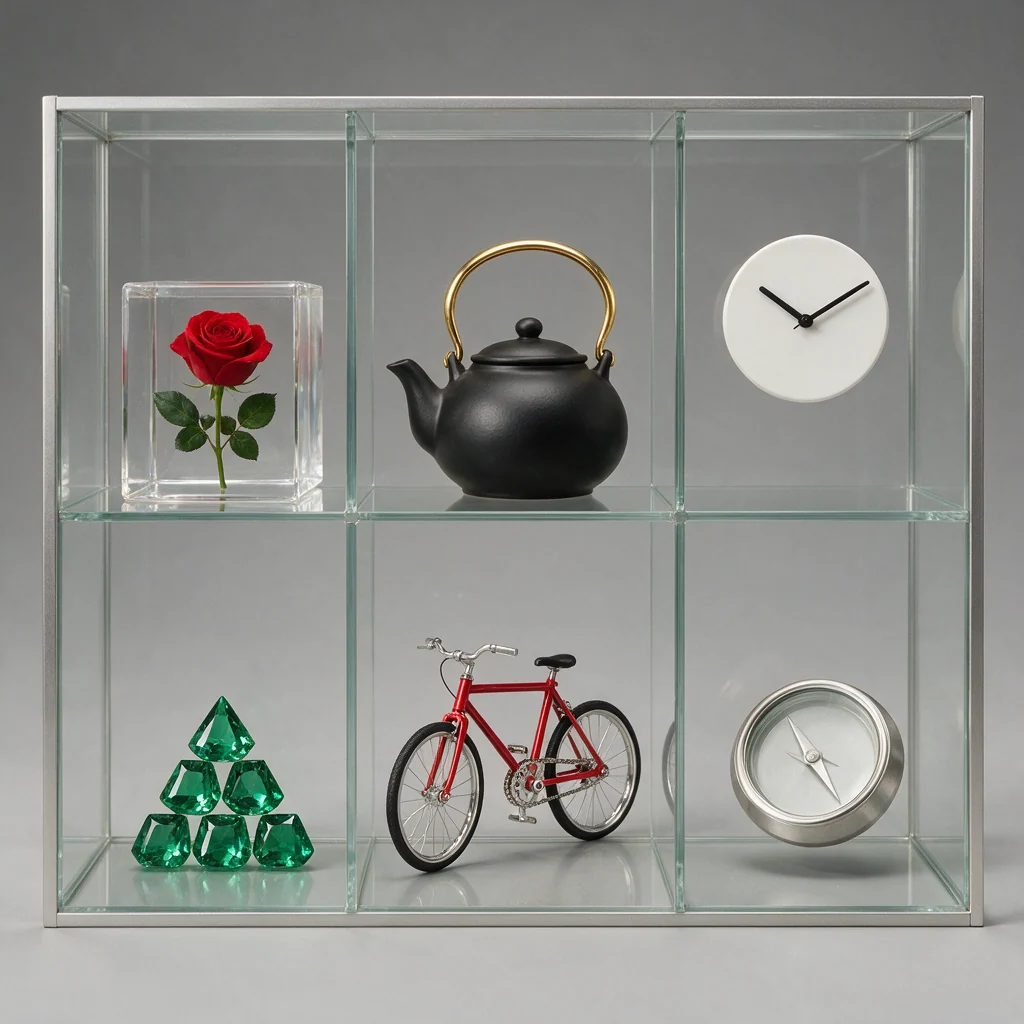
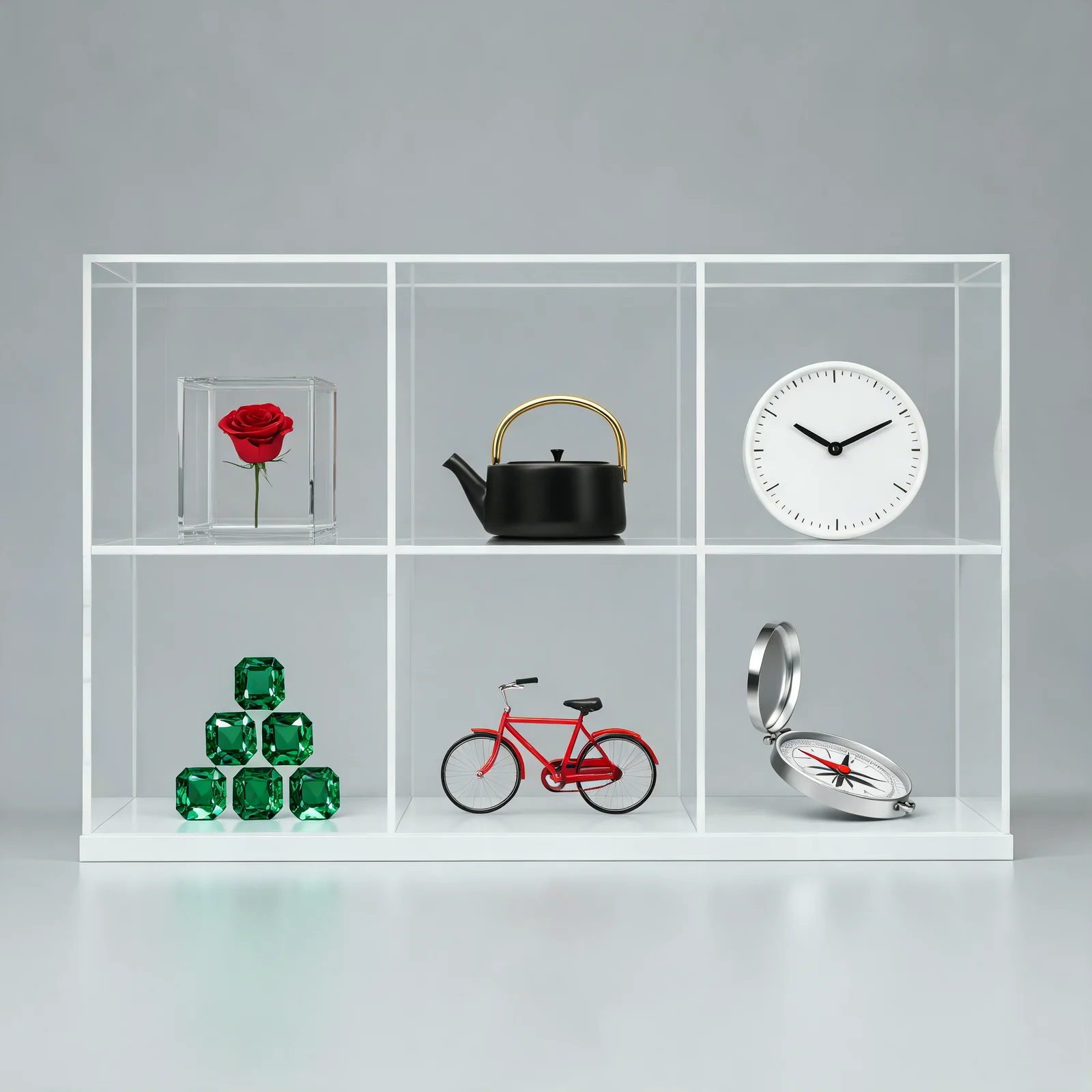
Create a front-facing photorealistic museum display cabinet divided into exactly six equal cells in a 3-column by 2-row grid. Each cell contains exactly one object.

Top-left: a transparent glass cube containing one suspended red rose.
Top-center: a matte-black ceramic teapot with a polished gold handle.
Top-right: a round white clock with black hands showing exactly 10:10.
Bottom-left: exactly six emerald-green gemstones stacked as a small pyramid.
Bottom-center: a miniature red bicycle facing left.
Bottom-right: a silver compass with its needle pointing northwest.

Keep all dividers straight, all objects centered, and all cells clearly separated. Use a neutral gray studio background with consistent soft lighting. No labels, no text, and no extra objects.
Outputs
Short analysis / evaluation
Both models kept the 3×2 cabinet, placed the six requested subjects in the correct cells, showed six gemstones, and oriented the bicycle to the left. Pro produced more convincing glass, ceramic, metal, bicycle, and gemstone materials while maintaining the requested clock time. Lite created a clean catalog-style arrangement, but the compass's red needle appeared to point northeast rather than northwest.
Observed result: Pro followed this multi-object prompt more precisely. Lite remains usable for a concept or catalog layout, but this version would need the compass direction corrected.
Image Quality and Prompt-Adherence Results
Pro made fewer instruction-level errors in the text/data and multi-subject pairs; the cabin pair was mixed. Lite maintained strong visual quality across all three supplied outputs.
| Category | Pro observation | Lite observation | Pair-level conclusion |
|---|---|---|---|
| Photorealistic environment | Strong mood and realism; path material missed | Strong composition; path followed, smoke too heavy | Tie, with different strengths |
| Dense text and numerical data | One punctuation omission; chart values correct | One incorrect chart label creates a contradiction | Pro |
| Multi-subject control | Correct structure and stronger directional adherence | Correct structure; apparent compass-direction error | Pro |
| Visual polish | High across all three outputs | High across all three outputs | Tie |
| Cross-run consistency | Not tested | Not tested | No verdict |
Match the model to the cost of correction. Pro may justify its higher price for exacting prompts; for reviewed, visually led work, Lite's price and output options may offer better value.
Speed, Reliability, and Cost
We did not measure generation time or failure rate. Without timestamps or failed-task records, neither model receives a speed or reliability advantage here.
PiAPI's documentation provides the following pricing comparison as of July 14, 2026:
| Strict task type | Size | Documented price per image |
|---|---|---|
seedream-5-pro | 1K | $0.068 |
seedream-5-pro | 2K | $0.136 |
seedream-5-lite | 2K | $0.052 |
seedream-5-lite | 3K | $0.052 |
Documented 2K price difference: Pro costs $0.084 more per image, or approximately 2.62 times Lite's listed price. For 100 strict 2K generations, that is $13.60 with Pro versus $5.20 with Lite—a difference of $8.40 before retries, reference-image charges, or workflow overhead.
Those numbers describe listed API pricing, not the measured cost of the six supplied examples. Check the current Seedream 5 API documentation before publishing a budget or client quote.
Resolution, Reference Images, and API Differences
Both tiers use the same seedream API model family, but you select the tier through task_type. Use seedream-5-pro or seedream-5-lite for the strict variants. PiAPI also documents less-restriction variants with a 25% price markup; those should be treated as separate configurations rather than mixed into a quality comparison.
The most relevant workflow differences are:
- Resolution: Pro supports 1K and 2K. Lite supports 2K and 3K. A fair native-quality test should use the shared 2K setting.
- Reference images: Both accept up to 10 public image URLs. Pro includes the first reference and lists a $0.003 charge for each additional one; PiAPI documents no Lite reference surcharge.
- Sequential generation: Lite supports
disabledorautoand can request 1–15 related images. Pro does not support the Lite sequential-generation fields. - Output controls: Both document the same aspect-ratio list and support JPEG, PNG, and WebP output.
For implementation details, use the Seedream 5.0 API guide alongside the live PiAPI Seedream documentation. Keep task type, resolution, output format, aspect ratio, and prompt fixed when you run your own comparison.
Which Seedream 5 Model Should You Choose?
Choose Seedream 5 Pro if...
- Your prompts contain exact numbers, units, short labels, or structured information.
- Small attribute-binding mistakes create meaningful review or editing costs.
- The fewer-error results from this sample match the kinds of prompts you expect to run.
- You are comfortable paying the documented $0.136 per strict 2K image.
Pro still needs review: its cabin output replaced the requested wooden path with stone steps.
Choose Seedream 5 Lite if...
- Your workflow prioritizes documented cost per image.
- You need a documented 3K option or sequential generation of related images.
- The prompt is primarily visual and allows a review or correction pass.
- You found Lite's brighter, more prominent cabin composition closer to your preferred style.
Lite's numerical and compass errors matter, but they do not make the model broadly unusable. They show where exactness checks are most important.
Test both if...
Test both models when one prompt combines visual polish with strict text, counts, or spatial directions. Run at least three generations per model using the same 2K resolution and aspect ratio, then compare usable-first-pass rate—not only the most attractive image. A model that costs less per request can become more expensive if it requires frequent retries or manual correction.
Limitations of This Comparison
This article evaluates a deliberately small sample. Each model contributed one output for each of three prompts, so we cannot estimate variability, consistency, retry rate, or average quality. Image models are nondeterministic, and another run may change the category result.
The exported files were also not controlled. Pro files were 1024×1024; Lite files were 1792×2240 for Example 1 and 2048×2048 for Examples 2 and 3. Example 1 used different aspect ratios, which prevents a clean composition comparison. We avoided interpreting apparent sharpness as a model advantage.
These results apply to the PiAPI-accessible model configurations and documentation reviewed on July 14, 2026. Model behavior, pricing, availability, and API details can change. Use this comparison to choose what to test next, not as a substitute for validating your own prompts.
Frequently Asked Questions
What is the difference between Seedream 5 Pro and Seedream 5 Lite?
Seedream 5 Pro and Seedream 5 Lite use the same PiAPI seedream model family but different task types. Pro supports 1K/2K; Lite supports 2K/3K, lower documented pricing, and sequential generation. In the three supplied pairs, Pro made fewer exact-text and instruction errors, while both produced strong visual quality.
Is Seedream 5 Pro always better than Seedream 5 Lite?
No. Pro performed better in our text-and-data and multi-subject examples, but Lite followed the cabin's wooden-path instruction more closely. Results depend on the prompt, settings, and run. Pro's name and price do not guarantee a better image, so test representative prompts before choosing a default model.
Should I use Seedream 5 Pro or Lite?
Use Pro when exact numbers, text, counts, directions, or object relationships are expensive to correct. Use Lite when documented cost, 3K output, or sequential generation matters more and you can review the result. If your workload mixes those needs, test both at the same 2K resolution and aspect ratio.
Which Seedream 5 model is cheaper through PiAPI?
Seedream 5 Lite is cheaper at the shared strict 2K setting in PiAPI's July 2026 documentation. Lite is listed at $0.052 per 2K image, while Pro is $0.136. That makes Pro approximately 2.62 times the Lite price at 2K, before retries or any additional reference-image charges.
What resolutions do Seedream 5 Pro and Lite support through PiAPI?
PiAPI documents 1K and 2K output sizes for Seedream 5 Pro, and 2K and 3K for Seedream 5 Lite. The shared resolution is 2K, making it the appropriate setting for a controlled model comparison. Actual pixel dimensions can vary with aspect ratio, so retain the original output metadata.
Can I use Seedream 5 Pro and Lite through the same API?
Yes. Both use PiAPI's seedream model family and POST /api/v1/task endpoint. Select seedream-5-pro or seedream-5-lite with task_type for strict generation. Their inputs overlap, but size options, sequential-generation behavior, pricing, and reference-image charges differ, so review those fields before switching task types.
Final Verdict: Seedream 5 Pro or Seedream 5 Lite?
In this Seedream 5 Pro vs Seedream 5 Lite comparison, Pro made fewer errors on exact typography, numerical data, and tightly constrained multi-object prompts. Lite combines lower documented 2K pricing with a 3K option, sequential generation, and competitive visual quality across the three examples.
There is no universal winner. The best model is the one that produces usable outputs at the lowest total workflow cost after review, corrections, and retries. Take one prompt that represents your real workload, run it through both the Seedream 5 Pro playground and Seedream 5 Lite playground under the same 2K settings, then compare exactness as carefully as appearance.
If your decision extends beyond the Seedream family, the Seedream 5 vs Nano Banana 2 comparison covers a separate cross-model choice.
When you are ready to integrate the selected model, verify the latest parameters and pricing in the Seedream 5 API documentation and create your key in the PiAPI workspace.