Seedream 5 Pro API Examples: Multi-Reference Product Images, Text Rendering, and Precision Editing
Seedream 5 Pro is PiAPI's premium Seedream 5 image-generation tier for high-quality text-to-image and reference-guided workflows. This guide documents three practical API examples: combining multiple references into a product hero image, rendering short marketing text, and changing one visual detail while preserving the rest of an image.
The goal is not to claim perfect control from a single prompt. Each section shows the inputs, planned request settings, supplied output, and observed trade-offs so developers can decide whether Seedream 5.0 Pro fits an ecommerce or creative-production workflow.
Direct answer
In the supplied tests, Seedream 5 Pro combined three reference roles into one product image, rendered a correct two-line English headline, and created a controlled cap-color variation. These are observed results from the supplied assets, not guarantees for every prompt or request.
Evidence note
The visual evaluations below are based on the supplied PNG files. Exact task payloads, task IDs, final API responses, and confirmed output settings were not available at review time, so this article does not present the displayed assets as authenticated task records.
In this guide
Results at a Glance
| Workflow | Visible result | Best fit | Important caveat |
|---|---|---|---|
| Multi-reference product image | Product identity, material detail, and campaign direction formed one coherent hero image. | Ecommerce hero images and campaign variants. | Identity retention is an observed result, not a guarantee. |
| Text rendering | The two-line headline used the correct spelling, capitalization, and line order. | Short campaign headlines and poster concepts. | Confirm the actual aspect ratio and manually review all production copy. |
| Precision editing | The cap assembly changed from silver to deep red while the bottle and scene stayed highly consistent. | Controlled color variants of an approved asset. | The dropper bulb turned red too. |
Test Method and Evidence
This article uses a simple fictional skincare bottle so the examples test reference guidance and editing behavior without depending on a third-party brand. The multi-reference workflow assigns three separate roles—product identity, material finish, and campaign art direction—then checks whether those signals remain distinct in one final image.
The six supplied source and output assets were reviewed on July 13, 2026. Every supplied file is a 1312 × 736 PNG. The article records only what is visibly present, including the text-format mismatch: the supplied text-rendering output is landscape even though the planned request called for a 4:5 vertical image.
| Claim type | Evidence used | Publication boundary |
|---|---|---|
| API identifiers, inputs, ratios, formats, sizes, and pricing | PiAPI Seedream 5 documentation, reviewed July 13, 2026. | Recheck the docs before implementation because product details can change. |
| Visual behavior in these examples | Six supplied source/output PNG files and the visible comparisons below. | Describe only these assets; do not turn one result into a universal guarantee. |
| Task delivery and response handling | No authenticated task record was available. | Do not publish polling, timing, or final-response-path instructions until a real response is captured. |
What Does the Seedream 5 Pro API Support?
PiAPI's Seedream API uses seedream as the model identifier. The Pro tier uses seedream-5-pro for strict moderation or seedream-5-pro-less-restriction for the less-restriction variant. Pro supports 1K and 2K output sizes, up to ten optional public reference-image URLs, and common aspect ratios from square through 21:9.
The examples in this tutorial use the strict seedream-5-pro task type. The first Pro reference image is included in the image price, while each additional reference has a separate charge. Check the current Seedream 5 API documentation before using these values in production.
If your workflow prioritizes 3K output instead of Pro's 1K and 2K options, review the Seedream 5 Lite API before choosing a tier. For a prompt-by-prompt quality and cost review, see the Seedream 5 Pro vs Seedream 5 Lite comparison.
Create a Seedream 5 Pro Task
A Pro request accepts a prompt, optional public image URLs, an aspect ratio, output format, and output size. The following example illustrates the documented input shape for the multi-reference workflow; it is not the missing authenticated payload for the supplied output.
curl -X POST 'https://api.piapi.ai/api/v1/task' \
  -H 'X-API-Key: YOUR_API_KEY' \
  -H 'Content-Type: application/json' \
  -d '{
    "model": "seedream",
    "task_type": "seedream-5-pro",
    "input": {
      "prompt": "Create a premium ecommerce hero image using the supplied reference images...",
      "image_urls": [
        "https://your-public-cdn.example/product-reference.webp",
        "https://your-public-cdn.example/material-reference.webp",
        "https://your-public-cdn.example/campaign-reference.webp"
      ],
      "aspect_ratio": "16:9",
      "output_format": "webp",
      "size": "2K"
    }
  }'
Response handling still needs live verification
The current documentation describes synchronous delivery, while a visible example also shows a pending task response. Do not copy a polling sequence or assume an output path until an authenticated Pro response confirms the current behavior.
Example 1: Multi-Reference Product Images
Product teams often have separate references for the physical product, its material finish, and campaign art direction. This example uses three images to create one new ecommerce hero image.
What can Seedream 5 Pro do with reference images?
In this supplied test, three references contributed distinct product-identity, material-finish, and campaign-direction cues to one coherent hero image. The result shows a useful multi-reference workflow, but it does not prove that every request will preserve identity equally well.
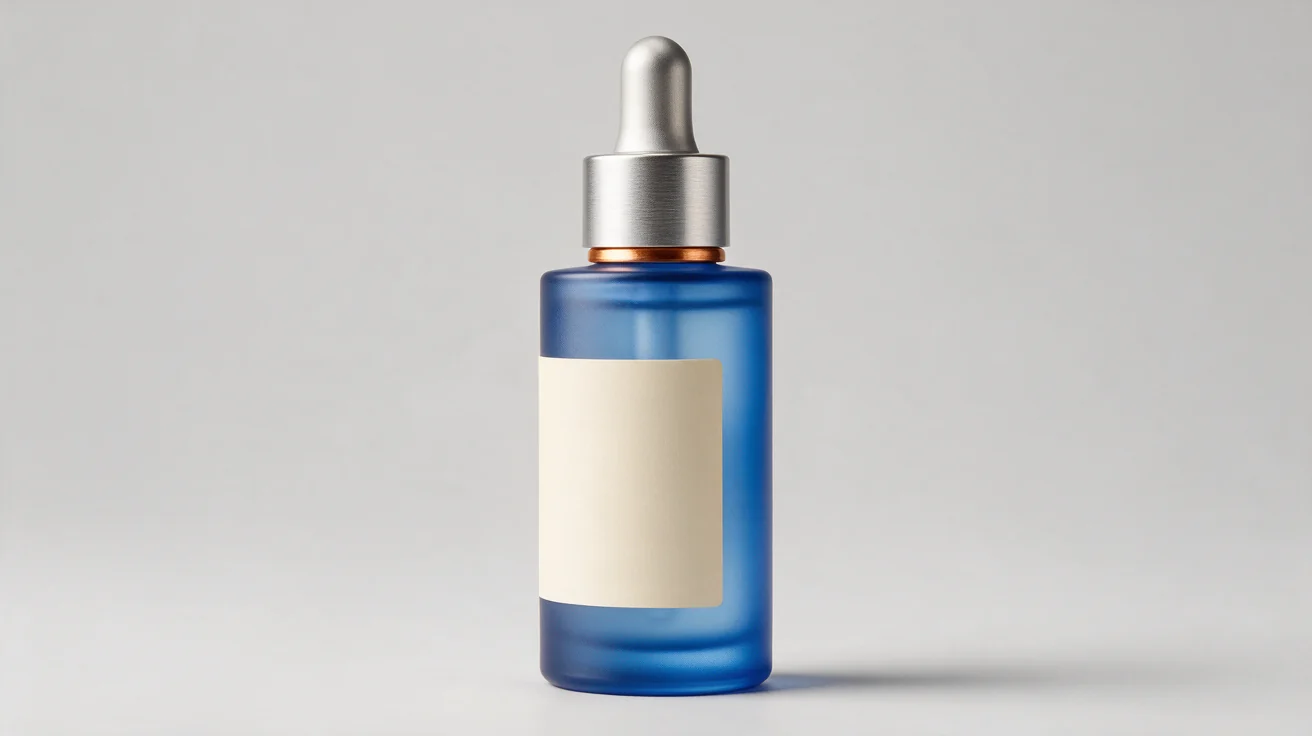
Input references

Prompt
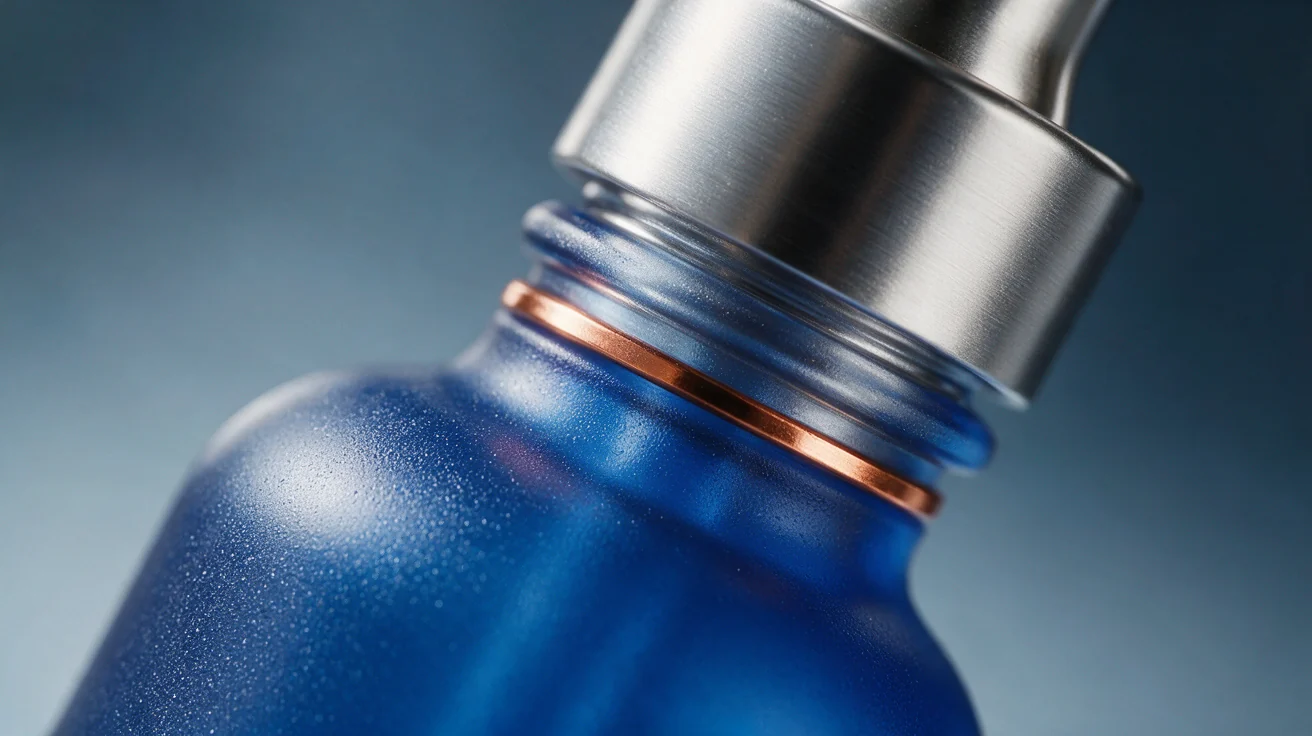
Create a premium 16:9 ecommerce hero image using the three supplied reference images. Treat reference image 1 as the exact product-design reference: preserve the tall frosted cobalt-blue serum bottle, brushed-silver dropper cap, thin copper ring, and blank cream label. Use reference image 2 only for material and finish. Use reference image 3 only for campaign art direction. Show one bottle, slightly right of center, with clean negative space. Do not add readable text, logos, extra bottles, people, hands, flowers, or unrelated objects.
Planned request settings
task_type: seedream-5-pro
aspect_ratio: 16:9
size: 2K
output_format: webp
reference images: 3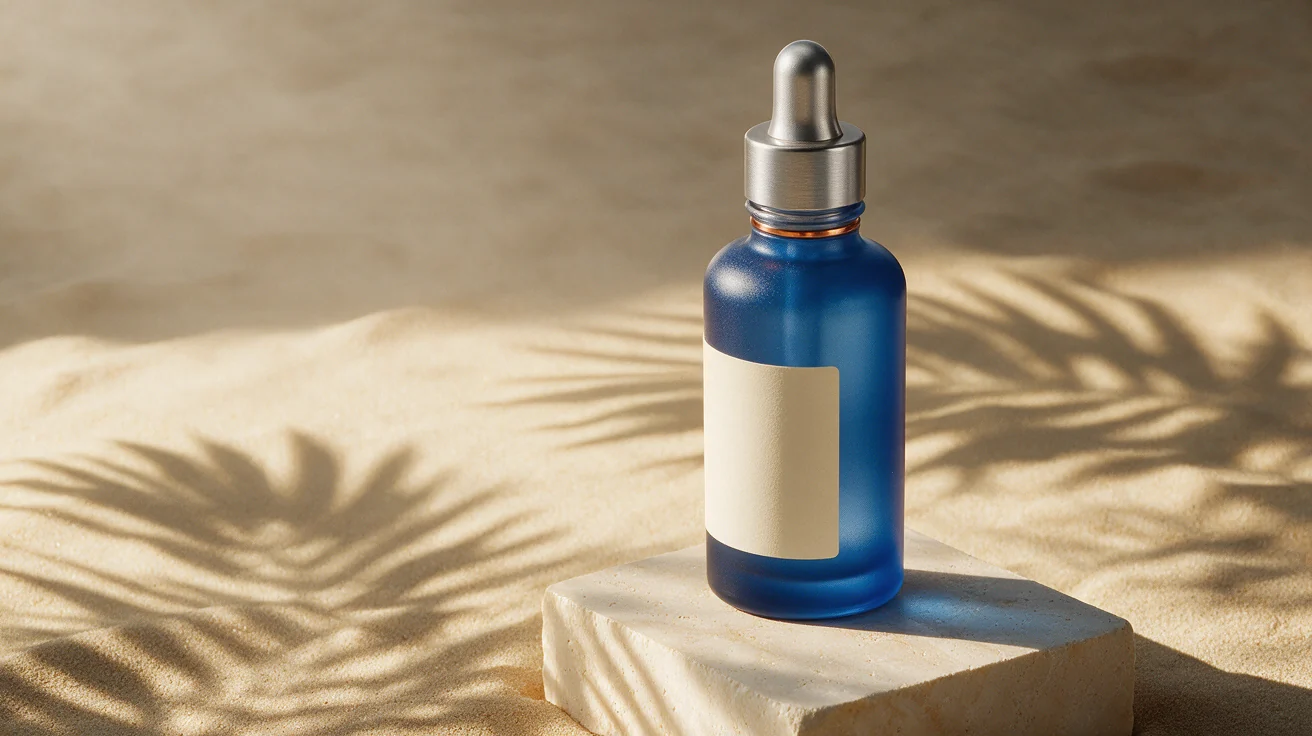
Evaluation
The output combines the product identity, material cues, and campaign direction into a coherent ecommerce composition. The cobalt-blue bottle, silver cap, copper ring, and blank cream label remain recognizable, while the stone pedestal, warm sand background, and palm-leaf shadows follow the campaign reference.
The one-product composition also holds: the bottle is fully visible, slightly right of center, and placed beside useful negative space. No readable text, extra bottles, people, hands, logos, or unrelated props are visible.
Working verdict: Strong multi-reference product-image result. It demonstrates a practical way to blend product identity, material treatment, and campaign direction in one request, subject to normal brand review.
Example 2: Seedream 5 Pro Text Rendering
For marketing visuals, the practical question is whether an image model can render short, controlled copy that a human can verify and use as a candidate campaign asset.
Can Seedream 5 Pro render text in images?
In this supplied test, it rendered SUMMER DROP and LIMITED EDITION with correct spelling, capitalization, and line order. The result supports short-copy experimentation, but production use still requires manual copy review and confirmation of the actual task settings.
Prompt
Create a premium vertical 4:5 skincare launch poster with a single fictional cobalt-blue serum bottle on a travertine pedestal. Render exactly two uppercase lines in the upper third: SUMMER DROP and LIMITED EDITION. Use modern sans-serif typography, generous negative space, and no other readable words, logos, watermarks, badges, or numbers.
Planned request settings
task_type: seedream-5-pro
aspect_ratio: 4:5
size: 2K
output_format: png
reference images: none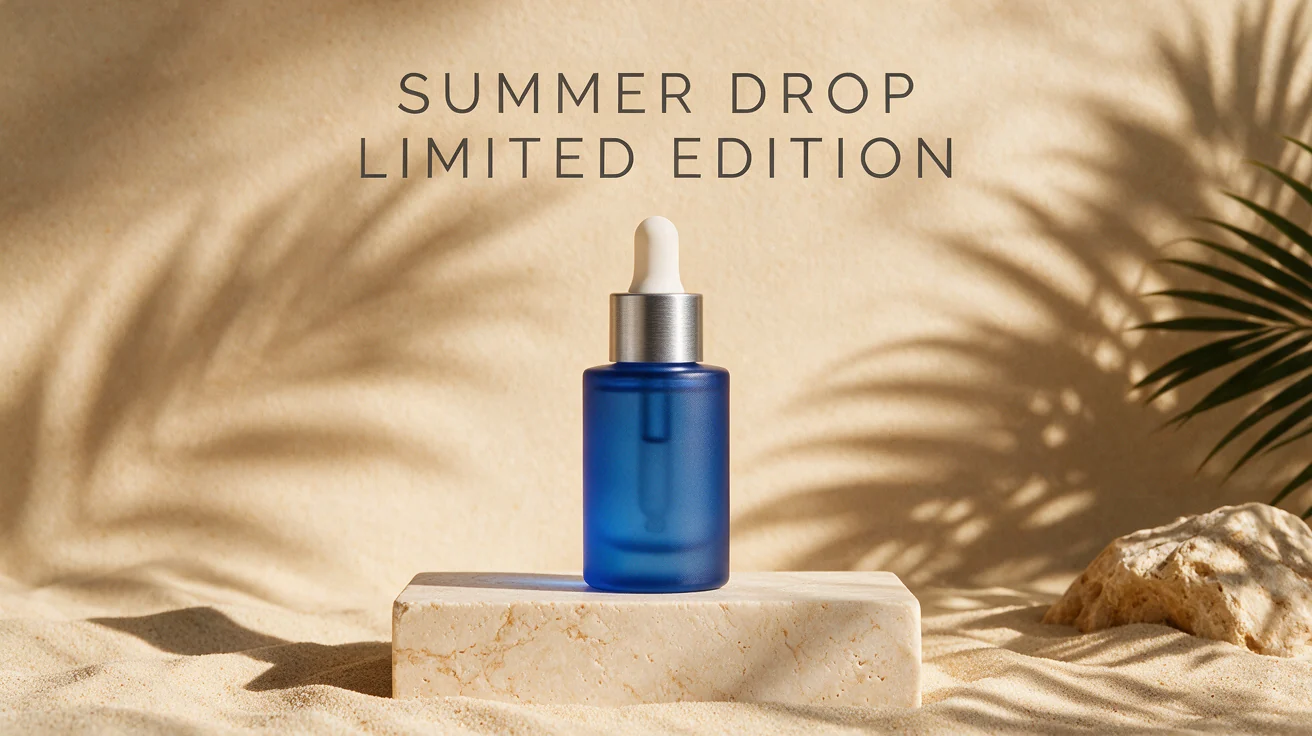

Evaluation
The output contains both requested lines with correct spelling, uppercase styling, and the intended order. The lettering is readable against the warm background, with no visible extra words, badges, logos, or watermarks.
The format still needs verification: the supplied file is landscape rather than the planned 4:5 vertical canvas. Confirm the task settings or export behavior before describing this displayed asset as a 4:5 or 2K result.
Production tip: Keep generated copy short, specify casing and line breaks, reserve negative space, generate multiple candidates, and manually verify every final character before publishing.
Example 3: Precision Editing
Image editing is most useful when a team has an approved composition and needs one controlled variation. This test uses Example 1 as the reference and requests a single cap-color change.
Can Seedream 5 Pro make a targeted image edit?
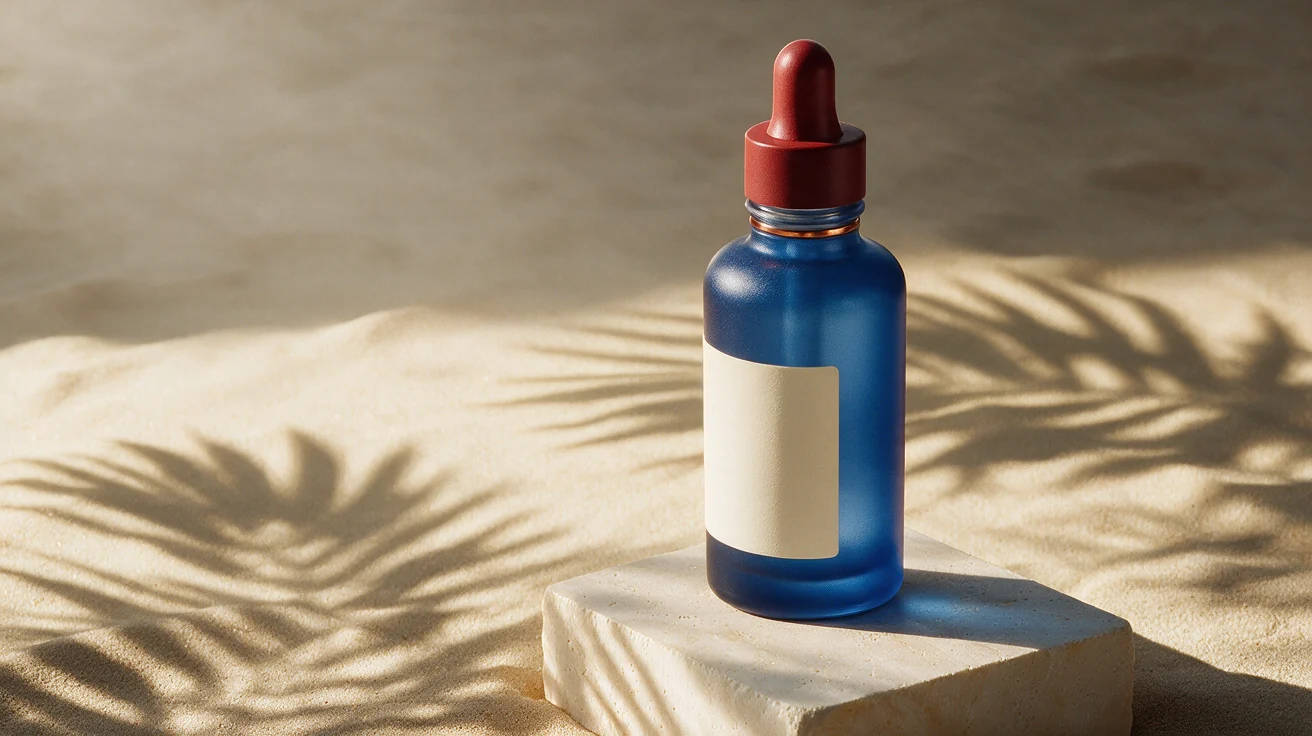
In this supplied before/after test, the cap assembly changed from silver to deep red while the bottle, label, pedestal, crop, lighting, and background stayed highly consistent. The dropper bulb also turned red, so the edit was controlled but not limited to the metal cap alone.
Prompt
Edit the supplied product image. Keep the bottle shape, cobalt-blue frosted glass, copper ring, blank cream label, camera angle, crop, pedestal, background, palm-leaf shadows, lighting direction, contact shadow, and overall composition unchanged. Change only the brushed-silver dropper cap to matte deep red. Do not add text, logos, extra products, people, or other objects.
Preservation check
| Check | Observed result |
|---|---|
| Cap color | Pass—the silver cap and dropper assembly are visibly deep red. |
| Bottle and glass color | Pass—the cobalt-blue frosted bottle remains recognizable. |
| Blank label | Pass—the label remains in the same general position and form. |
| Camera angle and crop | Pass—bottle placement and scene framing closely match. |
| Background and lighting | Pass—the sand, pedestal, and palm-shadow setup remain consistent. |
| Edit isolation | Partial—the red treatment extends to the dropper bulb, not only the metal cap. |
Working verdict: Strong precision-edit result. It demonstrates a useful color-variant workflow while showing why a human must review the exact component scope.
Prompt Patterns for More Controlled Outputs
- Assign each reference a role. State whether an image supplies product identity, material detail, or scene direction.
- List what must not change. Name the product shape, label, angle, crop, and lighting when they matter.
- Describe only the requested edit. Avoid combining unrelated changes.
- State exclusions. Rule out unwanted text, logos, people, extra products, and clutter.
- Review every candidate. Treat generated assets as candidates, not deterministic source files.
What Should a Production Seedream API Workflow Store?
A production workflow should store the source URLs, prompt, task type, input settings, task ID, complete response, generation date, output URL, approval decision, and visible limitations for every selected asset. This creates a reproducible record for review, variants, and troubleshooting.
source image URLs
prompt
task type and input settings
task ID and complete response
generation date
output URL
human approval decision
visible artifacts or brand deviations
Generate multiple candidates, route them through visual and brand review, and preserve the approved prompt and inputs with the final asset. If you are still selecting a model, see the Seedream 5 vs Nano Banana 2 comparison for additional product, layout, API, and pricing context.
Seedream 5 Pro API FAQ
How many reference images can I send to the Seedream 5 Pro API?
PiAPI's Seedream 5 documentation allows up to ten public reference-image URLs. This article's multi-reference example uses three images with distinct roles: product identity, material detail, and campaign art direction.
Can Seedream 5 Pro render text in images?
In the supplied test, Seedream 5 Pro rendered the requested two-line uppercase copy—SUMMER DROP and LIMITED EDITION—with correct spelling and line order. Keep copy short, then manually verify the final lettering and intended aspect ratio before publishing a campaign asset.
Can Seedream 5 Pro make a targeted image edit?
In the supplied test, the editing workflow changed the silver cap assembly to deep red while keeping the blue bottle, blank label, pedestal, sand background, and palm-shadow composition highly consistent. The red extended to the dropper bulb too, so review whether the model changed the exact component intended.
Which Seedream 5 Pro output sizes are available?
The Pro task types support 1K and 2K output sizes. The planned test setting was 2K, but the supplied PNG exports are 1312 × 736, so confirm the actual task settings before describing any displayed example as a 2K result.
Try Seedream 5 Pro Through PiAPI
Start by testing the model in the Seedream 5 Pro playground, then use the Seedream API documentation to confirm the latest request schema and pricing. When you are ready to connect requests, create or retrieve your API key in the PiAPI workspace.
These examples suggest Seedream 5 Pro is especially useful when a workflow needs to combine a product reference with campaign direction or create a controlled color variation of an approved asset. The short-text result is promising for concise headlines, but it still needs manual copy review and confirmed output settings before it becomes a production claim.