AI Age Filter Online: How to Make Yourself Look Older or Younger
PiAPI PiAPI
An AI age filter online lets you upload a portrait and generate a version of the same person at a different age. You can use it to make yourself look older, create a younger-looking portrait, test a future-self concept, or build age transformation into a creative workflow.
If you want to try it now, open PiAPI's AI age filter online , upload a clear portrait, choose a target age, and generate an older or younger version in the browser.
Quick answer: An AI age filter online is a browser-based image tool that edits a portrait to make the person look older or younger. The best age filters preserve the person's recognizable identity while changing age-related details such as skin texture, facial fullness, hair, jawline, and eye area.
An AI age filter is an image editing tool that changes the apparent age of a person in a photo while trying to preserve their recognizable identity. Instead of placing a simple wrinkle overlay on top of the image, a realistic AI age filter adjusts age-related details across the face and head, such as skin texture, facial fullness, hair color, hairline, eye area, jawline, and expression.
In practical terms, age progression is useful for future-self portraits, character aging, storytelling, and concept images. Age regression is useful for younger-looking portraits, de-aging edits, and creative before-and-after comparisons.
The best results still look like the same person. The face should not become a random stranger, and the image should keep the original pose, lighting, camera angle, clothing, and background whenever possible.
Using an AI age filter online is usually simple: upload a portrait, choose the target age, generate the result, and compare the before-and-after image. The quality of the result depends heavily on the input photo and how clear the target age instruction is.
- Upload a clear portrait.
- Select a target age or age range.
- Generate the age-filtered image.
- Compare the result with the original photo.
- Download or reuse the image in your creative workflow.
For PiAPI's tool, start with the AI Age Filter page. It is built around a practical upload-and-generate flow, so you can test the result first and then think about whether you want to reuse the same type of generation in a product, app, or content workflow.
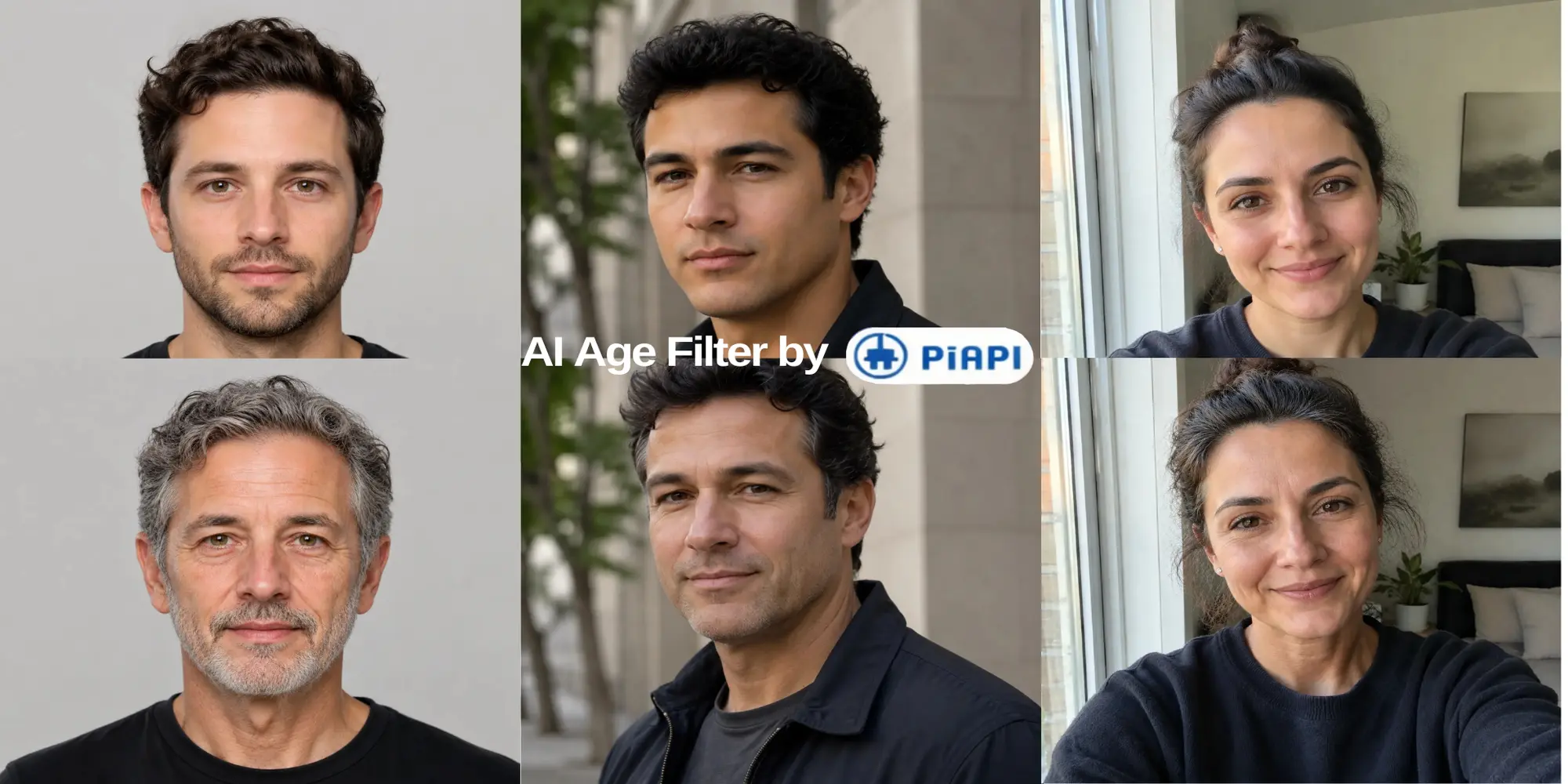
These examples show how different portrait types can pass through the AI age filter: a clean studio headshot, a casual phone selfie, and a three-quarter outdoor portrait. Together they show the range of input photos users may bring to the tool.
To make yourself look older with AI, choose a clear face photo and select an older target age that fits the result you want. For example, you might try a future-self portrait at 40, 50, 60, or 70 years old.
The strongest results usually come from portraits where the face is visible, well-lit, and not blocked by sunglasses, masks, heavy shadows, or extreme angles. AI can create a believable older portrait, but it should not be treated as a real prediction of how you will age.
An AI age filter can also make a person look younger. This is sometimes called age regression or de-aging. The goal is not just to smooth the face until it looks artificial. A good younger version should keep the same identity while adjusting age-related details in a natural way.
It should avoid over-smoothed skin, plastic-looking faces, or changes that make the person look like someone else. If the result looks too generic, try a clearer photo, a more realistic target age, or a more specific age instruction.
A realistic AI age filter does not only add wrinkles or remove them. It changes the portrait in a way that feels biologically consistent while keeping the person recognizable.
Realism rule: A believable AI age filter should change age-related facial details while preserving identity, pose, lighting, and background. If the result looks like a different person, a beauty filter, or a wrinkle overlay, it is not a strong age transformation.
The most important quality signal is identity preservation. The result should still feel like the same person at a different age. The face, hair, neck, and visible skin should all match the target age, while lighting and background should stay consistent so the edit feels like one real photograph.
The input photo matters. If the AI cannot clearly see the face, it has less information to preserve identity and apply a believable age transformation.
Avoid photos where the face is too small, heavily cropped, covered, or distorted by an extreme camera angle. If the portrait is useful but low-resolution, an AI image upscaler can help improve detail before you test an age transformation.
AI age progression is not an exact prediction of the future. It is a creative image transformation that estimates how a person might look at another age based on visual patterns learned by the model.
That means an AI-generated older or younger portrait can be useful for entertainment, concept art, social content, storytelling, character design, or product prototyping. It should not be used as proof of how someone will actually age.
PiAPI's AI Age Filter lets you upload a portrait, choose a target age, and generate an older or younger version online. It is designed for users who want a quick browser-based age filter and for builders who want to understand how AI image editing can fit into a product workflow.
If you are building with AI image generation, PiAPI can also help turn this type of playground workflow into an API-backed feature using models such as GPT Images 2 .