GPT Image 2 vs GPT Image 1.5 API: What's New in OpenAI Image Generation?
For creators, marketers, developers, and teams using a GPT image API, the difference goes beyond visuals alone. Better text rendering, improved consistency, stronger style control, and more dependable results can save time and improve workflow efficiency.
In this guide, we compare GPT Image 2 vs GPT Image 1.5 across image quality, prompt performance, pricing, and real-world use cases. We also break down what changed, share prompt tips, and review side-by-side examples to help you decide which GPT image generator is the better choice today.
What's New in GPT Image 2 Compared to GPT Image 1.5
Instead of simply generating better-looking images, GPT Image 2 focuses on producing results that are more usable, controllable, and reliable from the start.
Smarter Prompt Understanding with Reasoning-Based Generation
One of the biggest shifts in GPT Image 2 is the introduction of a reasoning-driven generation process. Before rendering the final image, the model can better interpret instructions, understand scene relationships, and plan visual elements more accurately.
This helps when prompts include multiple constraints such as object counts, camera angles, layout requests, or detailed scene compositions. Compared with GPT Image 1.5, GPT Image 2 is better equipped to follow complex prompts with fewer mistakes.
Sharper Image Quality with Fewer AI Artifacts
GPT Image 2 delivers cleaner visuals with stronger textures, lighting balance, and more natural details. Hands, faces, shadows, and fine elements appear more refined, reducing the visual inconsistencies that often signal AI-generated content.
For users creating product ads, lifestyle campaigns, or editorial visuals, this can lead to outputs that feel more polished and ready to publish.
Major Improvements in Text Rendering
Readable text inside AI-generated images has historically been a weak point across many models. GPT Image 2 makes a significant leap forward by generating clearer typography, better spacing, and more accurate lettering.
This makes it much more practical for menus, posters, packaging concepts, banners, social media ads, and branded marketing assets where text quality matters.
Better for UI and Interface Concepts
GPT Image 2 is also more capable when generating app screens, landing page mockups, dashboards, and interface concepts. Cleaner alignment, sharper icons, and more structured layouts make it more useful for UI or UX ideation.
For teams prototyping quickly, this can reduce the gap between concept generation and design execution.
More Advanced Image Editing and In-Painting
Compared with GPT Image 1.5, GPT Image 2 offers stronger image editing consistency. Users can modify specific parts of an image, such as changing clothing, facial expressions, objects, or backgrounds, while preserving the rest of the composition more accurately.
This is valuable for iterative creative workflows where only one element needs adjustment.
Stronger Consistency Across Multiple Images
Maintaining the same character or subject across several generations can be difficult for AI image models. GPT Image 2 improves visual consistency, making it easier to create image sequences with recurring characters, similar styling, or campaign-ready series assets.
This is especially useful for storytelling, product catalogs, or brand content sets.
Better Value for Commercial Workflows
While GPT Image 2 may cost more than GPT Image 1.5 depending on usage mode, the improved prompt accuracy, cleaner text rendering, and reduced need for manual editing can offer stronger overall value.
For marketers, developers, and businesses using a GPT image API, fewer retries and higher-quality outputs can translate into better efficiency and stronger campaign performance.
Best ChatGPT Image Prompts and Prompt Tips for GPT Image 2
Getting strong results from GPT Image 2 is not only about the model itself. Prompt quality still plays a major role in output accuracy, style, and consistency. A well-structured prompt can help the model better understand your intent and produce images that require fewer revisions.
Whether you are using GPT Image 2 for content creation, design concepts, or marketing assets, these prompt tips can help improve results.
Be Specific With the Subject and Scene
Clear prompts usually perform better than vague ones. Instead of asking for a woman in a cafe, describe the environment, outfit, expression, and setting.
A stylish woman sitting in a modern Paris cafe, morning sunlight through the window, warm tones, candid lifestyle photography.
The added detail gives the GPT image generator more direction to work with.
Include Style References
If you already know the look you want, mention it directly. GPT Image 2 responds well to visual styles such as cinematic, product photography, editorial, anime, minimalist, retro, or luxury branding.
Luxury skincare product on marble table, premium commercial photography style, soft shadows, elegant composition.
Define Camera Angle and Composition
Specifying perspective can improve image framing. Terms such as close-up, overhead shot, wide-angle, centered composition, portrait orientation, or macro shot help guide layout. This is especially useful when generating ads, product images, or social media visuals.
Mention Lighting and Mood
Lighting strongly affects image quality and emotion. Adding lighting instructions can make results feel more polished.
- Soft natural daylight
- Neon cyberpunk glow
- Golden hour sunlight
- Studio lighting
- Moody cinematic shadows
Use Text Prompts Carefully
GPT Image 2 is stronger at text rendering than earlier models, making it useful for posters, menus, banners, and thumbnails. If text is required, keep wording clear and concise.
Modern coffee poster with headline "Fresh Brew Daily", clean sans-serif typography.
Iterate and Refine
Many users get the best results through multiple rounds. Start with a base concept, then improve it by adjusting style, colors, composition, or subject details. This workflow often produces stronger results than trying to fit every detail into one long prompt.
Use GPT Image 2 for Real-World Creative Tasks
The model performs especially well for:
- Product marketing creatives
- Blog hero images
- Social media campaigns
- UI concept mockups
- Character art and storytelling visuals
Example 1: Luxury Watch Advertisement
Prompt:
A premium stainless steel wristwatch standing upright on a black reflective surface, water droplets around the base, dramatic side lighting, visible engraved dial details, realistic glass reflections, cinematic luxury campaign style, dark gradient background, headline text "Precision Redefined" at the top.
Comparison Analysis
For a premium advertising prompt like this, GPT Image 2 produces a noticeably more polished result than GPT Image 1.5. The headline text appears cleaner and more professionally aligned, while GPT Image 1.5 may introduce extra text or less refined typography.
Material realism is also stronger in GPT Image 2. Water droplets show believable surface tension and reflections align naturally with the black glossy base, whereas GPT Image 1.5 can render these details less accurately.
The watch itself benefits from sharper macro detail in GPT Image 2, with clearer dial markings, stronger metallic texture contrast, and a more premium finish. Lighting is another key difference, as GPT Image 2 handles dramatic side-lighting with better depth and rim highlights, while GPT Image 1.5 may appear flatter.
Overall, GPT Image 1.5 can still generate a strong concept image, but GPT Image 2 delivers a result that feels much closer to a real luxury campaign photograph.
Example 2: High-End Fashion Campaign Poster
Prompt:
A luxury fashion campaign poster for a modern streetwear brand. Confident model standing in a futuristic urban alley at night, neon reflections on wet pavement, cinematic blue and silver lighting, bold magazine-style composition, premium editorial photography, clean headline text "OWN THE NIGHT", smaller subtext "Fall Collection 2026", stylish modern typography, high-end billboard advertisement layout.
Comparison Analysis
For a design-heavy prompt like this, GPT Image 2 delivers a much stronger result than GPT Image 1.5 by combining image generation with professional layout quality. Typography appears cleaner, sharper, and more intentional, with readable fine print, stronger headline styling, and branding elements that feel like a real campaign rather than text simply placed onto an image.
Composition is another major difference. GPT Image 2 creates a more immersive scene with believable depth, better perspective, and environmental elements that feel physically connected. The model appears naturally placed within the alley, while background signage, lighting, and surrounding objects work together more cohesively. GPT Image 1.5 can still generate a strong concept, but elements may feel flatter or less integrated.
Material realism is also noticeably stronger in GPT Image 2. Clothing textures show natural folds, weight, and finish, while wet pavement reflections capture surrounding neon light more accurately. GPT Image 1.5 may produce simpler textures or less convincing reflections.
Human realism sees clear gains as well. GPT Image 2 renders more natural facial detail, skin texture, and body posture, while hands and clothing interaction appear more anatomically correct. GPT Image 1.5 may still show the smoother AI-generated look in faces or softer hand details.
Overall, GPT Image 1.5 works well for early-stage concepts, but GPT Image 2 produces a far more polished final asset that feels ready for real campaign use.
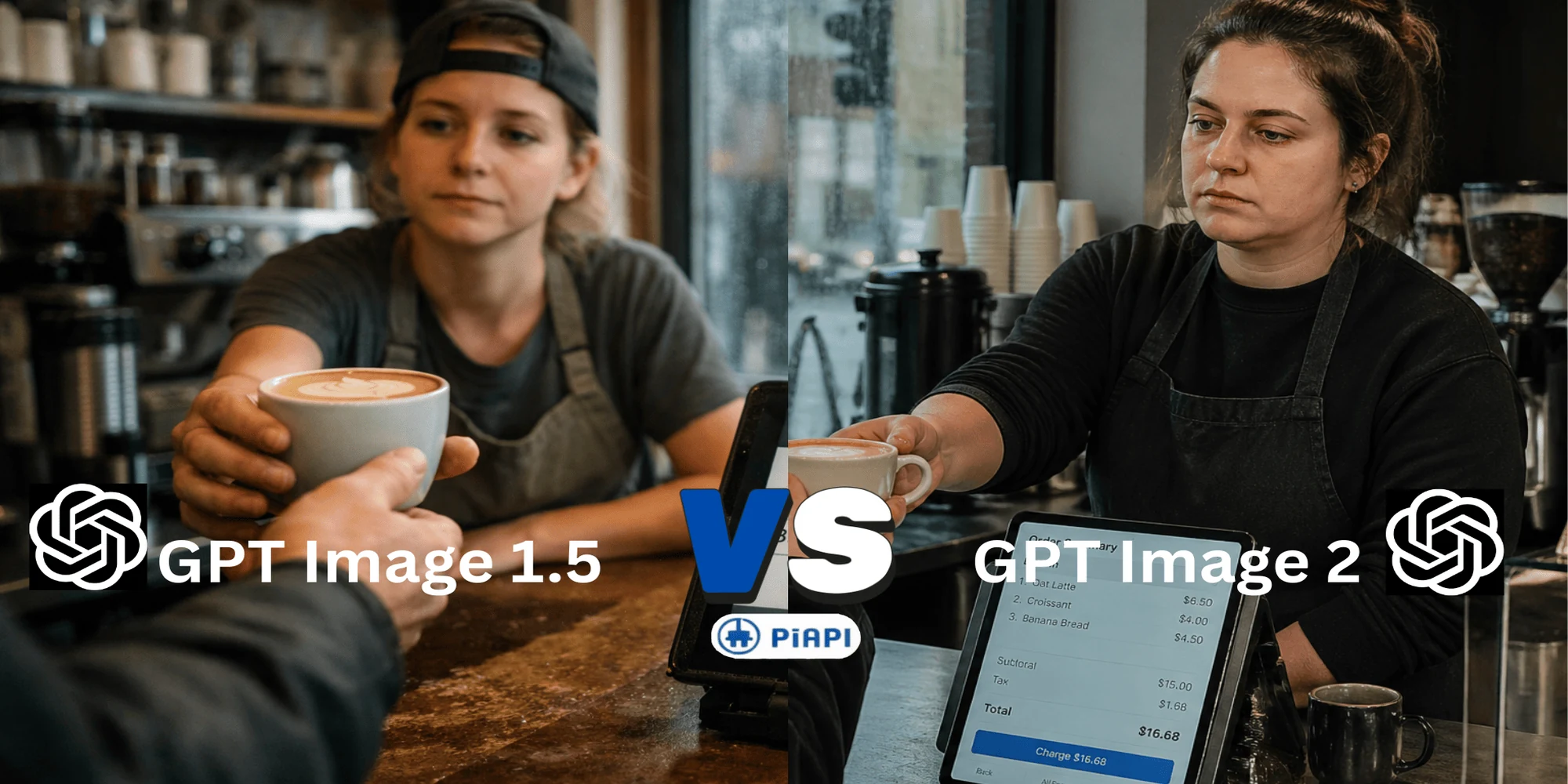
Example 3: Realistic Coffee Shop Scene with Readable POS Interface
Prompt:
A realistic, eye-level candid photograph taken with a Fujifilm camera. A weary barista is handing a latte to a customer across a bustling independent coffee shop counter at 8:00 AM on a rainy Tuesday. On the counter is a functional, authentic POS screen (tablet) showing a visible, readable "Order Summary" with three line items such as "1. Oat Latte $6.50", "2. Croissant $4.00", and "3. Americano $5.00". Natural soft lighting from the window, visible condensation on the shop glass, high-end documentary photography style, shallow depth of field focusing on the exchange and the screen, authentic atmosphere.
Comparison Analysis
This example showcases GPT Image 2's stronger real-world logic and scene understanding. Instead of only generating a coffee shop image, it creates a more believable environment where details feel functional and accurate.
The POS screen is a key difference. GPT Image 2 is more likely to produce readable menu items, realistic pricing, and totals that make sense, while GPT Image 1.5 may generate more generic or less consistent interface details.
Human interaction is also improved. GPT Image 2 handles hand placement, object contact, and the coffee handoff more naturally, while GPT Image 1.5 may still show awkward anatomy or fused hand artifacts.
Prompt adherence is stronger as well. The rainy Tuesday mood, softer grey lighting, and authentic cafe atmosphere feel more convincing in GPT Image 2, whereas GPT Image 1.5 can appear more staged.
Overall, GPT Image 1.5 creates a solid concept image, but GPT Image 2 delivers a more realistic and commercially usable final result.
GPT Image 2 vs GPT Image 1.5 Pricing Difference
Pricing is one of the biggest considerations when choosing an AI image generation model, especially for teams producing content at scale.
While GPT Image 1.5 offers a lower entry cost, GPT Image 2 focuses on higher output quality, stronger text rendering, better prompt accuracy, and more production-ready results. For many users, that can mean fewer retries, less manual editing, and stronger overall ROI despite the higher per-image cost.
If your priority is affordable high-volume generation, GPT Image 1.5 remains a strong option. If your priority is premium outputs for ads, branding, ecommerce, or polished visual content, GPT Image 2 may offer better value per successful generation.
Final Verdict: Is GPT Image 2 Worth It?
GPT Image 1.5 remains a strong option for users who prioritize affordability and high-volume image generation. It is still capable of producing quality visuals for concept work, experimentation, and everyday creative tasks.
However, GPT Image 2 is a clear upgrade in overall capability. Across prompt accuracy, text rendering, realism, scene understanding, and commercial readiness, the newer model consistently delivers more polished outputs with fewer compromises.
For marketers, creators, developers, and businesses using a GPT image API, GPT Image 2 is the stronger long-term choice when image quality and reliability matter. While the cost is higher, the reduced need for retries and stronger final assets can justify the premium.
If your focus is budget-friendly generation at scale, GPT Image 1.5 remains a practical choice. If you want the most advanced GPT image generator currently available, GPT Image 2 is the model worth watching.