How to Create a Korean Baseball AI Trend Video From Your Photo
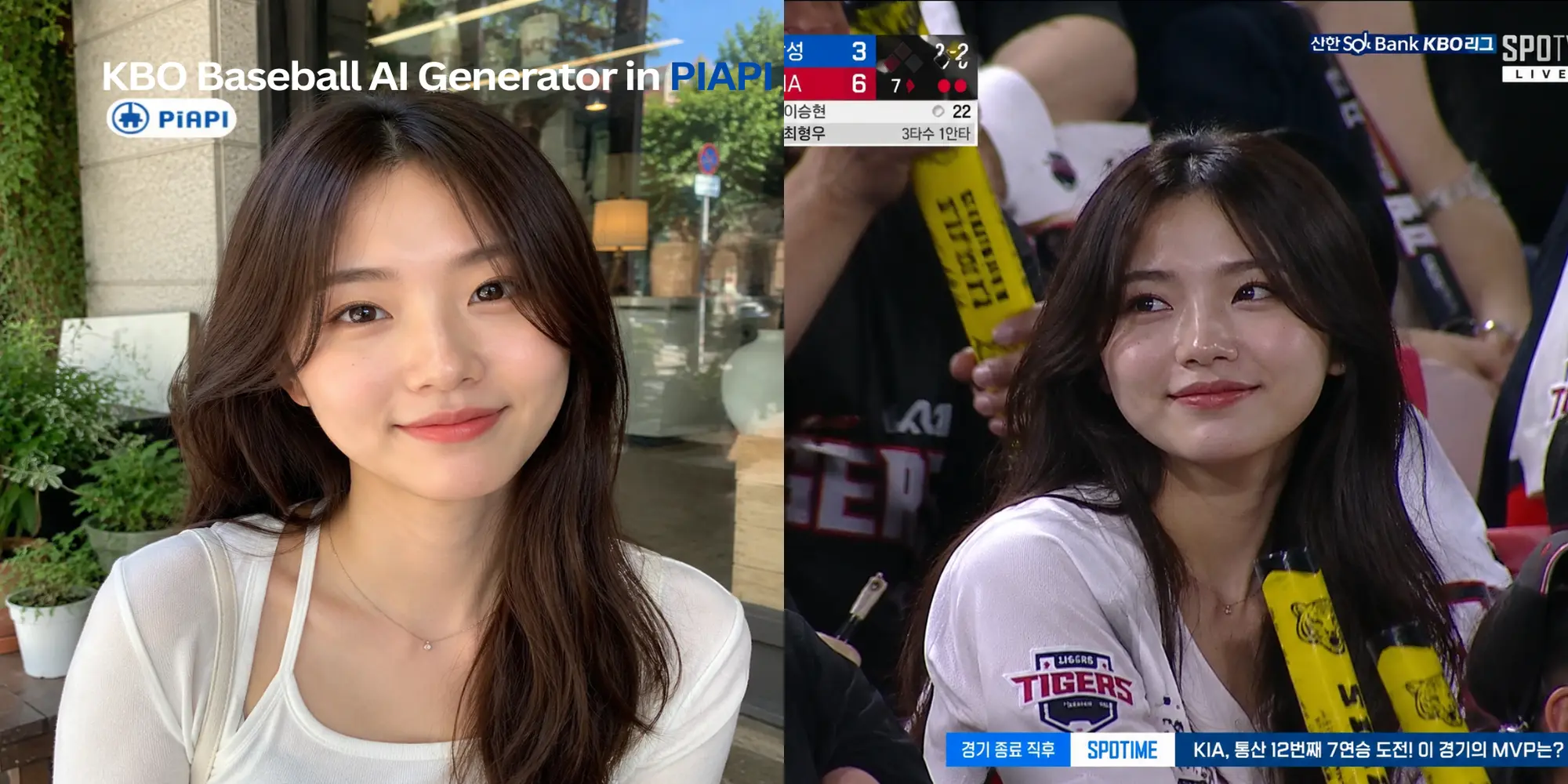
An AI sports video generator can turn a portrait into a Korean baseball-style fan-cam image, then animate that approved image into a short AI baseball video. The useful part is the two-step workflow: generate the still image first, check the face and baseball styling, then create the final video only when the image is worth animating.
If you want to try the workflow directly, open the AI Sports Video Generator and choose Korean Baseball mode, or go straight to the Korean Baseball AI Video Generator .
Quick Answer: How Do You Create a Korean Baseball AI Video?
Direct answer: To create a Korean baseball AI trend video, upload a clear portrait, choose Korean Baseball mode, generate a Korean baseball-style fan-cam image, review the still result, then animate the approved image into a short AI baseball video.
- Upload a clear portrait photo.
- Choose Korean Baseball mode.
- Select a team-inspired or color direction.
- Generate the baseball fan-cam image.
- Review the still image before video.
- Animate the approved image into a short sports clip.
This workflow is better than jumping straight to video because most quality issues are visible in the starting image. If the face, jersey direction, or stadium scene is wrong, regenerate the image before moving on.
Key Takeaways
- The Korean baseball AI trend works best as photo to image to video, not one-click video generation.
- A clear portrait improves identity preservation, outfit quality, and final video stability.
- Team-inspired styling should be treated as creative direction, not official jerseys, logos, league marks, or broadcaster assets.
- The embedded demo below is for the still-image step. Use the full generator when you are ready to animate.
Try Step 1: Generate a Korean Baseball-Style Image
Use the embedded demo below to test the first step inside this article. Upload a portrait and generate a Korean baseball-style image with stadium lighting, baseball jersey direction, and a sports broadcast composition.
What Is an AI Sports Video Generator?
An AI sports video generator turns a photo into a sports-themed image and then animates that image into a short video. For Korean baseball content, the still image usually carries the most important decisions: face preservation, jersey-inspired styling, stadium background, crowd energy, and broadcast-style framing.
Quotable definition: An AI sports video generator is a photo-to-video workflow that first creates a sports-themed still image from a portrait, then uses that approved image as the starting frame for a short AI-generated video.
On PiAPI, Korean Baseball mode sits inside the broader AI sports video generator. The mode is built for baseball-inspired fan visuals: jersey-style clothing, stadium lighting, crowd context, and a polished fan-cam feel.
What Is the Korean Baseball AI Trend?
The Korean baseball AI trend is a social visual style where a portrait is transformed into a baseball fan-cam or player-photo look. The output often combines a clean face, team-inspired colors, jersey-style clothing, stadium lighting, and a sports broadcast mood.
Direct answer: The Korean baseball AI trend turns a portrait into a Korean baseball-style fan image, often with team-inspired colors, a jersey look, stadium atmosphere, and a broadcast-style frame. It is a creative style, not official team or league branding.
You may also see people search for Korean baseball ai, Korean Baseball Video, AI Baseball Video, or baseball AI video generator. In practice, those searches point to the same need: create a baseball-style still image from a photo, then animate it.
How the Korean Baseball AI Video Workflow Works
Step 1: Upload a Clear Portrait
Start with a portrait where the face is large enough to recognize. A front-facing or slightly angled photo usually works better than a distant full-body image. The model needs enough facial detail to preserve the person while changing the scene into a baseball fan-cam moment.
Good input photos usually have:
- one main person
- a visible face
- balanced lighting
- minimal blur
- no heavy sunglasses or face covering
- enough detail for identity preservation
Step 2: Generate the Korean Baseball-Style Image
Next, generate the still image. The goal is to create a Korean baseball-style scene with a jersey-inspired outfit, stadium atmosphere, baseball fan energy, and a frame that can become a video.
Before animation, check:
- whether the face still looks like the source person
- whether the baseball outfit direction fits the intended style
- whether the background looks like a natural stadium or fan-cam scene
- whether any scoreboard or broadcast-style detail is too distracting
- whether the image is strong enough to animate
Step 3: Review the Image Before Video
This review step is the quality-control layer. If the still image is weak, video animation usually will not fix it. Regenerate the image first if the face changed too much, the jersey-style direction is off, or the sports frame feels cluttered.
Step 4: Animate the Image Into an AI Baseball Video
Once the still image looks right, use it as the video input. The video step should keep the approved frame while adding subtle camera motion, facial movement, and crowd energy. For social posts, a short polished clip is usually more useful than a long video.
Korean Baseball AI Template and Jersey-Style Tips
A Korean baseball AI template should give the model enough direction without forcing exact protected marks. The safer wording is style-based: Korean baseball-style, team-inspired colors, baseball jersey look, stadium fan-cam, and broadcast-style lighting.
Template definition: A Korean baseball AI template is a reusable prompt direction for turning a portrait into a Korean baseball-style fan-cam image, usually covering face preservation, jersey-style clothing, stadium background, and broadcast composition.
A good template direction usually asks the model to:
- preserve the subject identity
- use baseball jersey-style clothing
- add stadium lighting and crowd context
- keep the face clean and natural
- use team-inspired colors only as creative direction
- avoid promising exact official jerseys, logos, or league marks
AI Jersey Generator vs AI Baseball Video Generator
Some people search for an ai jersey generator or baseball jersey generator when they actually want the whole trend video. The difference is scope.
Short comparison: An AI jersey generator focuses on outfit styling. An AI baseball video generator handles the full creative workflow: portrait input, baseball-style still image, review, and final animated video.
| Search intent | Best match | Output |
|---|---|---|
| AI jersey generator | Outfit or jersey-style image | Still image |
| AI baseball video generator | Image-to-video sports workflow | Short video |
| Korean baseball AI trend | Portrait to fan-cam image to video | Trend-ready image and video |
Troubleshooting Korean Baseball AI Results
If the first result is not ready, diagnose the still image before trying video. Most issues come from the source photo, the amount of face detail, or a style direction that is too specific.
- If the face changes too much, use a brighter portrait with the face larger in frame.
- If the outfit looks too generic, choose a clearer team-inspired color direction.
- If the background feels cluttered, regenerate the still image before video.
- If the video looks unstable, pick a cleaner still image with fewer small text details.
Try the Korean Baseball AI Trend Video Generator
Ready to make the full clip? Open the AI Sports Video Generator, choose Korean Baseball mode, upload your portrait, generate the still image, then animate the approved result.
For the best first test, use a clean portrait and treat Korean baseball or KBO-style terms as creative direction. The output can be useful for social content, examples, and trend testing, but it should not be presented as official league, team, broadcaster, or licensed merchandise content.