Virtual Headshot for LinkedIn: How to Create a Professional Profile Photo with AI
A good LinkedIn photo should make you look recognizable, professional, and current. But booking a studio shoot can feel like too much work if you only need a clean profile picture, resume photo, or team bio image.
That is where a virtual headshot can help. Instead of scheduling an in-person photoshoot, you can start from a clear portrait and use AI to create a polished LinkedIn-ready image with a better outfit, cleaner background, and stronger profile crop.
In this guide, you will learn what photo to upload, which styles work best, and how to try the workflow directly with PiAPI's AI Headshot Generator.
Key Takeaways
- A virtual headshot lets you create a professional profile photo remotely from a clear portrait.
- For LinkedIn, choose a clean head-and-shoulders crop, professional outfit, and simple background.
- AI headshot tools work best when your input photo has good lighting, a visible face, and a natural expression.
- The simplest beginner workflow is upload, choose outfit, choose background, generate, review, and download.
What Is a Virtual Headshot?
A virtual headshot is a professional profile photo created without an in-person studio session. It can be produced through a remote photographer workflow or an AI headshot generator that uses your uploaded portrait to create a polished image for LinkedIn, resumes, team pages, or executive bios.
For LinkedIn, the goal is not to look like a different person. The goal is to look like a polished version of yourself: clear face, realistic expression, appropriate outfit, and a background that does not distract.
LinkedIn's profile photo guidelines say your photo should reflect your likeness, even when using an illustration or artistic rendering. That matters for AI headshots too: the final result should still look like you.
Why Use a Virtual Headshot for LinkedIn?
A virtual headshot is useful when your current LinkedIn photo is outdated, too casual, poorly lit, or no longer fits your role.
- Applying for jobs and want a more polished profile.
- Updating your LinkedIn after a promotion or career change.
- Building a founder, consultant, or freelancer profile.
- Creating consistent team photos for a company page.
- Preparing a speaker bio, resume, or executive profile.
The main advantage is speed. A traditional photoshoot can require scheduling, travel, studio time, editing, and delivery. A virtual headshot workflow is simpler: upload a suitable portrait, choose a professional style, and generate options you can review immediately.
You still need judgment, though. Choose a realistic image that fits your industry and looks appropriate for LinkedIn.
How to Create a Virtual Headshot for LinkedIn
- Upload a recent portrait where your face is easy to see.
- Choose an outfit that matches how you want to be seen professionally.
- Pick a simple background that keeps attention on your face.
- Generate the virtual headshot and review the result for believability.
- Check that the eyes, mouth, hairline, face shape, outfit, and background look natural.
- Download the best result and upload it to LinkedIn with a head-and-shoulders crop.
Try the AI Headshot Generator
Create a LinkedIn-ready virtual headshot
Upload a clear portrait, choose an outfit, pick a backdrop, and generate a polished professional result in PiAPI's guided AI Headshot Generator.
1. Upload
Start with a clear face photo.
2. Choose style
Pick the outfit and background vibe.
3. Generate
Review, download, or try another look.
Best Photo to Upload for an AI LinkedIn Headshot
The best photo for an AI LinkedIn headshot is a clear, recent portrait with your full face visible, natural lighting, and minimal obstruction.
- Your face is sharp, not blurry.
- Your eyes are visible.
- Lighting is even across your face.
- You are the only person in the photo.
- Your expression is natural.
- The photo is recent.
- Your face is not covered by sunglasses, hats, masks, or heavy shadows.
You do not need a perfect studio photo as the input. You just need enough facial detail for the AI to work with.
Best Outfit Styles for LinkedIn Virtual Headshots
Your outfit should match your role, industry, and personal brand. A lawyer, startup founder, designer, and doctor may each need a different style.
| Style | Best For | Why It Works |
|---|---|---|
| Formal | Executives, finance, legal, consulting | Signals trust and authority |
| Smart casual | Founders, operators, startup teams | Polished but approachable |
| Business casual | General professional profiles | Flexible and LinkedIn-safe |
| Creative professional | Designers, marketers, freelancers | Professional without looking too corporate |
| Lab / medical | Doctors, researchers, biotech | Matches clinical and research contexts |
Best Backgrounds for a LinkedIn Headshot
The best background for a LinkedIn headshot is clean, simple, and not distracting.
| Background | Best For | Notes |
|---|---|---|
| Solid color | Most LinkedIn profiles | Clean and distraction-free |
| Dark color | Executive or formal profiles | Creates a polished studio look |
| Office | Business and team profiles | Adds professional context |
| Nature | Approachable personal brands | Softer, less corporate feel |
Examples: Which Virtual Headshot Style Should You Choose?
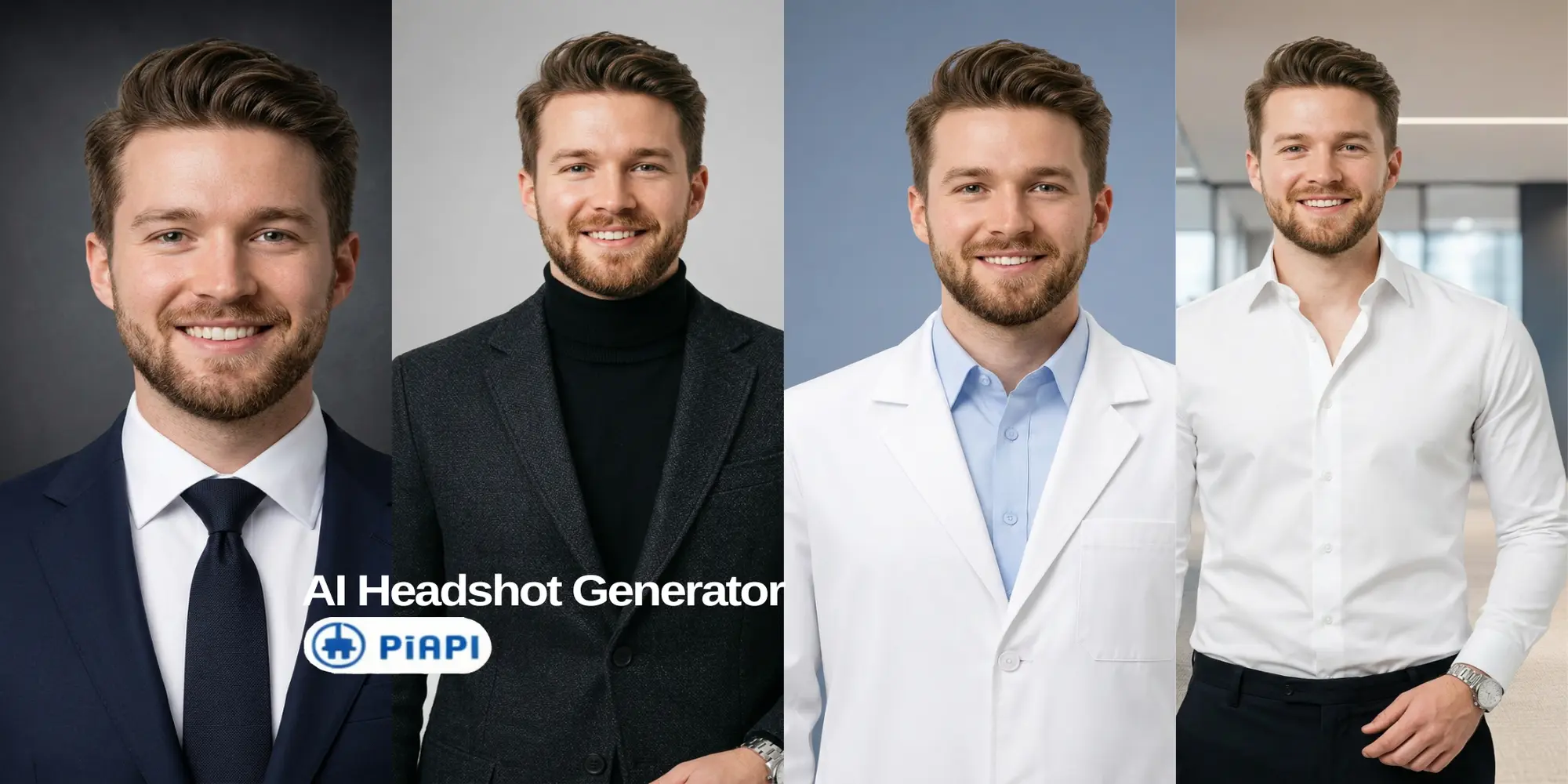
These examples use the same source portrait direction and show how outfit and background choices can change the professional signal of a virtual headshot.

Corporate LinkedIn Headshot
Finance, legal, consulting, enterprise sales, operations, and corporate leadership.
- Outfit
- Formal
- Background
- Dark color or solid color
- Vibe
- Trust, authority, and executive presence.

Founder or Startup Profile
Founders, operators, consultants, product leaders, and startup team members.
- Outfit
- Smart casual
- Background
- Office or solid color
- Vibe
- Credible, modern, and approachable.

Creative Professional Profile
Designers, marketers, creators, writers, freelancers, and agency professionals.
- Outfit
- Creative professional
- Background
- Clean solid color, office, or nature
- Vibe
- Personality with polish.

Medical or Research Profile
Doctors, researchers, clinicians, biotech professionals, and healthcare founders.
- Outfit
- Lab / medical
- Background
- Solid color or office
- Vibe
- Clinical, precise, and expert-led.
Virtual Headshot vs AI Photoshoot vs Traditional Photoshoot
| Option | Best For | Pros | Watch-outs |
|---|---|---|---|
| Virtual headshot | LinkedIn, resumes, team pages | Fast, remote, easy to update | Quality depends on input photo |
| AI photoshoot | Multiple looks and styles | More variety than one headshot | May need more review for realism |
| Traditional photoshoot | Premium brand shoots | Full creative control | Higher cost and scheduling effort |
A virtual headshot is usually enough for a clean LinkedIn profile picture. An AI photoshoot may be better if you want many styles for different platforms. A traditional photoshoot still makes sense when you need custom lighting or campaign-level brand photography.
LinkedIn AI Headshot Mistakes to Avoid
- Uploading a blurry, old, or heavily filtered photo.
- Choosing an outfit that does not match your role.
- Using a background that looks too dramatic for LinkedIn.
- Accepting a result that changes your face too much.
- Picking an image with unnatural skin, eyes, teeth, or hair.
- Cropping the headshot too tightly or too loosely.
- Using a photo that feels more like an ad than a profile picture.
The best LinkedIn AI headshot should look professional and still believable.
Frequently Asked Questions
What is a virtual headshot?
A virtual headshot is a professional profile photo created remotely instead of during an in-person studio session. It may be produced by a remote photographer workflow or by an AI headshot generator that turns an uploaded portrait into a polished image for LinkedIn, resumes, team pages, or bios.
Can I use an AI headshot for LinkedIn?
Yes, you can use an AI headshot for LinkedIn as long as it reflects your real likeness and looks professional. Avoid results that change your identity, look overly edited, or make you appear very different from how colleagues, recruiters, or clients would recognize you.
What is the best photo to upload for an AI LinkedIn headshot?
The best upload is a recent, clear portrait with your face visible, even lighting, and a natural expression. Avoid sunglasses, group photos, heavy shadows, strong filters, and extreme angles. AI headshot tools usually produce better results when the input photo already shows your face clearly.
What background is best for a LinkedIn headshot?
For most LinkedIn profiles, a solid color, subtle office, or dark studio-style background works best. These backgrounds keep attention on your face and avoid visual clutter. Nature backgrounds can work for approachable personal brands, but they should still look clean and professional.
What should I wear for a professional LinkedIn headshot?
Wear something that matches the role you want to be known for. Formal outfits work well for executives, finance, legal, and consulting. Smart casual works well for founders and startup teams. Creative professional styles can fit designers, marketers, creators, and freelancers.
Is a virtual headshot better than a traditional photoshoot?
A virtual headshot is better when you want a fast, remote way to refresh your LinkedIn photo. A traditional photoshoot is better when you need full creative control, custom lighting, or premium brand photography. For most profile updates, a realistic virtual headshot is enough.
Can I create an executive headshot with AI?
Yes, you can create an executive headshot with AI by choosing a formal outfit, clean background, and polished crop. The result should look confident, realistic, and appropriate for leadership contexts such as LinkedIn, speaker bios, board pages, company leadership pages, and investor materials.
Create Your LinkedIn-Ready Virtual Headshot
A virtual headshot is one of the simplest ways to refresh your LinkedIn profile without booking a studio photoshoot. Start with a clear portrait, choose an outfit that matches your professional role, pick a simple background, and review the result for realism before uploading it.
Start testing PiAPI's AI Headshot Generator and create a LinkedIn-ready virtual headshot today!
Unlock the power of 20+ AI models with PiAPI - image, video, chat, music, and more. Sign up today and start building smarter, faster, and at scale.