5 Suggerimenti di Seedance 2.5 con esempi video reali
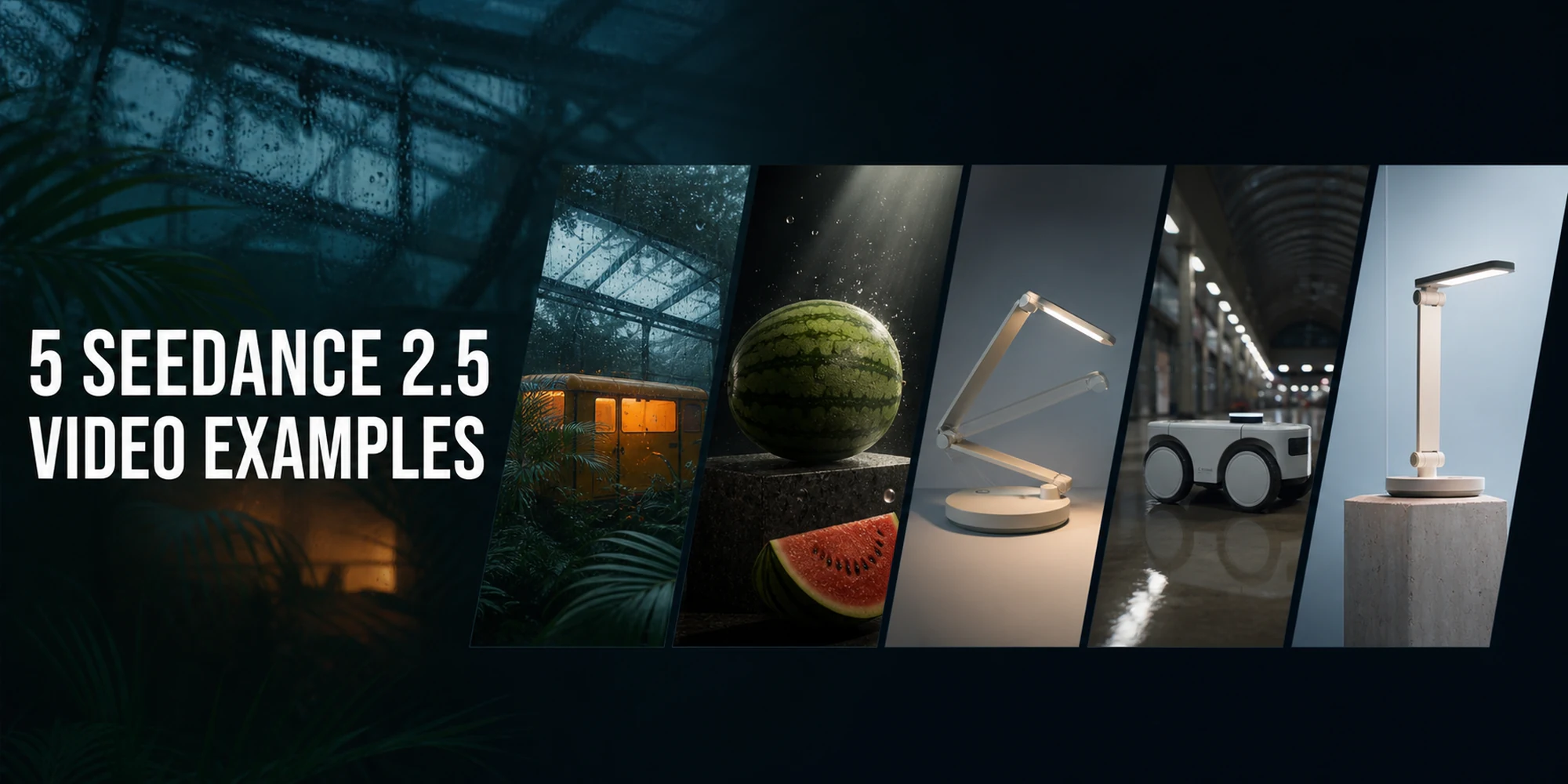
Cosa producono i prompt Seedance 2.5 quando li esegui attraverso PiAPI ? Questi cinque output originali riguardano la conversione da testo a video, riferimento all'immagine, controllo del primo e dell'ultimo fotogramma, trasferimento del movimento e riilluminazione del prodotto. Ogni esempio include una richiesta per ricreare il risultato, l'input fornito ove disponibile, le impostazioni, l'output reale e gli aspetti più utili.
Sviluppatori, esperti di marketing e creatori di video con intelligenza artificiale possono utilizzare questi esempi come punti di partenza pratici. Le istruzioni per ricreare il risultato descrivono gli input forniti e gli output osservati; non sono trascrizioni del registro delle attività o un benchmark di modello controllato e un'altra esecuzione potrebbe produrre un risultato diverso.
Concetti chiave
- Cinque video generati coprivano tre flussi di lavoro supportati a 720p.
- Il soggetto chiaro, il movimento, la fotocamera, l'illuminazione e le istruzioni di riferimento hanno prodotto i risultati più leggibili.
- I media di riferimento hanno aiutato a controllare le trasformazioni e il ritmo della telecamera.
- La forma di output effettiva ha seguito il riferimento fornito nei casi in cui differiva dalle proporzioni pianificate.
- Le cinque richieste specificavano 26 secondi di output, con un costo documentato di solo output di 15,60 dollari a 0,60 dollari al secondo.
In questa pagina: Risultati · Metodo · Cinque suggerimenti · Lezioni immediate · API esempio · FAQ
Cosa rende valido un prompt di Seedance 2.5?
Definizione: Un prompt Seedance 2.5 è un brief compatto per una singola inquadratura destinato all’attività video di PiAPI. Specifica il soggetto, il movimento, il comportamento della camera, il trattamento visivo e il ruolo di ogni riferimento. Per un output da 4 a 15 secondi, deve inoltre indicare cosa deve rimanere stabile e cosa non deve comparire.
Quale modello di prompt di Seedance 2.5 dovresti utilizzare?
| Obiettivo | Modello di input | Modalità PiAPI | Assegna questo ruolo al riferimento |
|---|---|---|---|
| Crea una scena originale | Solo testo | text_to_video | Nessun riferimento; descrivere lo scatto completo |
| Animare un prodotto o un argomento | Una o più immagini | omni_reference | Preservare identità, forma, materiali o stile |
| Controlla l'inizio e la destinazione | Prime e ultime immagini | first_last_frames | Definire i due stati endpoint |
| Riutilizza il movimento o la stimolazione della telecamera | Video | omni_reference | Guida il movimento senza copiare il soggetto originale |
| Modificare un trattamento visivo | Immagine o video | omni_reference | Conserva il soggetto mentre cambi l'illuminazione o l'impostazione |
Esempi video di Seedance 2.5 in sintesi
Tutti e cinque i video sono stati generati a 720p. La documentazione API di Seedance 2.5 attuale elenca output a 480p e 720p, durate intere da 4 a 15 secondi e il supporto per riferimenti di immagini, video e audio.
| Esempio | Modello di input | Produzione effettiva | Base di costo documentata | Risultato principale |
|---|---|---|---|---|
| Tram piovoso della serra | Solo testo | 5,08s, 1280×720 | $ 3,00 | Tracciamento laterale cinematografico con forte contrasto caldo/freddo |
| Rivelazione del prodotto all'anguria | Riferimento all'immagine | 5,08s, 1280×720 | $ 3,00 | Prodotto stabile ripreso con nebbia e luce in movimento |
| Lampada da scrivania spiegabile | Primo e ultimo fotogramma | 6,08s, 1280×720 | $ 3,60 | Trasformazione meccanica fluida con una fotocamera stabile |
| Tracciamento dei robot di consegna | Esempio 1 come riferimento di movimento | 5,08s, 1280×720 | Uscita $ 3,00 + ingresso video circa $ 1,52 | Il ritmo della fotocamera trasferito in un nuovo soggetto e ambientazione |
| Riaccensione lampada da scrivania | Riferimento all'immagine | 5,08s, 1280×720 | Uscita $ 3,00 | Trattamento pulito del prodotto con illuminazione fredda con movimento stabile |
Il totale del solo output è $ 15,60. Utilizzando la formula di metà tariffa della documentazione per il riferimento video di 5,08 secondi dell'Esempio 4 si aggiungono circa $ 1,52, per un totale stimato di circa $ 17,12 prima degli aggiustamenti di fatturazione specifici dell'account.
Osservato in questo set di esempi PiAPI: Cinque richieste hanno specificato 26 secondi di output, mentre i file MP4 a 720p restituiti ammontano a circa 26,42 secondi. Il set copre flussi di lavoro di solo testo, riferimento immagine, primo/ultimo fotogramma e riferimento video ed è stato rivisto il 3 agosto 2026; non è un modello di riferimento.
Come abbiamo generato questi esempi di Seedance 2.5
Su PiAPI si accede a Seedance 2.5 con il modello seedance e il tipo di attività seedance-2.5 . Si tratta di una guida ai prompt basata sull'output piuttosto che di un controllo del registro delle attività: i prompt per ricreare il risultato sono stati scritti dagli input forniti e dagli output osservati. I file restituiti sono H.264 MP4 video a 1280 × 720 e 24 fotogrammi al secondo.
Il piano di richiesta disattiva l'audio generato, ma ogni file restituito contiene un flusso audio AAC. Le copie di pubblicazione rimuovono tali flussi audio preservando i download originali per la verifica dei record delle attività.
Per un contesto più ampio del modello, leggi la guida al modello e al parco giochi Seedance 2.5. Per i dettagli su endpoint, prezzi e limiti, utilizza le specifiche API Seedance 2.5, con la documentazione API live che ha la precedenza se le due pagine differiscono.
Esempio 1: conversione da testo a video cinematografico
Questa linea di base non utilizza mezzi di riferimento. La richiesta separa il soggetto, la direzione della telecamera, il movimento ambientale, l'illuminazione e le esclusioni.
Richiesta di ricreare il risultato
At blue hour, a small yellow maintenance tram glides slowly through a rain-soaked glass greenhouse filled with tropical plants. The camera tracks parallel to the tram at waist height in one continuous shot. Water beads on the glass, the wheels rotate naturally, and nearby leaves shift gently from the tram's airflow. Warm amber light glows inside the tram against the cool blue greenhouse. Realistic cinematic lighting, stable geometry, natural motion, no cuts, no text, no people.Impostazioni: Testo in video · 5 secondi · 720p · 16:9 · audio disattivato
Cosa ha mostrato il risultato: L'output ha catturato la serra piovosa, la composizione a tracciamento parallelo e la calda luce del tram contro un ambiente blu freddo. Il tram è rimasto stabile, anche se il fogliame in primo piano ha nascosto la maggior parte del movimento delle ruote richiesto nel prompt.
Esempio 2: richiesta di conversione dell'immagine del prodotto in video
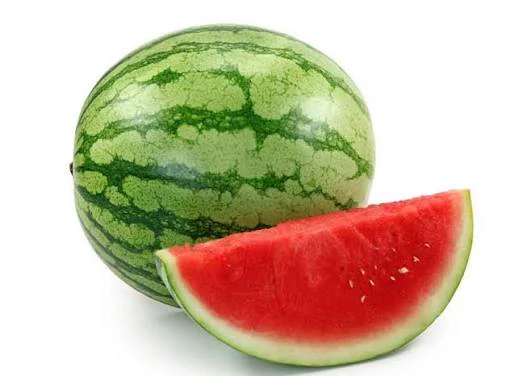
Questo esempio utilizza un riferimento a un'immagine per trasformare un'anguria statica in una presentazione di prodotto commerciale. Il suggerimento affida al riferimento un compito chiaro: preservare il prodotto mentre il modello cambia la presentazione attorno ad esso.
Richiesta di ricreare il risultato
Use @image1 as the exact product reference. Preserve the product's silhouette, materials, colors, label placement, and proportions. Create a premium vertical product reveal: the product stands on a dark stone pedestal while a narrow warm light sweeps slowly across its surface. The camera makes a smooth 20-degree arc from the front-left to a centered close-up. Add subtle drifting mist behind the pedestal, never in front of the product. One continuous shot, clean commercial lighting, stable edges, readable packaging where visible in @image1, no added text, no extra products, no hands.Impostazioni: Riferimento Omni · 5 secondi · 720p · pianificato 9:16 · effettivo 16:9 · audio disattivato
Cosa ha mostrato il risultato: L'anguria è rimasta limpida e stabile mentre la luce e la nebbia hanno creato un trattamento lucido del prodotto. Il riferimento fornito è orizzontale e anche l'output era orizzontale nonostante il piano per ricreare il risultato richiesto 9:16 . Ciò è coerente con il comportamento documentato delle proporzioni di riferimento.
Esempio 3: trasformazione del primo e dell'ultimo fotogramma
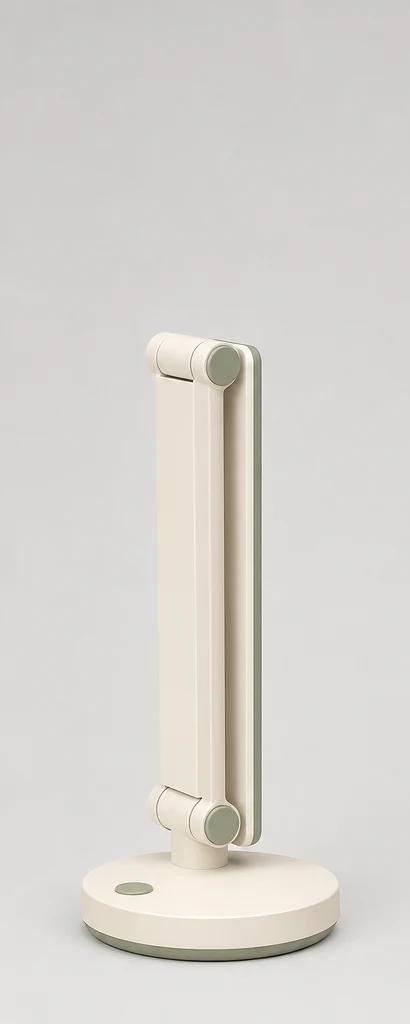
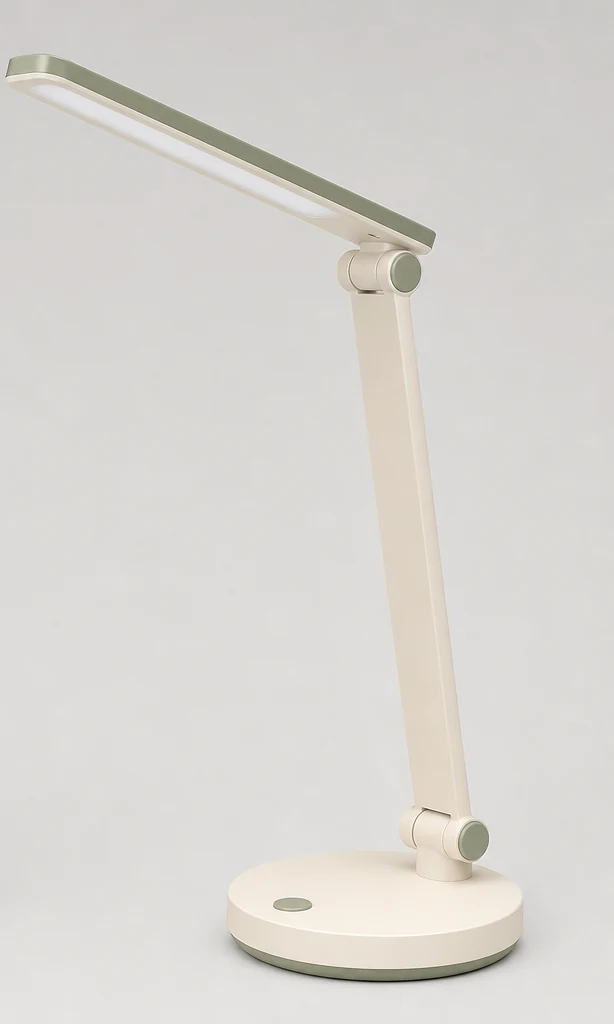
Il primo e l'ultimo fotogramma sono utili quando una scena necessita di uno stato iniziale e di una destinazione definiti. Qui la stessa lampada da scrivania inizia piegata e finisce completamente aperta.
Richiesta di ricreare il risultato
Begin exactly from @image1 and end exactly on @image2. In one continuous locked-camera shot, the folded desk lamp unfolds through its real hinges: the base stays fixed, the stem rises, the arm extends, and the shade rotates into its final position. The lamp switches on only during the final second. Preserve the lamp's color, materials, proportions, desk surface, framing, and background throughout. Smooth physically plausible mechanical motion, no cuts, no camera movement, no new parts, no disappearing parts, no text.Impostazioni: Primo e ultimo fotogramma · 6 secondi · 720p · ritagli endpoint ricreati · audio rimosso per la pubblicazione
Cosa ha mostrato il risultato: La lampada si è aperta senza intoppi attraverso una sequenza meccanica coerente mentre la base, il piano del tavolo e la fotocamera sono rimasti stabili. La luce è diventata anche visibilmente più intensa verso la fine, rendendo questo l'esempio di trasformazione più chiaro dell'intera serie.
Esempio 4: trasferimento del movimento da un riferimento video
L'esempio 4 riutilizza l'output non modificato del tram serra dell'esempio 1. Il messaggio chiede a Seedance 2.5 di mantenere la direzione della telecamera, la velocità del soggetto e il ritmo sostituendo la scena e il soggetto.
Video di riferimento:
t2v eg1.mp4
Richiesta di ricreare il risultato
Use @video1 only as the reference for camera movement, subject speed, and pacing. Replace the yellow tram and greenhouse with a compact white autonomous delivery robot rolling left to right through a clean covered night-market corridor after rain. Do not reproduce the tram, glass greenhouse, tropical plants, or yellow-and-blue color palette from @video1. Track parallel to the robot at the same approximate height and distance as the reference. Keep all six wheels rotating naturally and the robot's white body geometry stable. Reflections move across the wet floor as the camera travels. One continuous shot, realistic night lighting, no cuts, no text, no people.Impostazioni: Omni reference · 5 secondi · 720p · 16:9 · audio disattivato
Cosa ha mostrato il risultato: La nuova clip ha mantenuto un ritmo di tracciamento laterale simile sostituendo il tram e la serra con un robot bianco e un corridoio del mercato umido. La scena non copiava l'ambientazione originale e i riflessi del pavimento in movimento rafforzavano il movimento della telecamera.
Esempio 5: riaccensione della lampada da scrivania guidata dai riferimenti
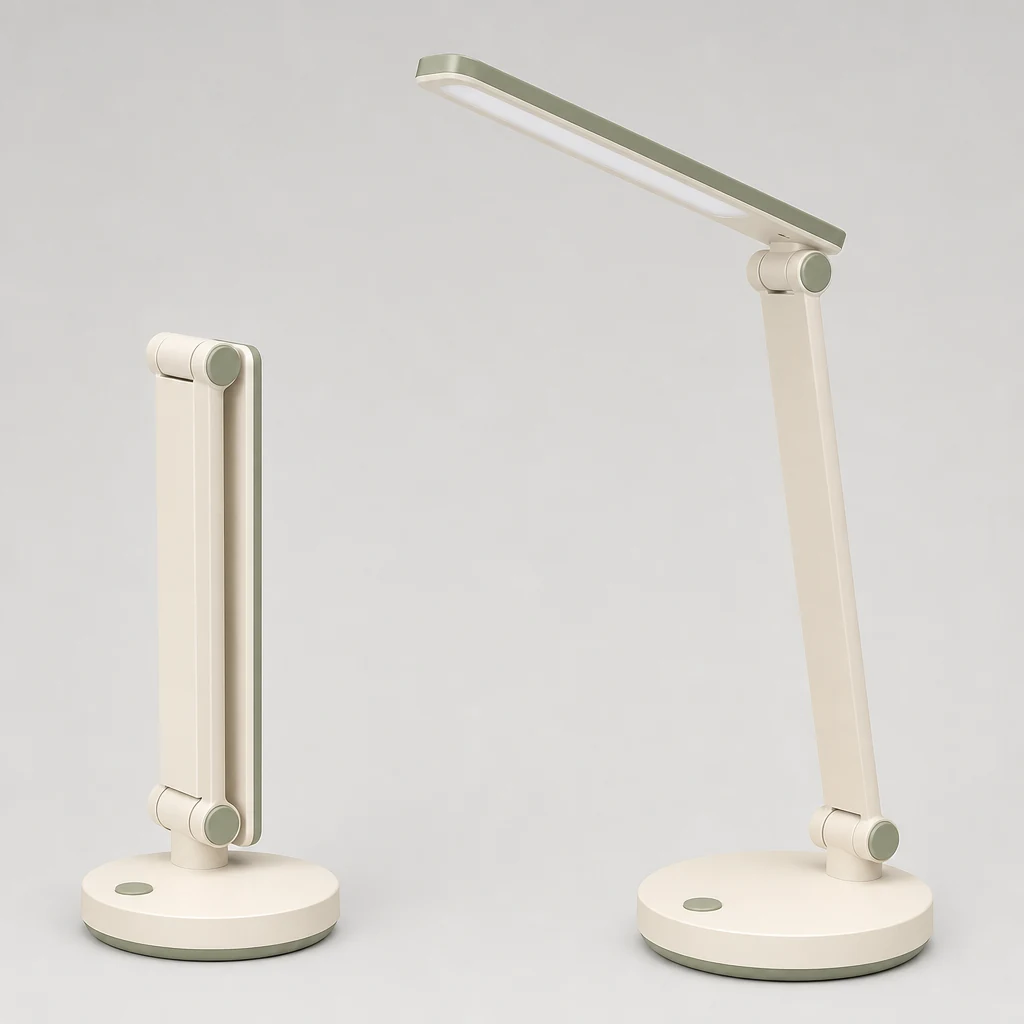
L'esempio finale utilizza la scheda prodotto della lampada da scrivania fornita come riferimento identitario, quindi modifica l'ambientazione e l'illuminazione preservando il design del prodotto.
Richiesta di ricreare il risultato
Use @image1 as the exact lamp product reference. Preserve the lamp's identity, silhouette, materials, ivory-and-sage colors, proportions, circular base, and hinge details. Present the open lamp on a gray stone pedestal against softly illuminated pale-blue translucent panels with cool diffused daylight. Keep the product stable while the camera moves smoothly toward a centered commercial composition. No mist, extra products, hands, added text, cuts, or audio.Impostazioni: Generazione guidata da riferimenti · 5 secondi · 720p · 16:9 effettivo · audio disattivato
Cosa ha mostrato il risultato: Il risultato è un prodotto con lampada pulita, ripreso con illuminazione fredda, pannelli azzurri e movimento stabile. Il corpo in avorio, gli accenti salvia, la base circolare e la forma articolata rimangono riconoscibili dal riferimento del prodotto fornito.
Cosa ci hanno insegnato i cinque suggerimenti di Seedance 2.5
Gli esempi indicano cinque pratiche abitudini di scrittura rapida:
- Descrivi una ripresa, non una sequenza di montaggi. Tutti e cinque i suggerimenti utilizzano un movimento continuo che rientra in cinque o sei secondi.
- Separa il movimento del soggetto da quello della telecamera. "Il tram scivola" e "la telecamera procede parallelamente" forniscono al modello due istruzioni distinte.
- Assegna a ogni riferimento un ruolo. L'esempio 2 utilizza un'immagine per l'identità del prodotto, mentre l'esempio 4 utilizza un video per il movimento e il ritmo.
- Dai un nome a ciò che deve rimanere fisso. L'esempio della lampada mantiene esplicitamente stabili la base, la fotocamera, il piano del tavolo e lo sfondo durante la trasformazione.
- Controlla la forma effettiva dell'output. Un'immagine di riferimento può sovrascrivere le proporzioni richieste, quindi prepara la risorsa sorgente nel formato che intendi pubblicare.
Limitazioni osservate: Il fogliame oscurava un dettaglio meccanico richiesto nell'esempio 1, l'esempio 2 ha restituito una composizione orizzontale invece dell'annuncio verticale pianificato e l'esempio 4 mostrava quattro ruote visibili invece delle sei richieste. Ispeziona ogni file consegnato prima di adattare un prompt per la produzione.
Come ricreare un esempio di API Seedance 2.5
Invia un'attività autenticata a POST https://api.piapi.ai/api/v1/task con il modello seedance e il tipo di attività seedance-2.5. Mantieni la tua chiave API sul server e utilizza URL accessibili pubblicamente per eventuali riferimenti forniti.
curl --request POST "https://api.piapi.ai/api/v1/task" \
  --header "X-API-Key: $PIAPI_API_KEY" \
  --header "Content-Type: application/json" \
  --data '{
    "model": "seedance",
    "task_type": "seedance-2.5",
    "input": {
      "prompt": "A small yellow maintenance tram glides through a rain-soaked glass greenhouse at blue hour. The camera tracks parallel in one continuous shot. Warm interior light contrasts with the cool greenhouse. No cuts, text, or people.",
      "mode": "text_to_video",
      "duration": 5,
      "resolution": "720p",
      "aspect_ratio": "16:9",
      "audio": false
    }
  }'
Per le istruzioni guidate da riferimenti, aggiungi image_urls, video_urls o audio_urls e menziona ciascuna risorsa nella richiesta come @image1, @video1 o @audio1. L'API attualmente supporta fino a 9 immagini, 3 video e 3 file audio. Consulta il contratto di richiesta Seedance 2.5 per le regole di convalida e i dettagli della risposta.
Domande frequenti su Seedance 2.5
Posso copiare questi esempi di prompt di Seedance 2.5?
SÌ. Copia la struttura, quindi sostituisci soggetto, azione, ambiente e ruoli di riferimento con i dettagli del tuo progetto. Se un prompt utilizza @image1 o @video1, fornisci l'URL del supporto corrispondente nella richiesta. I risultati possono variare da una generazione all'altra, quindi esamina il video restituito prima di utilizzarlo nella produzione.
Seedance 2.5 può utilizzare riferimenti a immagini, video e audio?
SÌ. L'attività Seedance 2.5 di PiAPI supporta riferimenti a immagini, video e audio tramite image_urls, video_urls e audio_urls. I limiti attuali sono 9 immagini, 3 video e 3 file audio. Un riferimento audio richiede almeno un riferimento immagine o video nella stessa richiesta.
Per quanto tempo un video Seedance 2.5 può rimanere su PiAPI?
La documentazione PiAPI attuale accetta durate intere da 4 a 15 secondi, con 5 secondi come valore predefinito. Poiché le pagine prodotto e gli articoli meno recenti possono conservare limiti precedenti, usa la documentazione API live come fonte attendibile quando crei o aggiorni un’integrazione.
Seedance 2.5 supporta 1080p?
No. PiAPI attualmente supporta 480p e 720p per il tipo di attività seedance-2.5, con 720p come impostazione predefinita. Le richieste per 1080p non sono supportate dal contratto documentato. Pianifica il flusso di lavoro di generazione e pubblicazione attorno agli output 480p o 720p.
Quanto sono costati questi cinque esempi di Seedance 2.5?
I cinque esempi contengono 26 secondi di output richiesti alle 720p. Alla tariffa documentata di PiAPI tariffazione di $0.60 per secondo di output, il totale di solo output è $15.60. L'esempio 4 utilizza anche un riferimento video di 5.08-secondo; applicando la formula documentata di input-video del dimezzamento si aggiunge circa $1.52, per un totale stimato di circa $17.12.
Prova un prompt di Seedance 2.5 su PiAPI
Questi prompt Seedance 2.5 mostrano come testo, immagini, fotogrammi iniziali e finali e riferimenti di movimento possano guidare diversi tipi di video brevi. Inizia con un soggetto chiaro e un’inquadratura realizzabile, quindi aggiungi solo i riferimenti e le istruzioni di conservazione necessari al tuo workflow. Per un processo e-commerce specifico per il modello, con preparazione dei riferimenti, tre esempi originali in 9:16 e il costo completo, consulta il workflow per annunci di prodotto con Seedance 2.5.
Prova uno di questi suggerimenti nel parco giochi di Seedance 2.5 oppure rivedi la documentazione dell'API prima di integrare l'attività nella tua applicazione.
- Sono implementati cinque MP4 di pubblicazione senza audio e immagini di poster.
- Gli input forniti di anguria e lampada da scrivania sono implementati come risorse WebP.
- L'esempio 3 utilizza ritagli di immagini ricreate trasparenti preparate dalla scheda prodotto della lampada piegata/aperta fornita.
- Viene implementata la copertina WebP 2000×1000 specifica per articolo.
- I prompt sono etichettati come prompt per ricreare il risultato anziché come trascrizioni del registro delle attività.
*Fonti controllate il 3 agosto 2026: documentazione Seedance 2.5 Preview API, specifiche API di Seedance 2.5 e guida al modello e al Playground Seedance 2.5. La documentazione API live è la fonte attendibile per il contratto di richiesta attuale.*