How to Create Product Ads With the Seedance 2.5 API
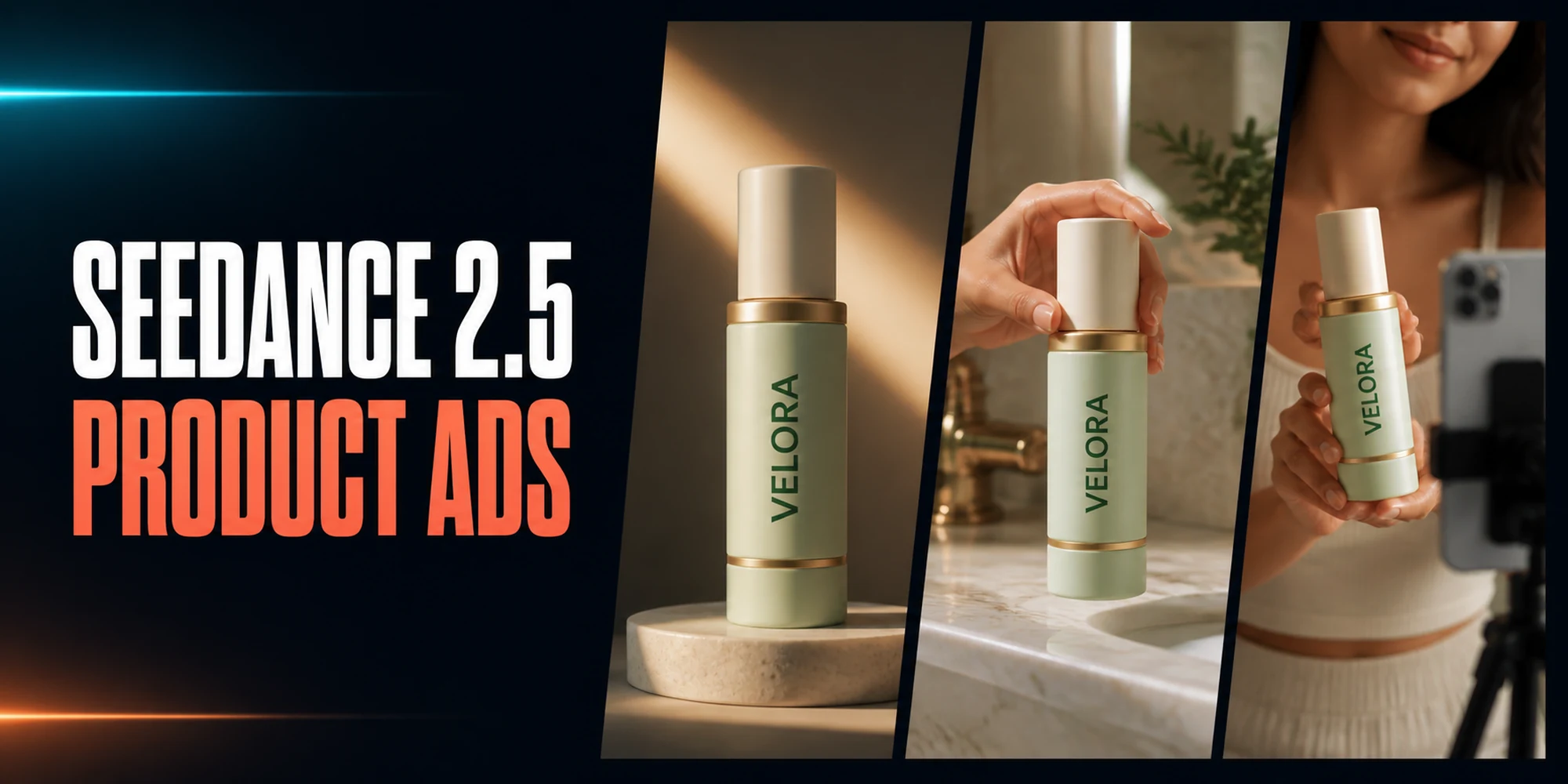
With the Seedance 2.5 API, you can create Seedance 2.5 product ads by giving the model a clean product reference, translating brand rules into visible constraints, and generating one simple action per clip. We tested that workflow with a fictional skincare product and made three original 5-second ecommerce video ads in 9:16: a studio reveal, a lifestyle interaction, and a UGC-style hook. All three intended clips were usable. Confirmed fully loaded spend was $15.03, or $5.01 per usable clip.
This guide is for developers, e-commerce teams, and performance marketers who need repeatable source footage. It includes the request structure, reusable prompt blocks, observed results, and cost calculation.
Key takeaways
- Start with one reference that shows the whole product, its materials, proportions, and exact wordmark.
- Split the prompt into identity, scene, motion, framing, and exclusions so each instruction has a clear job.
- Generate one continuous action per clip. Add captions, voiceover, cuts, and offers during editing.
- Review product identity, hand contact, framing, and editability before paying for another attempt.
- Measure total spend divided by usable clips. The intended clips cost $3.00 each, while the fully loaded result was $5.01 to $6.01 per usable clip.
On this page: Results · Workflow · Reference preparation · API request · Three examples · Cost · FAQ
Seedance 2.5 Product Ads at a Glance
| Variant | Main control | Observed result | Production decision |
|---|---|---|---|
| Premium reveal | Fixed product; moving light and camera | Brand details remained stable throughout the shot | Use as hero source footage |
| Lifestyle interaction | One hand action with a specified grip | Plausible lift with minor scale change | Use without rerunning |
| UGC-style hook | Gentle handheld move toward camera | Stable product; lower face entered the top edge | Use after a small crop |
How to Create Seedance 2.5 Product Ads
Definition: A Seedance 2.5 product ad is a short generated video that uses the Seedance 2.5 task plus product references and shot instructions to create editable advertising footage. Product identity, scene, movement, framing, and exclusions are controlled in the request rather than left implicit.
- Define the product identity that must not change.
- Create or select one clean product reference.
- Write brand constraints as visible, testable details.
- Choose one shot, one camera move, and one product action.
- Submit the reference and prompt through the Seedance API.
- Inspect the original output for product drift, motion defects, framing, and editability.
- If the clip is unusable, change one major variable and run it again.
- Record every charged attempt, then calculate cost per usable clip.
This article used a fictional facial-mist brand called VELORA, avoiding third-party logos and real product claims. All three concepts share the same reference and technical settings.
For campaign messaging, platform formats, and final-ad review beyond source-clip generation, use the broader AI product-ad workflow.
Prepare the Product Reference and Brand Constraints
A product reference is a visual specification, not only a mood image. Show the full silhouette, keep the label readable, and remove props that might be mistaken for packaging.
Our master image contained exactly one bottle: frosted pale-sage glass, a matte ivory cap, a narrow brass collar, one lower brass ring, and the word VELORA in dark green. The straight-on angle made each feature easy to check in the output.
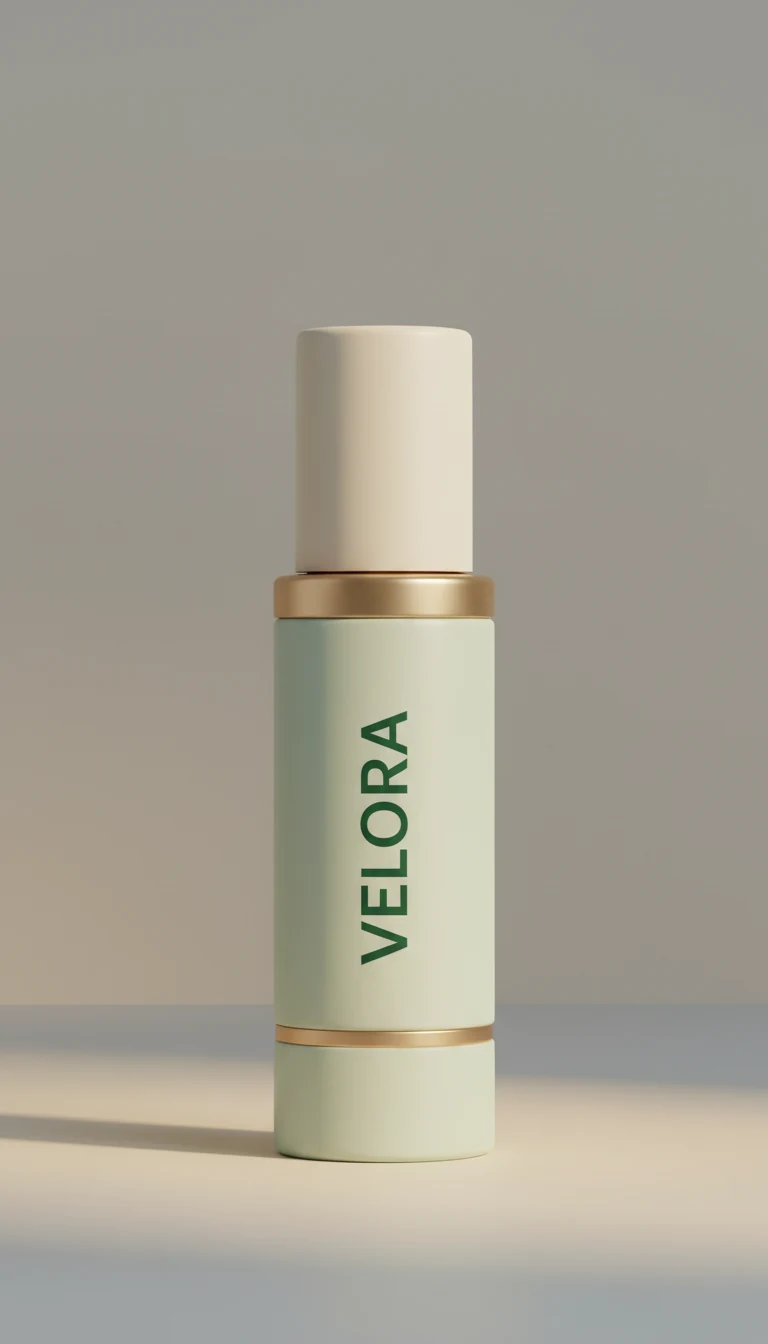
The image request specified 9:16, but the downloaded PNG measured 768 × 1344, or 4:7. All three videos arrived at 720 × 1280, exact 9:16. That is one observed result, not a promise that every ratio mismatch will resolve this way. Check downloaded files rather than trusting requested settings.
Product reference checklist
- One product, fully visible from top to base
- Front-facing logo or wordmark in sharp focus
- Enough contrast to separate the product from the background
- No extra copy, hands, reflections, or duplicate objects
- Empty space matching the intended vertical composition
- No distorted, duplicated, or cropped product details
- Rights cleared for the product, image, logo, and publication use
Brand constraint template
Use @image1 as the exact product identity reference.

Preserve:
- [product silhouette and proportions]
- [primary material and color]
- [cap, closure, hardware, or trim]
- [exact front wordmark or label]

Do not change:
- [geometry]
- [color]
- [label spelling or placement]
- [number of products]
Avoid vague instructions such as “keep it on brand.” Name the shape, material, color, hardware, and wordmark; the same list becomes an acceptance check.
Send a Seedance 2.5 API Request
PiAPI uses a task endpoint for Seedance 2.5. The request below shows the structure used for this experiment. Replace the temporary image URL and prompt with your own values.
curl --request POST \
  --url https://api.piapi.ai/api/v1/task \
  --header 'Content-Type: application/json' \
  --header 'X-API-Key: YOUR_PIAPI_API_KEY' \
  --data '{
    "model": "seedance",
    "task_type": "seedance-2.5",
    "input": {
      "prompt": "Use @image1 as the exact product identity reference...",
      "mode": "omni_reference",
      "image_urls": ["https://your-public-url.example/product-reference.png"],
      "duration": 5,
      "resolution": "720p",
      "aspect_ratio": "9:16",
    }
  }'
The first reference URL maps to @image1. Every intended task used one public image URL, omni_reference, 5 seconds, 720p, and 9:16. Audio behavior should be verified against the live API contract rather than inferred from an unsupported request field. Check the current fields in the PiAPI Seedance 2.5 API guide before shipping.
The returned files contained AAC audio streams even though the request did not include an audio control field. We preserved the originals and removed the streams from these publication copies. Check requested settings and observed media properties separately.
PiAPI describes itself as a non-official API service and states that it is not affiliated with ByteDance. The request contract and experiment results in this article describe Seedance 2.5 access through PiAPI.
Build Reusable Product-Ad Prompts
A reusable Seedance 2.5 product video prompt can be assembled from five blocks:
[IDENTITY]
Use @image1 as the exact product identity reference. Preserve [visible product details].

[SHOT]
Create one continuous vertical 9:16 [reveal/lifestyle/UGC] shot in [setting].

[ACTION AND CAMERA]
[Product or person action]. The camera [specific restrained movement].

[COMPOSITION]
Keep [product placement] and leave [safe area] for later ad copy.

[EXCLUSIONS]
Do not change [identity details]. No [common artifacts, extra objects, generated text, or audio].
Put identity first, then describe one scene in chronological order. A slow push, one hand lift, or one move toward camera is easier to review than several actions compressed into five seconds.
For short vertical ads, request source footage. Reserve a safe area, then add price copy, claims, captions, and calls to action in an editor.
For other reference roles and shot patterns, review these Seedance 2.5 prompt examples.
Example 1: Premium Product Reveal
The reveal prompt placed the bottle on a warm-gray stone pedestal against a dark sage background. It asked for one warm light sweep and a slow push-in with a small arc. The bottle stayed upright and motionless so the camera and light supplied the movement.
Use @image1 as the exact product identity reference. Preserve the VELORA bottle's cylindrical silhouette, frosted pale-sage glass, matte ivory spray cap, narrow brushed-brass collar, lower brass ring, proportions, and exact dark-green VELORA wordmark throughout the entire shot.

Create one continuous premium product-reveal shot in a native vertical 9:16 composition. The bottle stands upright and motionless on a low warm-gray stone pedestal against a dark sage studio background. A narrow warm light sweeps once from left to right across the bottle while the camera makes a very slow, smooth push forward with a subtle 10-degree arc from front-left to centered. Add faint atmospheric haze only behind the pedestal. Keep the bottle fully visible and centered with clean empty space above it for a later text overlay.

Commercial cosmetic lighting, realistic frosted glass and brushed metal, stable geometry, restrained motion, no cuts. Do not change the bottle, cap, collar, brass ring, colors, proportions, or wordmark. No added label copy, misspelled text, duplicate bottle, hands, people, liquid splash, flowers, fruit, floating particles in front of the label, generated captions, border, watermark, or audio.
What the result showed: The clip delivered the pedestal, dark-sage studio, light transition, and smooth push-in. The silhouette, cap, brass details, and wordmark stayed readable, leaving a usable hero clip.
Example 2: Lifestyle Product Interaction
For the lifestyle variant, we changed the setting and action while keeping the product-identity block intact. The prompt assigns the hand one simple task and tells it where to grip the bottle.
Use @image1 as the exact product identity reference. Preserve the VELORA bottle's silhouette, materials, brass details, proportions, and exact VELORA wordmark.

Create one continuous vertical 9:16 lifestyle product shot in a quiet modern bathroom at sunrise. Begin with the bottle upright on a pale travertine vanity beside a folded ivory towel. After one second, one natural adult hand enters slowly from the right, grips the lower half without covering the wordmark, lifts it approximately eight centimeters, and holds it steady facing the camera. Use a locked close-up camera with only a subtle focus adjustment. Leave clean space in the upper third for later ad copy.

Use plausible hand contact and stable bottle geometry. No cuts, face, extra hands, jewelry, spraying, added packaging, generated text, watermark, or audio.
What the result showed: The hand enters from the right, lifts the bottle, and keeps the wordmark visible. Contact looks plausible. The bottle changes scale slightly, but its identity and label remain usable, so another paid generation was not justified.
Example 3: UGC-Style Vertical Hook
The UGC prompt trades polished camera movement for gentle handheld motion. It also reserves space for a hook caption that would be added after generation.
Use @image1 as the exact product identity reference. Preserve the VELORA bottle's silhouette, materials, brass details, proportions, and exact VELORA wordmark.

Create a believable five-second UGC-style vertical ad hook filmed like a handheld smartphone video in soft morning window light. Frame an adult creator from shoulders to waist against a neutral apartment background, with the face outside the top edge. The creator holds the bottle upright near the center, brings it slightly closer during the first two seconds, then holds it steady for the final three seconds. Use gentle natural handheld movement. Keep negative space in the upper quarter for a later hook caption, but do not generate the caption.

Use plausible fingers and stable product identity in one continuous shot. No speaking, lip sync, face, extra fingers, warped hands, second product, invented claim, generated text, watermark, or audio.
What the result showed: The clip reads as a natural social video, with coherent fingers and a stable bottle. The creator's lower face enters the top edge despite the exclusion. A modest crop can remove it, so we accepted the source instead of buying another attempt. This UGC example also covers the short vertical variant.
Calculate Cost per Usable Seedance 2.5 Clip
Cost per generation hides the price of rejected or misconfigured work. Use this formula instead:
Cost per usable clip = total charged generation cost / number of usable clipsThe Seedance 2.5 API pricing and specifications listed 720p output at $0.60 per second when this experiment ran. Each 5-second video therefore charged $3.00. Two technically valid but incorrect prompt submissions were also billed. We include them in the fully loaded workflow cost because automation mistakes still consume production budget. One earlier reveal task lost its polling connection before its ID was recorded, so its final status and charge remain unknown.
| Cost item | Confirmed cost |
|---|---|
| Product reference image | $0.03 |
| Three intended 5-second videos | $9.00 |
| Two incorrect-prompt submissions | $6.00 |
| Confirmed total | $15.03 |
| Possible disconnected task | Up to $3.00 |
All three intended clips were usable as source footage. Confirmed cost per usable clip was therefore $15.03 / 3 = $5.01. If the disconnected task also completed and billed, the conservative result is $18.03 / 3 = $6.01 per usable clip.
The creative-only number was $3.00 per intended clip, but workflow errors make $5.01 to $6.01 the better budget range. “Usable” means suitable for editing or publication, not proven conversion performance.
Test record, August 6, 2026: Three usable 5-second 720p clips required $15.03 in confirmed spend. Including the unresolved task creates a conservative ceiling of $18.03, or $6.01 per usable clip.
Product-Ad Production Checklist
Before generation
- Confirm rights to the product reference and brand assets.
- Record the downloaded image dimensions and inspect the label at full size.
- Turn brand rules into visible identity and exclusion lists.
- Define one shot, one action, one camera move, and one safe area.
- Validate the actual payload before paying for a task.
After generation
- Download and preserve the original file.
- Check resolution, aspect ratio, duration, frame rate, and audio streams.
- Review the first, middle, and last frames for geometry and label drift.
- Check hands, contact, cropping, duplicate products, and generated text.
- Decide whether a crop or edit is cheaper than another generation.
- Record every charge, including rejected and misconfigured tasks.
Seedance 2.5 Product-Ad FAQ
How do you create a product ad with the Seedance 2.5 API?
Prepare a clean product image, reference it as @image1, and submit it through omni_reference with a prompt covering identity, scene, motion, composition, and exclusions. Generate one simple shot, inspect the downloaded file, and revise one major variable at a time if the clip is not usable.
What reference image works best for a vertical product video?
Use one front-facing product on a simple background, with the full silhouette and label visible. Match the intended vertical composition, leave safe space for later copy, and remove extra props or reflections. Verify the downloaded image dimensions before submitting it because requested and returned dimensions can differ.
How do you keep a product label consistent in AI video?
Use a sharp, readable reference and repeat the exact wordmark in the identity block. Describe its color and placement, then prohibit misspellings, added copy, occlusion, and redesign. Review the label across the whole clip, not only the first frame, because text and geometry can drift during motion.
Can Seedance 2.5 make UGC-style ads?
Yes. Ask for smartphone-like framing, gentle handheld motion, one plausible product action, and clean space for a later caption. Keep the generated clip simple and add speech, claims, captions, offers, and cuts in post-production. In our test, the source was usable after a minor top crop.
How much does a usable Seedance 2.5 product clip cost?
In this five-second 720p experiment, each intended generation cost $3.00. After two billed setup errors and a $0.03 reference image, three usable clips cost $5.01 each on confirmed spend. The conservative figure was $6.01 if an unresolved task also billed. Check current pricing before production.
Can Seedance 2.5 outputs be used in paid product ads?
Confirm usage against the current PiAPI terms, the rights attached to every reference asset, and the rules of the advertising platform where the clip will run. This experiment uses a fictional product and makes no claim that generation alone clears trademarks, likenesses, music, product claims, or campaign compliance.
Create Your First Product-Ad Source Clip
The repeatable part of this workflow is simple: prepare one inspectable product reference, freeze the identity block, change only the scene and action, and count every paid attempt. That produced three usable Seedance 2.5 product ads with a transparent fully loaded cost.
Try the product-reveal prompt in the Seedance 2.5 playground, then carry the tested request fields into your application.
Sources checked August 6, 2026: Seedance 2.5 Preview API documentation, Seedance 2.5 API pricing and specifications, and Google Ads asset-generation guidance. The live API documentation is the source of truth for the current request contract.