AI Kiss Generator Guide: How to Create Kling AI Kiss Videos
An AI kiss generator is an image-to-video tool that turns a still photo into a short kissing video. It uses AI motion generation to animate two visible subjects, create a lean-in or kiss effect, and produce a short clip without manual video editing.
The Kling AI Kiss Generator on PiAPI gives creators and developers a simple way to test this workflow with Kling Effects. Upload a reference image with two subjects, generate a short kiss video, and review the result directly in the playground.
In this guide, we'll look at what an AI kiss generator is, how the Kling kiss generator works, what makes a good input image, and when this type of AI kissing video generator is useful.
Key Takeaways
- An AI kiss generator creates a short kissing video from a still image.
- Kling AI Kiss on PiAPI uses a clear two-subject image as the reference input.
- Better source images usually have visible faces, balanced lighting, and simple backgrounds.
- Real examples in this guide show both the input image and the generated Kling kiss video.
- Consent matters because AI kiss videos can imply romantic or intimate actions that did not happen.
What is an AI Kiss Generator
An AI kiss generator is software that creates a short kiss animation from a still image. The tool analyzes the people or characters in the uploaded photo, applies a kiss motion effect, and generates a video clip that can be previewed or downloaded.
Most AI kissing video generator tools are built for simple creative workflows. Users do not need video editing skills, motion design software, or prompt engineering experience. The core process is usually:
- Upload a photo
- Choose or trigger a kiss effect
- Generate the video
- Preview and download the result
For searchers looking for AI kiss generator tools, the main goal is usually practical. They want to know whether the tool can create a realistic AI kiss video, how fast it works, and what kind of image produces the best result.
Kling AI Kiss Generator Guide
The Kling AI Kiss Generator on PiAPI is a browser-based playground for creating short Kling kiss videos from images. It uses a fixed kiss prompt and Kling 2.6 image-to-video generation , which makes the workflow easier to test than an open-ended text-to-video prompt.
Quick Answer: To create a Kling kiss video, upload a clear image with two visible subjects to PiAPI's Kling AI Kiss Generator, submit the task, and preview the generated 5-second video. The output quality depends mainly on face visibility, subject placement, lighting, and scene simplicity.
Using the Kling AI Kiss playground follows a simple flow:
- Open the Kling AI Kiss Generator
- Upload a reference image in JPEG, JPG, or PNG format
- Make sure the image includes two visible subjects
- Submit the task
- Preview the generated Kling kiss video
Because the workflow depends on the uploaded image, output quality is closely tied to the input. A clear image with visible faces, balanced lighting, and enough space around both subjects will usually produce a more stable result.
Key Features of Kling AI Kiss
Kling AI Kiss is built for short image-to-video generation using a focused kiss effect. The main value is that it gives users a direct way to test an AI kiss video generator without building the motion from scratch.
Photo-to-Video Kiss Generation
The playground turns a still image into a short AI kiss video. This makes it useful for testing romantic, playful, or character-based video effects from a single reference image.
Fixed Kiss Effect Workflow
The Kling kiss generator uses a fixed kiss prompt and short duration. This reduces prompt setup and makes the experience easier for users who want to test the effect quickly.
Two-Subject Image Input
The reference image should include two subjects. This helps the model understand who should appear in the generated kiss animation and keeps the workflow more predictable.
Kling Effects Integration
PiAPI connects the playground to Kling Effects , giving users a focused way to test Kling AI kiss video generation from the browser before exploring broader API workflows.
Developer-Friendly Testing
For developers and product teams, the page is useful as a reference workflow. It shows how an AI video effect can be packaged into a simple upload, submit, and preview experience.
AI Kiss Generator vs AI Kiss Video Generator
The phrases AI kiss generator, AI kissing video generator, and AI kiss video generator are often used to describe the same type of tool. The difference is mostly in what the user expects to create.
| Phrase | What it usually means |
|---|---|
| AI kiss generator | A broad tool for creating AI kiss content from an image |
| AI kissing video generator | A tool focused specifically on generating kissing videos |
| AI kiss video generator | A shorter way to describe the same image-to-video workflow |
| Kiss video generator | A broader phrase that may include AI and non-AI tools |
| Kling kiss generator | A Kling-based workflow for creating AI kiss videos |
For this guide, the important takeaway is simple: if you want a short kissing video from a photo, use an AI kiss video generator with a clear two-subject image. PiAPI's Kling AI Kiss playground is built around that exact workflow.
Best Input Tips for AI Kiss Videos
Input quality has a major impact on AI video output. Before using a kiss video generator, prepare the source image carefully.
Use a Clear Two-Person Image
The PiAPI Kling AI Kiss playground asks for a reference image with two subjects. Both subjects should be visible and easy to identify.
Keep Faces Visible
Avoid images where faces are heavily cropped, covered, blurred, or turned too far away from the camera. Clear faces help the model preserve identity and generate more natural motion.
Choose Balanced Lighting
Strong shadows, overexposure, and heavy filters can make the generated video less stable. Natural lighting usually works better.
Avoid Cluttered Scenes
Busy backgrounds, overlapping objects, and complex poses can introduce artifacts. A cleaner image gives the model a simpler scene to animate.
Expect Short-Form Output
AI kiss generators work best for short clips. The goal is a believable moment, not a long cinematic sequence.
Can You Use an AI Kissing Generator Free?
Some users search for AI kissing generator free or AI kissing video generator free because they want to test the effect before committing to a paid workflow. The safest way to evaluate these tools is to look for a demo-style playground, check whether credits or login are required, and review the current pricing before repeated generation.
PiAPI's Kling AI Kiss page is designed as a try-first workflow. You can test the AI kiss effect in the playground, review the generated video quality, and then decide whether it fits your creative project or API integration needs.
Free AI kiss tools can be useful for quick tests, but production use usually depends on output quality, generation limits, privacy terms, and whether the tool supports the model or API access you need.
Example 1: Couple Photo
For a simple couple-photo use case, upload a clear image with both people facing the camera or angled naturally toward each other.
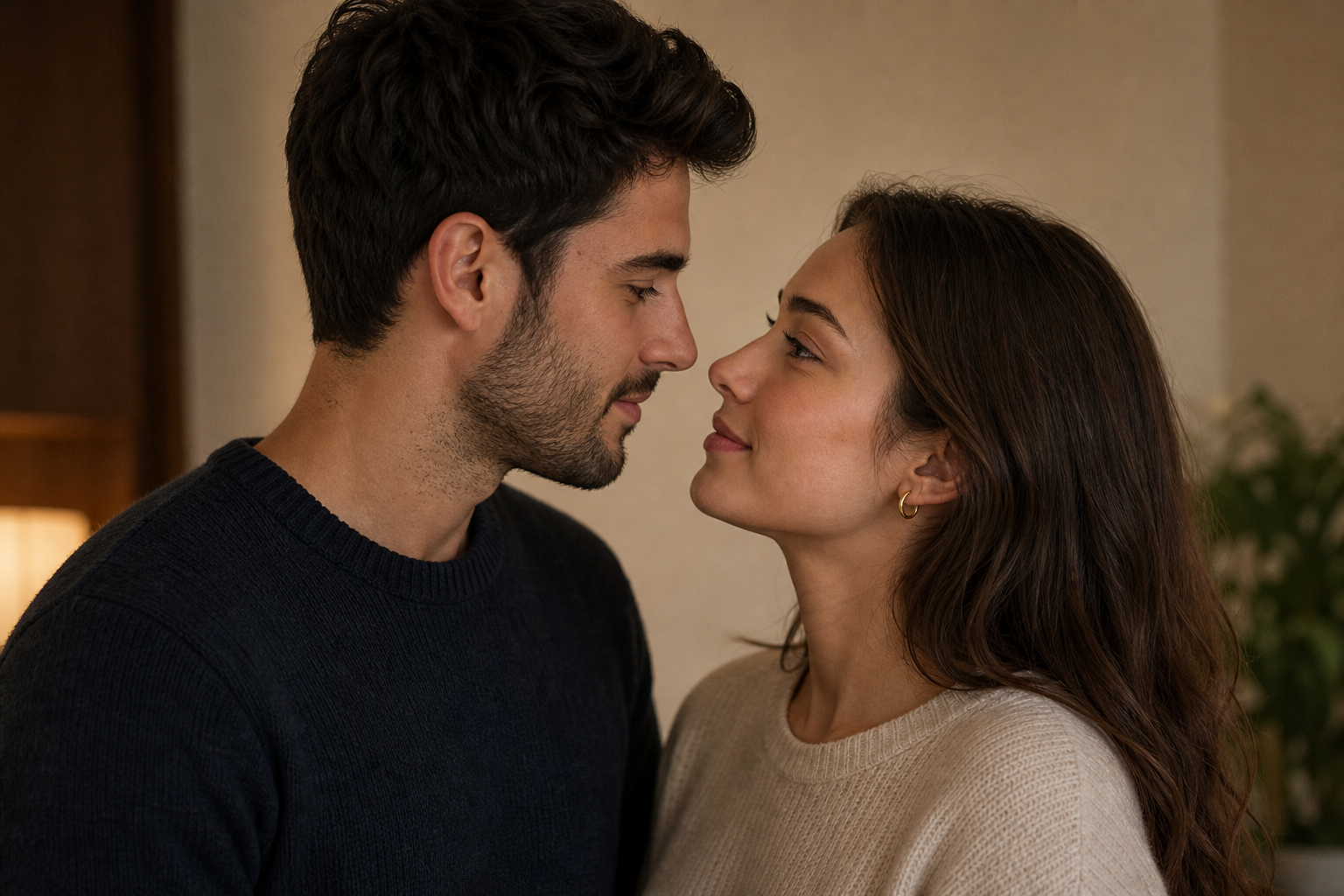
This generated input image is designed for a Kling kiss video test: two adults, clear faces, balanced lighting, simple background, and close portrait framing.
Evaluation:
Kling AI Kiss handles this example well. The subjects lean toward each other smoothly, the kiss moment is clear, and both faces remain recognizable throughout the 5-second video. Minor artifacts appear around the lips and facial edges, but the clip is usable for a short demo or social preview.
Example 2: Character or Fan Edit
For creative edits, users may upload artwork, fictional characters, or stylized images with two subjects.
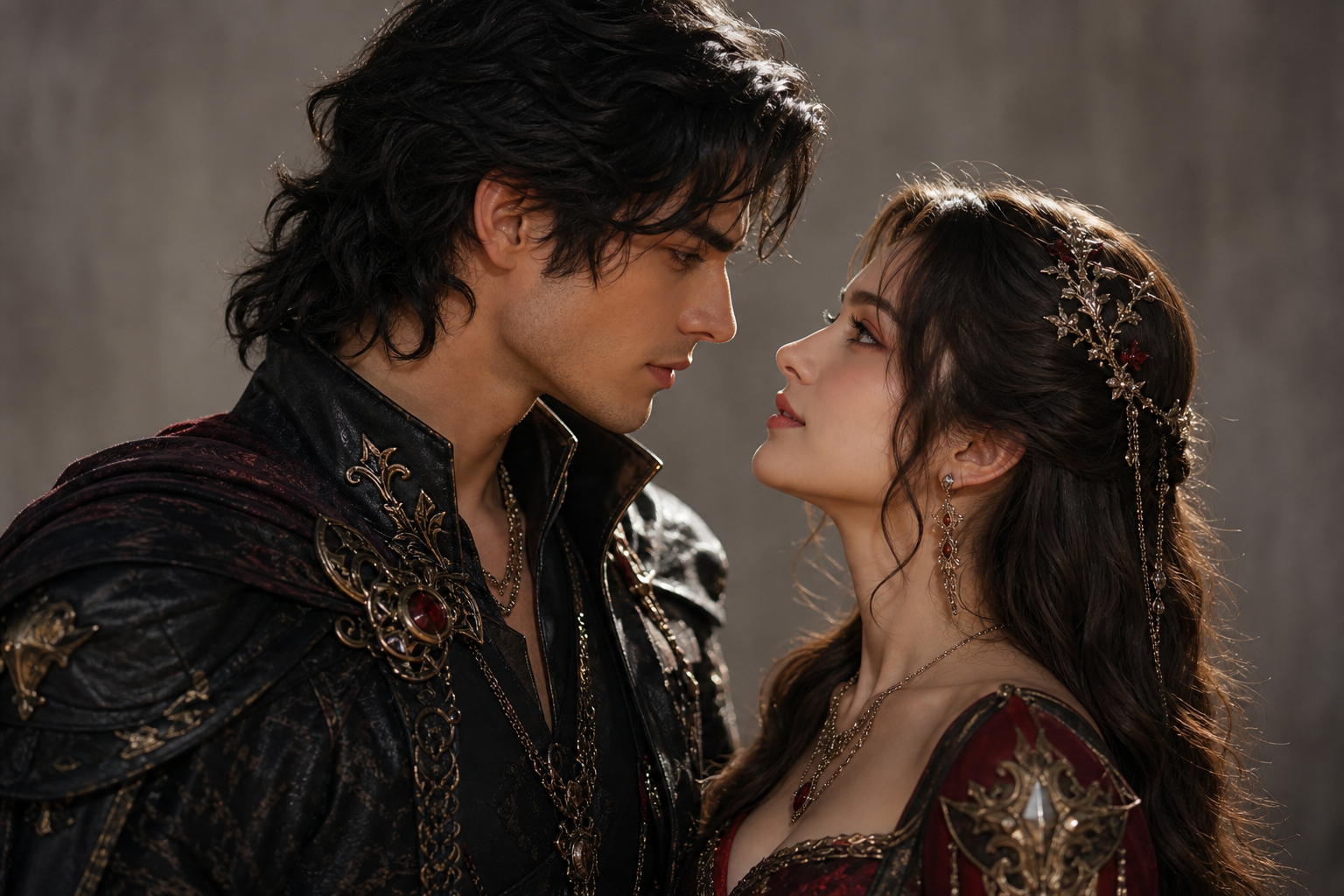
This generated input image uses two original fantasy-style characters with clear faces, close framing, and detailed costumes.
Evaluation:
Kling AI Kiss produces a clear, cinematic kiss motion from this stylized input. The faces stay recognizable, the costume details remain mostly stable, and the romantic framing fits the original image well. The main limitation is that fine details around hair, lips, and accessories can shift slightly during the 5-second motion, so character-style inputs may need a few retries for production use.
Want to compare more photo styles before uploading your own image? See our AI kiss video examples from different photos .
Safety and Consent
AI kiss generators should be used carefully because they can create romantic or intimate scenes that did not happen in real life. Users should only upload images they have the right to use and should avoid creating kiss videos of real people without consent.
This matters for privacy, trust, and responsible AI use. A kissing video can imply intimacy, so it should not be generated in a way that misrepresents someone or violates their boundaries.
Before using any AI kiss video generator, review the platform's privacy terms, content policies, and refund rules. PiAPI links to its Privacy Policy , Terms and Conditions , Refund Policy , and NSFW Policy from the Kling AI Kiss page.
When to Use PiAPI for Kling Kiss Videos
PiAPI is useful when you want to test Kling kiss video generation in a developer-friendly environment. The playground helps users understand the effect visually, while the broader PiAPI platform supports teams exploring AI generation APIs .
- a focused Kling kiss generator playground
- a way to test image-to-video effects
- a simple upload and preview workflow
- access to broader AI API documentation
- a developer-first gateway for image, video, audio, and other generation models
For casual creators, the playground is a quick way to try the effect. For developers, it can also act as a starting point for thinking about how AI video generation might fit into a product workflow.
FAQ
What is an AI kiss generator?
An AI kiss generator is a tool that turns a still image into a short kissing video. It uses image-to-video AI to animate subjects in the photo, create a lean-in or kiss motion, and produce a romantic or playful video clip.
How does the Kling kiss generator work?
The Kling kiss generator uses a reference image, a fixed kiss prompt, and Kling 2.6 image-to-video generation to create a short AI kiss video. On PiAPI, users upload an image with two subjects and generate the result through the Kling AI Kiss playground.
Can I create an AI kiss video from one photo?
Yes. Some AI kiss video generator workflows use one photo if that image includes two visible subjects. The PiAPI Kling AI Kiss playground asks for a reference image that includes two subjects.
What is the best image for an AI kiss video?
A clear image with two visible faces, balanced lighting, and minimal clutter usually works best. Avoid blurry photos, extreme angles, and heavily cropped subjects.
Is the Kling AI Kiss Generator free to try?
PiAPI presents the Kling AI Kiss page as a demo-style playground. Check the current page, pricing, and account requirements before using it for production or repeated generation.
Is there a free AI kissing video generator?
Some AI kissing video generator tools offer free demos, free trials, or limited credits. Always check whether the tool requires login, credits, or a paid plan before repeated use. PiAPI's Kling AI Kiss page is positioned as a demo-style playground for testing the workflow.
What does AI kiss mean?
AI kiss usually refers to an AI-generated kissing image or video. In this guide, it means a short image-to-video clip where an AI model animates two visible subjects into a kiss scene.
Is it okay to make AI kiss videos of other people?
Only use images you have permission to use. Avoid creating romantic or intimate AI videos of real people without consent, especially if the output could misrepresent them.
Conclusion
AI kiss generators make it easy to turn still photos into short romantic videos, and Kling Effects gives this workflow a focused image-to-video format. For the best results, start with a clear two-subject image, keep the scene simple, and review the output for face consistency, motion quality, and artifacts.
The PiAPI Kling AI Kiss Generator is a useful way to test this effect directly in the browser. It works well as both a creative playground and a developer-friendly reference for AI video generation workflows.
Start testing the Kling AI Kiss Generator on PiAPI today.
Unlock the power of AI video generation with PiAPI - image, video, audio, and more. Sign up today and start building faster.