Why Your AI Face Rating Changes: Photo Tips for More Consistent Face Scores
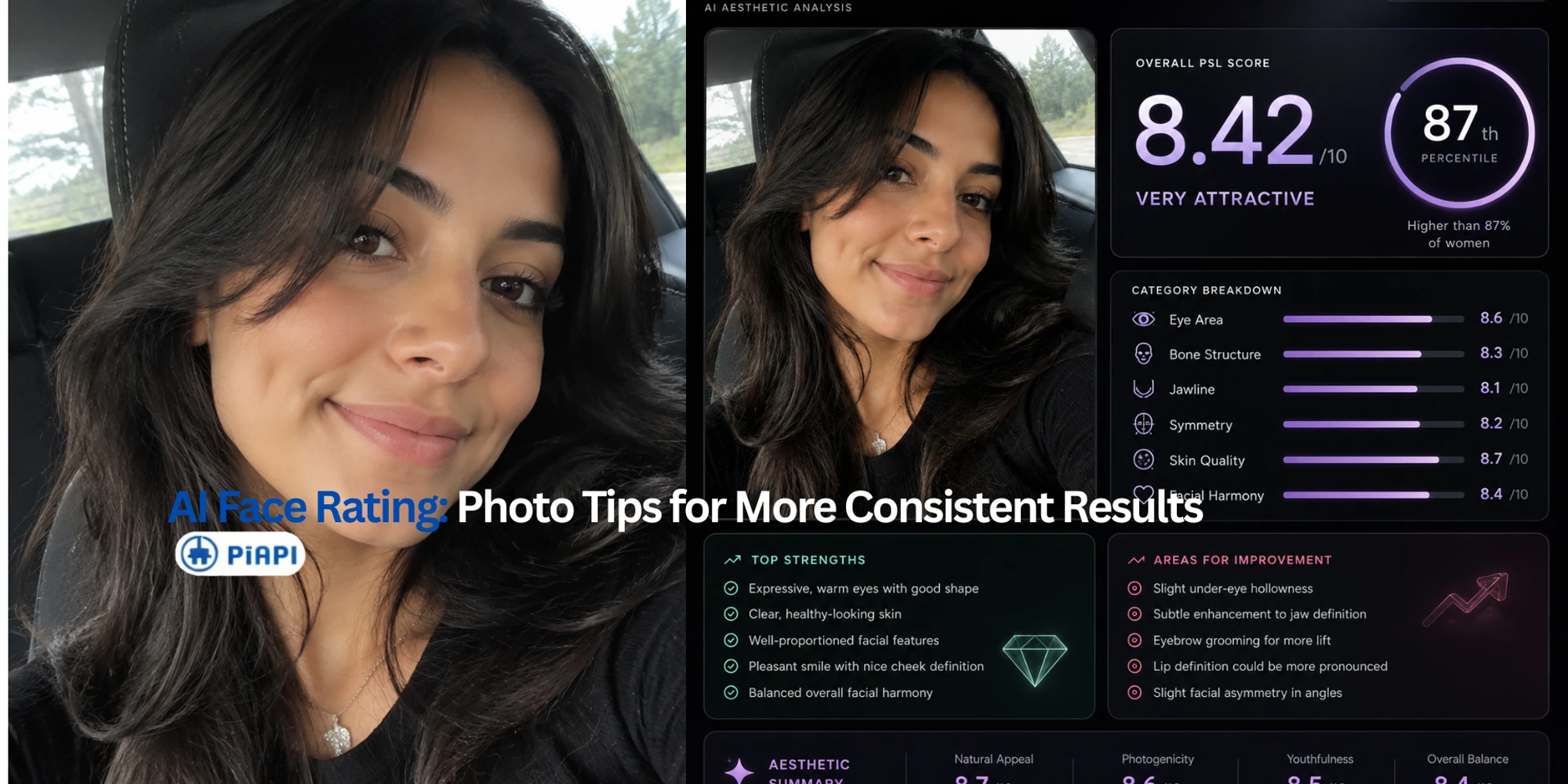
AI face rating report example showing how selfie lighting and camera angle affect face scores
PiAPI
PiAPI

AI face rating changes can feel confusing. You upload one selfie, get a face score, upload another photo later, and the report looks different. That does not always mean the AI suddenly changed its opinion of you. Most of the time, it means the uploaded image gave the AI different visual information.

Quick answer: AI face ratings can change because the AI is analyzing the uploaded image, not a fixed personal identity score. Lighting, camera angle, expression, blur, filters, face coverage, and image clarity can all affect the report. For more consistent face scores, upload clear, front-facing selfies under similar lighting and compare reports from similar photo conditions.

Try a Clearer Selfie

Generate a new AI face rating report

Upload one clear, front-facing selfie with full face visibility and soft lighting. No prompt setup is needed: just upload the photo and generate the report.

Open the AI Face Rater

This guide is about photo quality and consistency. If you want the broader background on score language, see our guide to what AI face rating and PSL scores mean. If you are ready to test a clearer selfie, you can use PiAPI's AI Face Rater.

AI Face Rating Is Image-Dependent, Not a Fixed Identity Score

An AI face rating tool can only analyze what is visible in the uploaded image. It does not see your face in every possible lighting condition, from every angle, or across every expression. It receives one photo and generates a report from that specific input.

That is why two photos of the same person can produce different face scores or different category notes. One image may show the full face clearly. Another may be dim, tilted, filtered, cropped, or partially covered. The AI is not comparing your entire identity across all real-world contexts. It is reacting to one image at a time.

The healthiest way to read an AI face score is as photo and appearance feedback. It can be useful for noticing image clarity, expression, face visibility, and profile-photo presentation. It should not be treated as a measure of personal worth, health, identity, personality, or objective attractiveness.

Lighting: Why Dark or Uneven Light Changes Face Scores

Lighting is one of the easiest reasons an AI face rating can change. A clear selfie with soft, even light gives the AI more visible detail to work with. A dark selfie, harsh side light, or strong backlight can hide parts of the face and change how the report reads visible features.

Low light can blur edges around the eyes, jawline, cheekbones, and face contour. Harsh lighting can create shadows that make one side of the face look heavier or less balanced. Backlighting can make the face less readable because the camera exposes for the background instead of the face.

For a more consistent AI face rating, use light that is:

  • Soft and even
  • In front of you, not behind you
  • Bright enough to show facial features clearly
  • Similar between photos if you want to compare reports

Camera Angle: Why Low, Tilted, or Close-Up Selfies Affect Ratings

Camera angle can also change an AI face score. A selfie taken at eye level usually gives the AI a more straightforward view of facial balance, proportions, and symmetry. A low-angle selfie, high-angle selfie, tilted selfie, or very close selfie can distort the way features appear.

A low angle can emphasize the lower face and jawline. A high angle can make the forehead and eyes appear larger relative to the lower face. A tilted photo can make left-right balance harder to read. A very close selfie can stretch the center of the face and change perceived spacing between features.

If you are comparing two face rating reports, the angle matters. A front-facing eye-level selfie and a low-angle selfie are not equivalent inputs. The changed report may reflect the changed camera position, not a stable difference in the person.

Example: Why the Same Person Can Get Different Face Scores

Input selfie in a car with mixed daylight and angled framing
Input A: same person, car selfie, angled framing, mixed daylight from the window.
Input selfie indoors with a different angle and stronger sunlight patch
Input B: same person, different camera angle, warmer indoor light, and stronger sunlight.
AI face rating report for Input A showing an 8.42 out of 10 score
Output A: the generated report shows an overall PSL score of 8.42/10.
AI face rating report for Input B showing an 8.27 out of 10 score
Output B: the changed lighting and angle produce a slightly different 8.27/10 score.

These two selfies show the same person, but the input conditions are different. The second photo changes lighting and camera angle, so the AI has different visual information to analyze. That can change the report even when the person is the same.

In this example, the two reports stay in the same broad rating band, but the score shifts slightly from 8.42/10 to 8.27/10. The category notes also change a little around eye area, bone structure, jawline, symmetry, and improvement suggestions. This should not be framed as "one score is the true score." The point is simpler: AI face rating is image-dependent. If lighting, angle, and framing change enough, the report can change too.

Expression: Neutral, Smiling, Tense, and Unclear Faces

Expression changes the visible structure of a face. A natural smile, a tense expression, a raised eyebrow, or a closed-mouth neutral look can all change how the AI reads balance, eye area, cheek shape, and overall facial harmony.

That does not mean one expression is "correct." It means expression is part of the image. If you want to compare face scores across multiple attempts, choose a similar expression each time. A relaxed, natural expression is usually easier to compare than an exaggerated pose.

If your AI face rating changes after you switch from a neutral selfie to a smile, the report may be responding to the new expression, not making a deeper judgment about you.

Filters, Blur, Sunglasses, Masks, and Group Photos

The best selfie for AI face rating is usually simple: one person, full face visible, sharp image, no heavy edits. Anything that hides or changes facial details can affect the report.

Heavy filters can smooth texture, change contrast, alter contours, and make the image less representative of the original face. Blur can reduce detail around the eyes, jawline, cheekbones, and face outline. Sunglasses hide the eye area. Masks cover the lower face. Hats can cover the forehead or cast shadows. Group photos can make it unclear which face should be analyzed.

If the AI cannot clearly read the face, the output may become less useful. The report may still generate, but it may be responding to a weaker input.

Best Selfie for AI Face Rating: A Simple Checklist

Use this checklist when you want a more consistent AI face score:

  • Use one person in the image.
  • Face the camera directly.
  • Keep the full face visible.
  • Use soft, even lighting.
  • Keep the camera near eye level.
  • Avoid heavy filters or beauty edits.
  • Avoid sunglasses, masks, and hats that cover the face.
  • Use a sharp, non-blurry image.
  • Avoid extreme close-ups or heavily cropped photos.
  • Use similar lighting, angle, distance, and expression if comparing reports.

The goal is not to create a perfect photo. The goal is to give the AI a clear and comparable input. If the photo changes dramatically, the report can change too.

What AI Face Rating Accuracy Can and Cannot Tell You

AI face rating accuracy depends on the uploaded image, the model behavior, the hidden prompt, and the report design. A face rating can be useful for quick visual feedback, but it is not an objective universal score.

An AI report can help you notice things like:

  • The photo is too dark.
  • The face is not fully visible.
  • The angle changes perceived proportions.
  • The expression changes the report.
  • A profile photo may be clearer with better framing.

It cannot tell you your personal worth. It should not make claims about identity, health, race, age, personality, or social value. Treat the report as one visual feedback signal from one image.

That framing makes the result more useful. Instead of asking, "Is this score the truth?" ask, "What did this image make easy or hard for the AI to read?"

Try the AI Face Rater Again With a Clearer Selfie

If your previous score changed more than expected, try the AI Face Rater again with one clearer, front-facing selfie. The tool does not need a prompt from you: upload the photo, hit Generate, and let the preset workflow create the report.

AI Face Rating Consistency FAQ

Why did my AI face rating change?

Your AI face rating can change because the tool analyzes the specific uploaded photo. Lighting, camera angle, expression, blur, filters, face coverage, and image clarity can all change how the AI reads visible facial features.

What is the best selfie for AI face rating?

The best selfie for AI face rating is a clear, front-facing photo with one person, full face visibility, soft even lighting, minimal filters, and a camera angle close to eye level.

Does lighting affect AI face scores?

Yes. Low light, harsh shadows, and backlighting can hide facial details or change how features appear. Soft front lighting usually creates a clearer input for AI face rating.

Does camera angle affect face rating AI results?

Yes. Low, high, tilted, close-up, or heavily cropped selfies can change perceived proportions, symmetry, and lower-face structure. Use similar camera angles when comparing reports.

Are AI face ratings accurate?

AI face ratings can be useful for quick photo feedback, but they are not objective or universal. The result depends on the uploaded image, model behavior, prompt framing, and scoring design.

Can filters change my AI face score?

Yes. Heavy filters can alter texture, contrast, facial contours, and overall image clarity. If you want a more consistent report, use a lightly edited or unfiltered selfie.

Do I need to write a prompt for the AI Face Rater?

No. The AI Face Rater uses a preset workflow. You only need to upload a clear selfie and hit Generate, so the most important thing you control is the input photo quality.

Should I treat an AI face score as personal worth?

No. An AI face score should never be treated as a measure of personal worth, identity, health, personality, or social value. It is only a visual feedback signal based on one uploaded image and one scoring system.

More Stories

AI Face Rating Explained: What Face Scores and PSL Ratings Mean

June 4, 2026

Learn what AI face rating means, how PSL face scores became a social-media trend, what face rating AI tools measure, and how to interpret scores safely.

PiAPI
PiAPI

New Working Dance Presets for PiAPI's Kling 2.6 Dance Generator

June 1, 2026

PiAPI's Kling 2.6 Dance Generator now includes new working dance presets while still supporting custom reference video uploads for your own motion style.

PiAPI
PiAPI