

LinkedIn AI Headshot: How to Create a Professional Profile Photo with AI
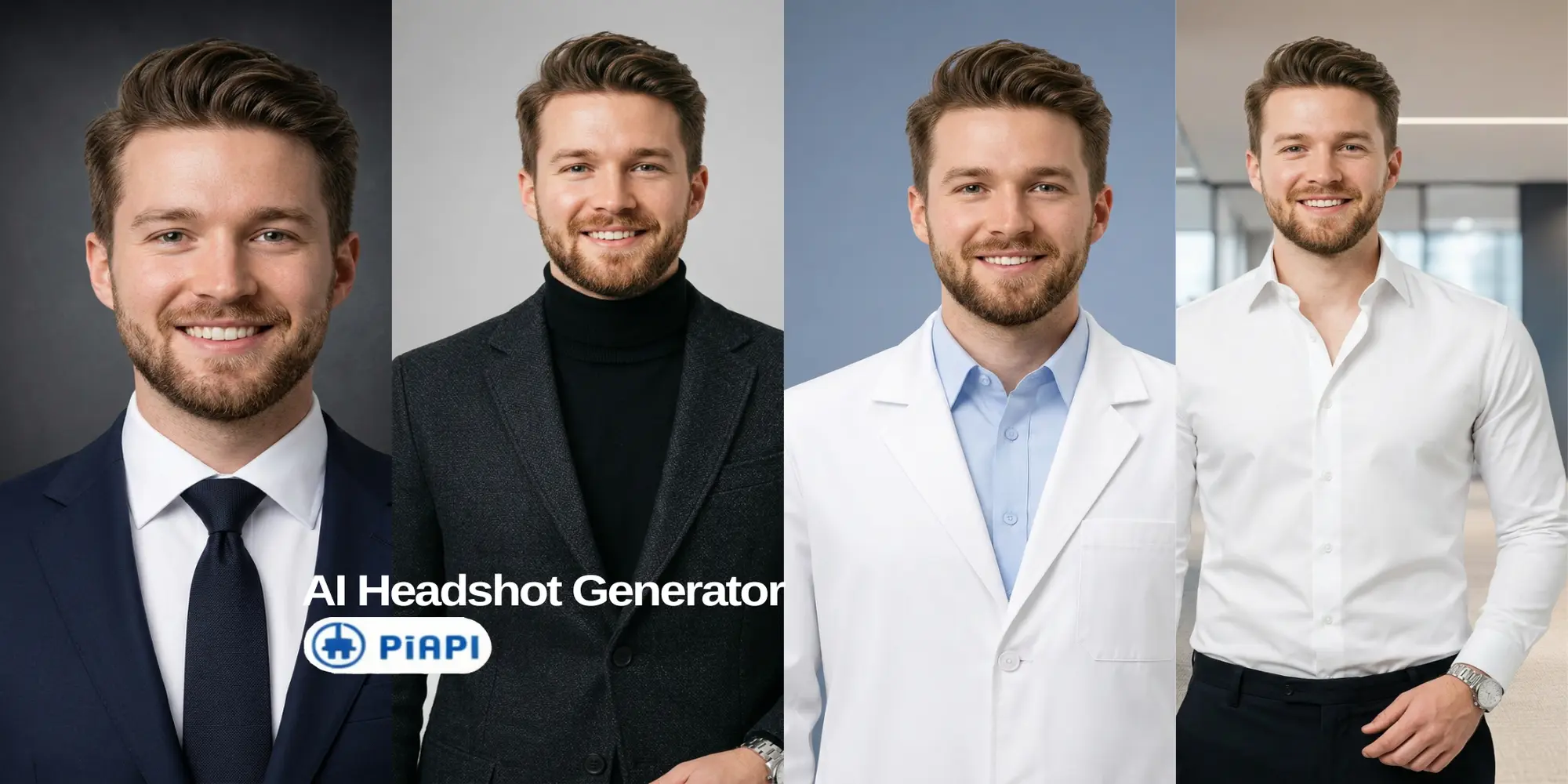
AI-generated corporate virtual headshot for a professional LinkedIn profile
PiAPI
PiAPI

A LinkedIn AI headshot is a professional profile photo generated from a clear portrait using AI. It can help you create a polished LinkedIn photo without booking a studio shoot.

A good LinkedIn photo should make you look recognizable, professional, and current. But booking a studio shoot can feel like too much work if you only need a clean profile picture, resume photo, or team bio image.

Instead of scheduling an in-person photoshoot, you can start from a clear portrait and use an AI headshot generator to create a LinkedIn-ready image with a better outfit, cleaner background, and stronger profile crop.

In this guide, you will learn what photo to upload, which styles work best, and how to try the workflow directly with PiAPI's AI Headshot Generator.

Key Takeaways

  • A LinkedIn AI headshot lets you create a professional profile photo remotely from a clear portrait.
  • For LinkedIn, choose a clean head-and-shoulders crop, professional outfit, and simple background.
  • AI headshot tools work best when your input photo has good lighting, a visible face, and a natural expression.
  • The simplest beginner workflow is upload, choose outfit, choose background, generate, review, and download.

What Is a LinkedIn AI Headshot?

A LinkedIn AI headshot is a professional profile photo generated from a clear portrait using AI. The workflow can update your outfit, clean up the background, and create a polished image for LinkedIn, resumes, team pages, or executive bios.

For LinkedIn, the goal is not to look like a different person. The goal is to look like a polished version of yourself: clear face, realistic expression, appropriate outfit, and a background that does not distract.

LinkedIn's profile photo guidelines say your photo should reflect your likeness, even when using an illustration or artistic rendering. That matters for AI headshots too: the final result should still look like you.

Why Use a LinkedIn AI Headshot?

A LinkedIn AI headshot is useful when your current LinkedIn photo is outdated, too casual, poorly lit, or no longer fits your role.

  • Applying for jobs and want a more polished profile.
  • Updating your LinkedIn after a promotion or career change.
  • Building a founder, consultant, or freelancer profile.
  • Creating consistent team photos for a company page.
  • Preparing a speaker bio, resume, or executive profile.

The main advantage is speed. A traditional photoshoot can require scheduling, travel, studio time, editing, and delivery. A LinkedIn AI headshot workflow is simpler: upload a suitable portrait, choose a professional style, and generate options you can review immediately.

You still need judgment, though. Choose a realistic image that fits your industry and looks appropriate for LinkedIn.

How to Create a LinkedIn AI Headshot

  1. Upload a recent portrait where your face is easy to see.
  2. Choose an outfit that matches how you want to be seen professionally.
  3. Pick a simple background that keeps attention on your face.
  4. Generate the LinkedIn AI headshot and review the result for believability.
  5. Check that the eyes, mouth, hairline, face shape, outfit, and background look natural.
  6. Download the best result and upload it to LinkedIn with a head-and-shoulders crop.

Try the AI Headshot Generator

Create a LinkedIn-ready virtual headshot

Upload a clear portrait, choose an outfit, pick a backdrop, and generate a polished professional result in PiAPI's guided AI Headshot Generator.

1. Upload

Start with a clear face photo.

2. Choose style

Pick the outfit and background vibe.

3. Generate

Review, download, or try another look.

Open the AI Headshot Generator

Best Photo to Upload for a LinkedIn AI Headshot

The best photo for a LinkedIn AI headshot is a clear, recent portrait with your full face visible, natural lighting, and minimal obstruction.

  • Your face is sharp, not blurry.
  • Your eyes are visible.
  • Lighting is even across your face.
  • You are the only person in the photo.
  • Your expression is natural.
  • The photo is recent.
  • Your face is not covered by sunglasses, hats, masks, or heavy shadows.

You do not need a perfect studio photo as the input. You just need enough facial detail for the AI to work with.

Best Outfit Styles for LinkedIn AI Headshots

Your outfit should match your role, industry, and personal brand. A lawyer, startup founder, designer, and doctor may each need a different style.

StyleBest ForWhy It Works
FormalExecutives, finance, legal, consultingSignals trust and authority
Smart casualFounders, operators, startup teamsPolished but approachable
Business casualGeneral professional profilesFlexible and LinkedIn-safe
Creative professionalDesigners, marketers, freelancersProfessional without looking too corporate
Lab / medicalDoctors, researchers, biotechMatches clinical and research contexts

Best Backgrounds for a Professional LinkedIn Headshot

The best background for a LinkedIn headshot is clean, simple, and not distracting.

BackgroundBest ForNotes
Solid colorMost LinkedIn profilesClean and distraction-free
Dark colorExecutive or formal profilesCreates a polished studio look
OfficeBusiness and team profilesAdds professional context
NatureApproachable personal brandsSofter, less corporate feel

Examples: Which Virtual Headshot Style Should You Choose?

These examples use the same source portrait direction and show how outfit and background choices can change the professional signal of a virtual headshot.

Corporate LinkedIn AI headshot with formal suit and dark studio background

Corporate LinkedIn Headshot

Finance, legal, consulting, enterprise sales, operations, and corporate leadership.

Outfit
Formal
Background
Dark color or solid color
Vibe
Trust, authority, and executive presence.
Founder startup AI headshot with smart casual outfit in an office background

Founder or Startup Profile

Founders, operators, consultants, product leaders, and startup team members.

Outfit
Smart casual
Background
Office or solid color
Vibe
Credible, modern, and approachable.
Creative professional AI headshot with dark blazer and clean studio background

Creative Professional Profile

Designers, marketers, creators, writers, freelancers, and agency professionals.

Outfit
Creative professional
Background
Clean solid color, office, or nature
Vibe
Personality with polish.
Medical professional AI headshot with lab coat and soft blue studio background

Medical or Research Profile

Doctors, researchers, clinicians, biotech professionals, and healthcare founders.

Outfit
Lab / medical
Background
Solid color or office
Vibe
Clinical, precise, and expert-led.

LinkedIn Headshot Generator vs Virtual Headshot

OptionBest ForProsWatch-outs
Virtual headshotLinkedIn, resumes, team pagesFast, remote, easy to updateQuality depends on input photo
AI photoshootMultiple looks and stylesMore variety than one headshotMay need more review for realism
Traditional photoshootPremium brand shootsFull creative controlHigher cost and scheduling effort

A LinkedIn headshot generator is usually enough for a clean LinkedIn profile picture. An AI photoshoot may be better if you want many styles for different platforms. A traditional photoshoot still makes sense when you need custom lighting or campaign-level brand photography.

LinkedIn AI Headshot Mistakes to Avoid

  • Uploading a blurry, old, or heavily filtered photo.
  • Choosing an outfit that does not match your role.
  • Using a background that looks too dramatic for LinkedIn.
  • Accepting a result that changes your face too much.
  • Picking an image with unnatural skin, eyes, teeth, or hair.
  • Cropping the headshot too tightly or too loosely.
  • Using a photo that feels more like an ad than a profile picture.

The best LinkedIn AI headshot should look professional and still believable.

Frequently Asked Questions

What is a LinkedIn AI headshot?

A LinkedIn AI headshot is a professional profile photo generated from a clear portrait using AI. It helps you create a polished LinkedIn photo with a professional outfit, clean background, and realistic head-and-shoulders crop.

Can I use an AI headshot for LinkedIn?

Yes, you can use an AI headshot for LinkedIn as long as it reflects your real likeness and looks professional. Avoid results that change your identity, look overly edited, or make you appear very different from how colleagues, recruiters, or clients would recognize you.

What is the best photo to upload for an AI LinkedIn headshot?

The best upload is a recent, clear portrait with your face visible, even lighting, and a natural expression. Avoid sunglasses, group photos, heavy shadows, strong filters, and extreme angles. AI headshot tools usually produce better results when the input photo already shows your face clearly.

What background is best for a LinkedIn headshot?

For most LinkedIn profiles, a solid color, subtle office, or dark studio-style background works best. These backgrounds keep attention on your face and avoid visual clutter. Nature backgrounds can work for approachable personal brands, but they should still look clean and professional.

What should I wear for a professional LinkedIn headshot?

Wear something that matches the role you want to be known for. Formal outfits work well for executives, finance, legal, and consulting. Smart casual works well for founders and startup teams. Creative professional styles can fit designers, marketers, creators, and freelancers.

Is a virtual headshot better than a traditional photoshoot?

A virtual headshot is better when you want a fast, remote way to refresh your LinkedIn photo. A traditional photoshoot is better when you need full creative control, custom lighting, or premium brand photography. For most profile updates, a realistic virtual headshot is enough.

Can I create an executive headshot with AI?

Yes, you can create an executive headshot with AI by choosing a formal outfit, clean background, and polished crop. The result should look confident, realistic, and appropriate for leadership contexts such as LinkedIn, speaker bios, board pages, company leadership pages, and investor materials.

Create Your LinkedIn AI Headshot

A LinkedIn AI headshot is one of the simplest ways to refresh your LinkedIn profile without booking a studio photoshoot. Start with a clear portrait, choose an outfit that matches your professional role, pick a simple background, and review the result for realism before uploading it.

Start testing PiAPI's AI Headshot Generator and create a LinkedIn AI headshot today!

Unlock the power of 20+ AI models with PiAPI - image, video, chat, music, and more. Sign up today and start building smarter, faster, and at scale.
More Stories

How to Upscale Images and Increase Resolution

July 16, 2026

Learn how to upscale images, increase resolution, choose between 2x, 4x, and 8x, and process repeat image workflows with PiAPI online.

PiAPI
PiAPI

Seedream 5 Pro vs Nano Banana Pro: Which Model Should You Use?

July 17, 2026

Compare Seedream 5 Pro vs Nano Banana Pro with matched playground examples, PiAPI pricing, text rendering, editing, and API differences. Find your best fit.

PiAPI
PiAPI