Clay Animation Maker: Create Clay-Style Videos and Images with AI
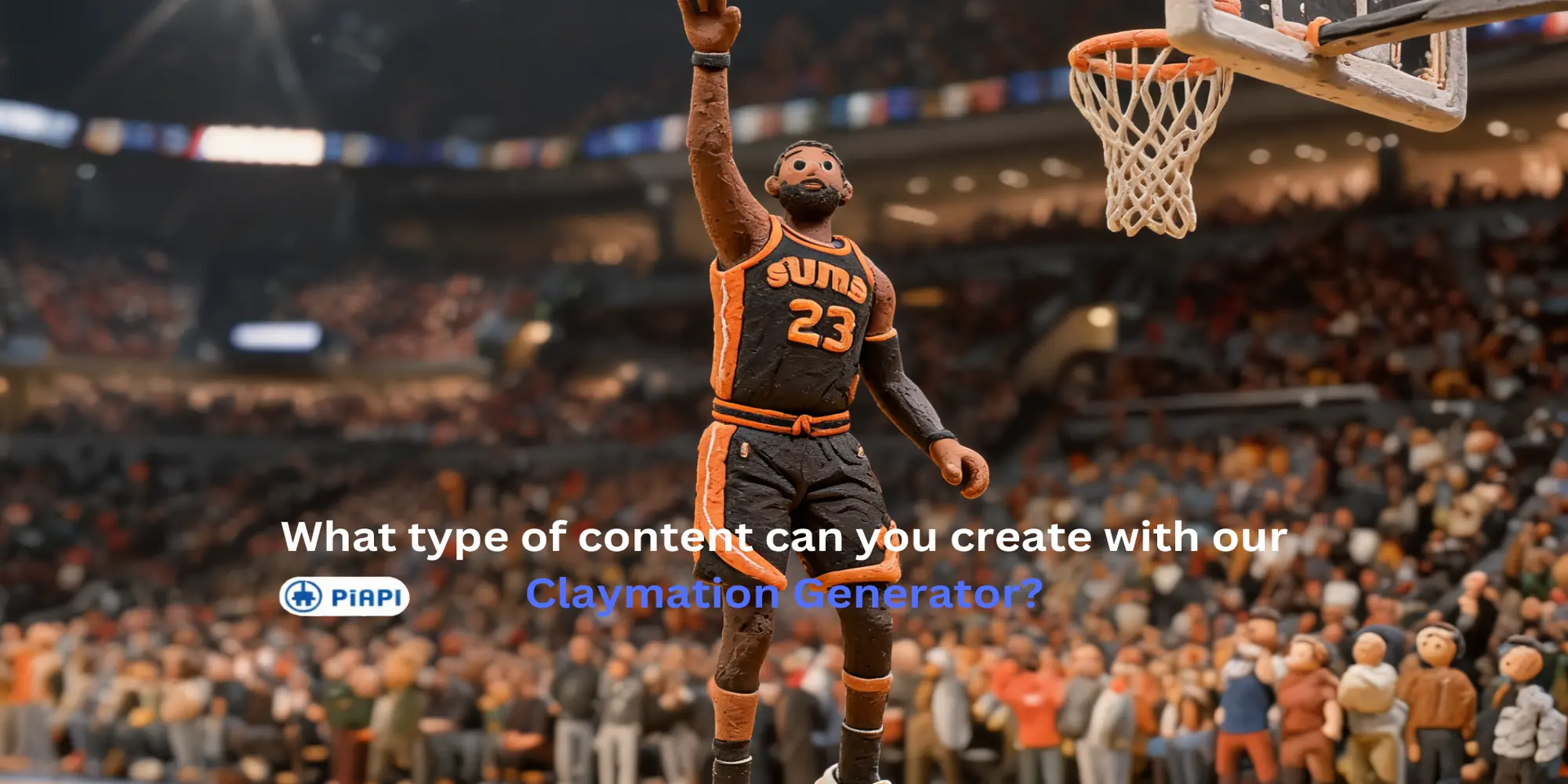
An AI clay animation maker helps you create clay-style videos and images without building physical sets, sculpting figures, or shooting frame by frame. Instead of starting from a traditional stop-motion setup, you can use text prompts, existing videos, or uploaded images to create visuals with rounded clay shapes, handmade texture, miniature-set lighting, and a stop-motion-inspired look.
Quick answer: The easiest way to make clay-style visuals with AI is to choose a mode based on your input: use Text to Video for new clay animations, Video to Video for existing footage, Text to Image for still clay concepts, and Image to Image to restyle an uploaded image as clay.
PiAPI's Claymation AI Generator supports four clay-style workflows in one place:
- Text to Video
- Video to Video
- Text to Image
- Image to Image
That means you can create a clay animation from a prompt, turn existing footage into claymation style, generate still clay concepts, or restyle an image as a clay object.
What Is a Clay Animation Maker?
A clay animation maker is a tool for creating visuals that look like clay animation. Traditional clay animation, also called claymation, usually involves sculpting characters, building miniature sets, adjusting lighting, and capturing small movements frame by frame.
Definition: An AI clay animation maker is software that creates claymation-style images or videos from text prompts, uploaded images, or existing videos. It simulates handmade clay texture, rounded forms, miniature-set lighting, and stop-motion-inspired visuals without requiring physical clay models.
An AI clay animation maker gives creators a faster way to explore the style. You can describe a scene, upload footage, or provide a reference image, then generate clay-style output for social posts, product concepts, character ideas, short videos, ads, or creative tests.
The goal is not to replace every detail of handmade stop-motion production. The goal is to make the clay animation look easier to prototype, iterate, and adapt across image and video formats.
What Can You Create with an AI Clay Animation Maker?
With PiAPI's Claymation AI Generator, you can create both clay-style videos and clay-style images. The best mode depends on what you already have.
| Starting point | Best mode | Best for |
|---|---|---|
| Written idea | Text to Video | New clay-style animation clips |
| Existing video | Video to Video | Turning footage into a claymation look |
| Written visual concept | Text to Image | Still clay-style concepts and thumbnails |
| Existing image | Image to Image | Restyling a photo, product, logo, or character as clay |
Use Text to Video when you want to create a new clay-style animation from a written prompt.
Use Video to Video when you already have footage and want to transform it into claymation style.
Use Text to Image when you want a still clay-style concept, thumbnail, character, product idea, or scene.
Use Image to Image when you want to restyle an existing image, logo, product shot, or character as a clay object.
This is the main advantage of using one clay animation maker instead of separate tools for clay images and clay videos.
Text to Video: Make a Clay-Style Animation from a Prompt
Text to Video is the most direct way to create a clay animation from scratch. You write a prompt that describes the subject, action, scene, and claymation look you want. For broader AI video generation beyond clay-style outputs, PiAPI also supports models such as Kling 3.0.
For example, a prompt can describe a miniature character, the movement, the camera framing, and the handmade texture:
A tiny handmade clay astronaut walks across a miniature moon set, turns toward Earth in the sky, and waves slowly. Soft stop-motion movement, visible clay fingerprints, rounded clay shapes, warm studio lighting, shallow depth of field.Example output
- Mode: Text to Video
- Input: prompt above
- Output:
/images/blogs/clay-animation-maker/text-to-video-clay-astronaut.mp4
The result shows the value of Text to Video for starting from an idea alone. The clay-style scene, miniature setting, and simple character motion make it easy to understand how a written prompt can become a short clay animation.
This mode is useful when you do not have a starting video or image. It works well for quick creative ideas, short scenes, character concepts, and clay-style motion tests.
Video to Video: Turn Existing Footage into Claymation Style
Video to Video is useful when you already have motion and want to convert that footage into a clay animation look. Instead of writing a full style prompt, you upload a source video and use the preset claymation workflow in the playground.
The additional prompt field is optional. Use it only when you want to guide specific changes, such as removing an unwanted object, adding a small detail, or clarifying what should stay important from the source video.
Example output
- Mode: Video to Video
- Input:
/images/blogs/clay-animation-maker/video-to-video-input.mp4 - Output:
/images/blogs/clay-animation-maker/video-to-video-clay-output.mp4
The output keeps the original video structure while applying the clay animation preset. This example shows the simplest Video to Video workflow: upload a source clip, use the preset clay animation style, and generate a clay-style version without writing a full prompt.
For best results, use short footage with a clear subject, stable motion, and simple backgrounds. The cleaner the input, the easier it is for the clay animation effect to preserve the action.
Text to Image: Create Clay-Style Concepts
Text to Image is useful when you want a still clay-style visual before making a video. You can use it for thumbnails, character references, storyboards, product concepts, campaign visuals, or social content. If you are comparing image models for still concepts, Seedream 5 Lite is another PiAPI image model worth understanding.
Here is an example prompt:
A cheerful claymation food truck selling tiny cupcakes on a miniature street, handmade clay texture, rounded toy-like shapes, colorful stop-motion set, soft studio lighting, detailed but playful.Example output
- Mode: Text to Image
- Input: prompt above
- Output:
/images/blogs/clay-animation-maker/text-to-image-clay-cupcake-truck.png
The generated image shows a clear clay-style cupcake truck scene with rounded handmade shapes, soft miniature-set lighting, and playful character details. This is useful for testing the visual direction of a clay animation before creating video.
This mode is good for exploring style direction quickly. If you are planning a clay-style video, still images can help you test the look before moving into video generation.
Image to Image: Restyle an Image as Clay
Image to Image is useful when you already have a visual reference and want to convert it into clay style. In the playground, the claymation style prompt is already preset, so you can upload an image and hit generate.
The additional prompt field is optional. Use it only when you want to guide a specific change, such as keeping a brand shape clear, removing an unwanted detail, adding a small prop, or preserving the main subject more strongly.
Example output
- Mode: Image to Image
- Input:
/images/blogs/clay-animation-maker/image-to-image-basketball-input.png - Output:
/images/blogs/clay-animation-maker/image-to-image-basketball-clay-output.png
The output keeps the basketball scene recognizable while changing the player, hoop, court, and crowd into a handmade clay-style scene. This is a good example of Image to Image because the source composition stays clear, but the final look feels much more tactile and stop-motion inspired.
This mode is strongest when the input image has a clear subject and simple composition. If the source image is too busy, crop it around the main object before generating.
Try an Image to Clay Demo
Upload an image and generate a clay-style version with the embedded playground below. The claymation style is already preset, so you can start with a simple image and generate without writing a full prompt.
For the full playground with Text to Video, Video to Video, Text to Image, and Image to Image modes, open the Claymation AI Generator.
Which Claymation Mode Should You Use?
Choose the mode based on your starting point.
If you only have an idea, use Text to Video for animation or Text to Image for a still concept.
If you already have a video, use Video to Video to turn the existing motion into clay animation style.
If you already have an image, use Image to Image to restyle it as a clay object.
For most creators, the easiest workflow is:
- Start with Text to Image to explore the clay look.
- Use Text to Video when you want motion from a prompt.
- Use Video to Video when you have footage that already has the right action.
- Use Image to Image when you need a clay-style version of an existing asset.
Mode recommendation: If your goal is a clay animation video, start with Text to Video when you only have an idea and Video to Video when you already have footage. If your goal is a still clay visual, use Text to Image for new concepts and Image to Image for existing assets.
Tips for Better Clay Animation Results
Keep the subject clear. Clay animation works best when the viewer can immediately understand the main character, object, or action.
Use tactile style words. Phrases like handmade clay, visible fingerprints, rounded clay shapes, miniature set, soft studio lighting, and stop-motion style help define the look.
Avoid overloading the scene. Too many characters, fast motion, or complicated backgrounds can make the result less readable.
For Video to Video, start with short clips. A simple five-second clip with one clear subject is easier to transform than a long, busy scene.
Try PiAPI's Claymation AI Generator
You can try the full workflow on PiAPI's Claymation AI Generator. The playground lets you switch between text-based, image-based, and video-based claymation workflows from one page.
If you are comparing tools first, you can also read the Best Claymation AI Generator for Images and Videos guide. That article focuses on tool selection, while this guide focuses on how to use each clay animation workflow.
Start testing the Claymation AI Generator through PiAPI today. Unlock the power of 20+ AI models with PiAPI - image, video, chat, music, and more. Sign up today and start building smarter, faster, and at scale.
FAQ
What is a clay animation maker?
A clay animation maker is a tool that helps create visuals in a clay animation or claymation style. An AI clay animation maker can generate clay-style videos or images from text prompts, existing videos, or uploaded images.
What is the best AI clay animation maker for videos?
The best AI clay animation maker for videos should support both prompt-based video generation and video-to-video restyling. PiAPI's Claymation AI Generator supports Text to Video for creating new clay-style clips and Video to Video for transforming existing footage with a clay animation preset.
Can AI make clay animation videos?
Yes. AI can make clay animation-style videos through text-to-video or video-to-video generation. Text to Video creates motion from a prompt, while Video to Video transforms existing footage into a claymation look.
How do I turn a video into claymation with AI?
Upload a short source video into Video to Video mode, keep the preset clay animation style, and generate the result. If you want to remove, add, or preserve a specific detail, use the optional prompt field for that extra instruction.
What is the difference between Text to Video and Video to Video?
Text to Video starts from a written prompt and creates a new clay-style animation. Video to Video starts from uploaded footage and restyles that footage as clay animation while keeping the original motion and composition as the base.
Can I turn a video into claymation style?
Yes. Use Video to Video mode to transform existing footage into claymation style. For best results, choose a short clip with a clear subject and simple movement.
Can I create clay-style images too?
Yes. Use Text to Image to create a new clay-style image from a prompt, or Image to Image to restyle an existing image as a clay object.
Is this the same as a claymation generator?
In many searches, clay animation maker and claymation generator refer to similar tools. The difference is usually intent: a clay animation maker sounds more workflow-focused, while a claymation generator sounds more tool-focused. PiAPI's Claymation AI Generator supports both image and video workflows.
Do I need animation skills to use an AI clay animation maker?
No. You do not need stop-motion or animation skills. You only need a prompt, image, or video input, then the AI tool generates the clay-style result.
Conclusion
An AI clay animation maker gives you a faster way to create clay-style videos and images. With PiAPI's Claymation AI Generator, you can create a clay animation from text, transform existing footage with Video to Video, generate still clay concepts, or restyle an image as a clay object.
If you want one workflow for clay-style visuals across video and image formats, try the Claymation AI Generator.